A lightweight, hackable mini-OpenCode written in Python.
FSM-driven execution · OpenAI-compatible · built for daily use and easy customization


A terminal coding agent that reads your codebase, plans changes, edits files, runs commands, and verifies its work.
python-agent-harness is inspired by gptel-agent-harness and opencode. It brings opencode's prompts and core behaviors—such as AGENTS.md discovery, plan/build modes, skills, sub-agents, and todo tracking—into a lightweight Python implementation with only three runtime dependencies:
richhttpxprompt_toolkit
It works with any OpenAI-compatible API and is designed to be easy to inspect, customize, and use for everyday software development.
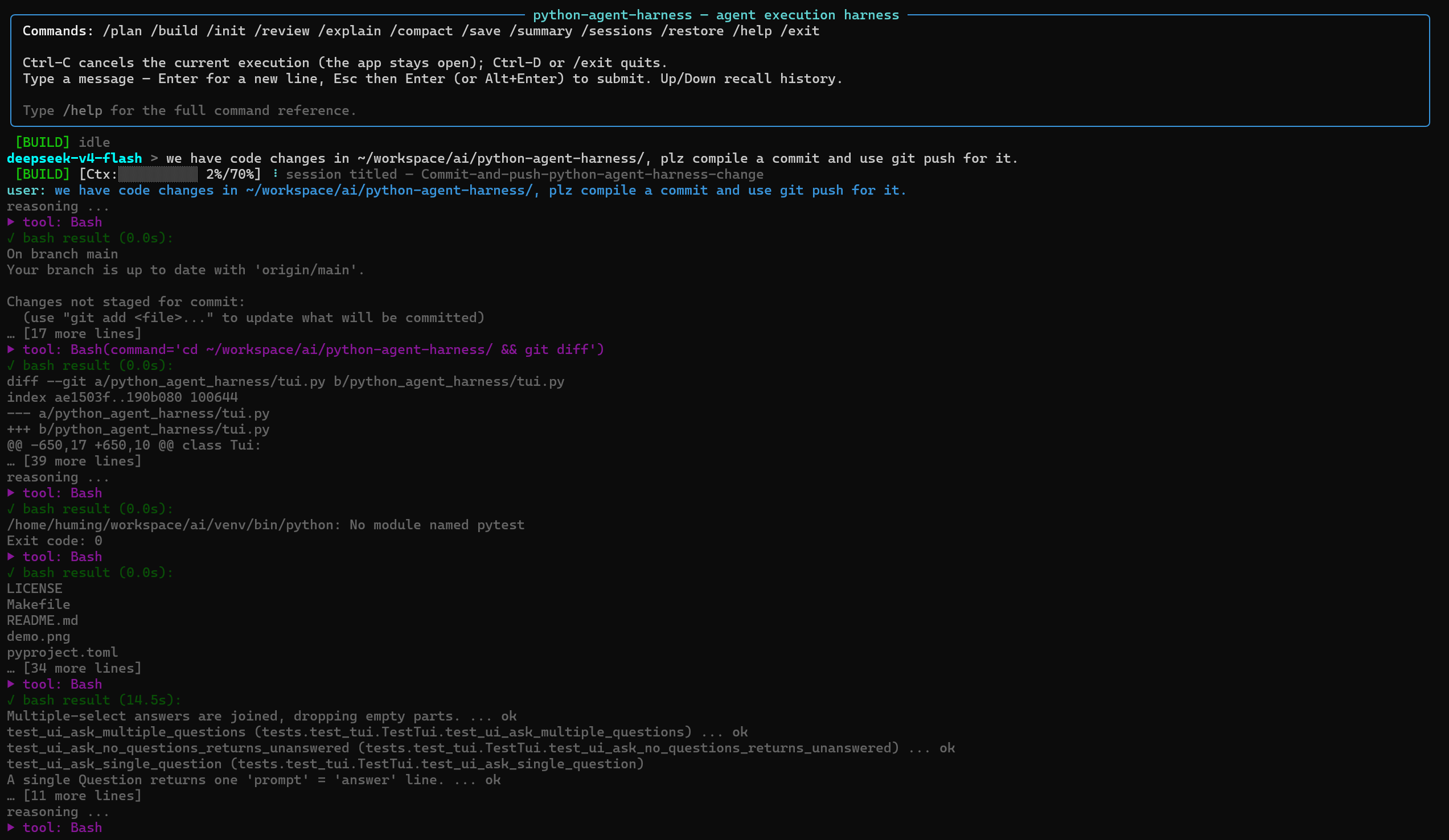
pip install python-agent-harness

python-agent-harness config --init
python-agent-harness run
Optional extras:
pip install "python-agent-harness[mcp]"   # MCP server integration
pip install "python-agent-harness[dev]" # development toolsgit clone git@github.com:beacoder/python-agent-harness.git
cd python-agent-harness
make install
. venv/bin/activate
python-agent-harness config --init
python-agent-harness runOptional extras:
pip install -e ".[mcp]"   # MCP server integration
pip install -e ".[dev]"   # development tools
Edit ~/.config/python-agent-harness/config.json and set your base_url, api_key, and model.
- FSM-driven execution — explicit
WAIT/TOOL/TRET/SUPERVISE/DONE/ERRS/ABRTstates. Completion supervision nudges the model when it stops early, while failed tool calls are sanitized so they never strand the agent. Transient API failures (429/5xx) retry with exponential backoff and jitter. Auth-expired status codes (configurable viaAUTH_REFRESH_STATUS_CODESinconfig.py; defaults to[401, 502]) trigger automatic API key re-read from config/env — some API gateways return502instead of401when the backend auth token has expired. Note: codes in this list are treated as auth-expired exclusively and will not be retried with backoff, so only include codes that are unambiguously auth-related in your environment. - Context management — CJK-aware token estimation, per-model context windows, and automatic compaction at 70% usage.
- Image & text attachments — attach an image or a text file with
@pathin your message (e.g.@screenshot.png,@README.md): images (PNG/JPEG/GIF/WebP, up to 20 MB, magic-byte validated) become multimodalimage_urlparts, text files are inlined as text. Only images and text files are supported as input. Path supports web-url for image as well. - Coding tools —
Agent,TodoWrite,Glob,Grep,Read,Insert,Edit(including unified diffs),Write,Mkdir,Bash,Skill,Question,LSP, andPlanExit. Synchronous tools execute sequentially, but a round made up entirely of read-only tools (Read,Glob,Grep,Skill,LSP) is dispatched concurrently via a bounded thread pool; asynchronous tools such asBashandAgentcan run concurrently as well. Results are always delivered in the model's emitted order. - Plan / Build modes — plan mode is read-only except for the per-session plan file.
- Persistent sessions — sessions are automatically saved after every response to
~/.local/share/python-agent-harness/sessions/, with LLM-generated titles and support for/restore --latestand/sessions. - Focused TUI — a Rich-based interface with a pinned status bar, Todos panel, inline red/green diff rendering for
EditandWrite, and aprompt_toolkiteditor with history and completion.Esc+Entersubmits,Ctrl-Dquits, andCtrl-Ccancels without leaving the application. - MCP support — optional MCP integration through the
[mcp]extra. MCP tools become ordinary agent tools such asmcp__<server>__<tool>. Supportsstdio,streamable-http, andssetransports. - Slash commands — built-in
/init,/review,/explain, and other commands, plus custom commands loaded fromprompts/commands/*.md. - Custom agents — switch the main agent's system prompt at runtime with
/agent. Agent prompt files live inprompts/agents/*.md. Usedefault_agentin the config file to start sessions with a specific agent. - Embeddable runtime boundaries — drive the agent from programs:
headless --jsonfor one-shot CI/scripting (write-only JSONL stream),servefor hosting apps (resident process, bidirectional protocol: multi-turn memory, mid-run Q&A, protocol-level cancel).
Most of opencode's prompts and core behaviors have been ported to this project. The goal is to retain its practical coding-agent workflow while keeping the implementation small, dependency-light, and easy to customize.
The following opencode prompts have corresponding implementations in python-agent-harness:
| opencode | python-agent-harness |
|---|---|
default.txt (main agent) |
agent.md |
plan.txt / plan-mode.txt / build-switch.txt |
plan.md / plan-mode.md / build-switch.md |
task.txt (sub-agent) |
subagent.md + Agent tool |
todowrite.txt / question.txt / skill.txt |
TodoWrite / Question / Skill tools |
read.txt / write.txt / edit.txt / grep.txt / glob.txt |
Read / Write / Edit / Grep / Glob tools |
shell.txt |
Bash tool + agent.md Git/GitHub guidance |
plan-enter.txt / plan-exit.txt |
PlanExit tool |
initialize.txt / review.txt / explain |
initialize.md / review.md / commands/explain.md |
| compaction / summary / title | compact.md / summary.md / title.md |
AGENTS.md handling |
prompts.py (find_agents_md_files, load_context_files, per-file resolution) |
All LLM settings live in a single JSON configuration file. Environment variables are optional.
{
  "llm": {
    "base_url": "https://api.openai.com/v1",
    "api_key": "sk-...",
    "model": "gpt-5-mini",
    "reasoning_effort": null,
    "stream": true,
    "supports_image_input": false
  },
  "models": {
    "_comment": "Named LLM profiles for /model switching. Partial settings; unset keys inherit the main llm.",
    "deepseek": {
      "base_url": "https://api.deepseek.com/v1",
      "model": "deepseek-chat"
    },
    "qwen": {
      "base_url": "https://dashscope.aliyuncs.com/compatible-mode/v1",
      "model": "qwen3.5-coder"
    }
  },
  "context_windows": {
    "_comment": "Optional per-model context-window overrides (tokens). Keys are model names or substrings (e.g. deepseek-v4 = 1000000); matched in file order, first match wins. Overrides the built-in CONTEXT_WINDOWS table in config.py.",
    "deepseek-v4": 1000000
  },
  "subagent_llm": {
    "profile": null,
    "base_url": null,
    "api_key": null,
    "model": null,
    "temperature": null,
    "max_tokens": null,
    "timeout": null,
    "reasoning_effort": null,
    "stream": null,
    "supports_image_input": null
  },
  "default_agent": null,
  "paths": {
    "context_path": null,
    "skill_path": null
  },
  "lsp": {
    "servers": {
      ".c":   { "command": ["clangd", "--compile-commands-dir=$REPO/build/Linux_x86_64", "--background-index"], "language_id": "c" },
      ".h":   { "command": ["clangd", "--compile-commands-dir=$REPO/build/Linux_x86_64", "--background-index"], "language_id": "c" },
      ".cpp": { "command": ["clangd", "--compile-commands-dir=$REPO/build/Linux_x86_64", "--background-index"], "language_id": "cpp" },
      ".cc":  { "command": ["clangd", "--compile-commands-dir=$REPO/build/Linux_x86_64", "--background-index"], "language_id": "cpp" },
      ".hpp": { "command": ["clangd", "--compile-commands-dir=$REPO/build/Linux_x86_64", "--background-index"], "language_id": "cpp" },
      ".cxx": { "command": ["clangd", "--compile-commands-dir=$REPO/build/Linux_x86_64", "--background-index"], "language_id": "cpp" }
    }
  },
  "mcp": {
    "servers": {
      "example": {
        "transport": "stdio",
        "command": "npx",
        "args": [
          "-y",
          "@modelcontextprotocol/server-filesystem",
          "/tmp"
        ],
        "env": [],
        "parallel": false,
        "timeout": null,
        "enabled": false
      }
    }
  }
}llm— main LLM configuration. Optional keys includetemperature,max_tokens,timeout,reasoning_effort,stream, andsupports_image_input. Values such asreasoning_effortare passed to the API as-is when set.run --no-streamoverridesstream.supports_image_input(defaultfalse) controls whether@pathimage attachments are sent to the model or stripped with a warning.models— named LLM profiles for runtime switching with/model. A profile is a partial settings dictionary; unset keys inherit from the mainllm.defaultrestores the main LLM configuration.context_windows— optional per-model context-window overrides (tokens). Keys are model names or substrings (e.g.,deepseek-v4); matched in file order, first match wins. Overrides the built-inCONTEXT_WINDOWStable inconfig.py.subagent_llm— LLM configuration forAgenttool requests. Unset values inherit from the mainllm. Setprofileto reuse a profile frommodels. Precedence is: profile settings > explicitsubagent_llmsettings > mainllm> environment variables.default_agent— name of the agent to use at session start (instead of the built-inagent.md). The agent must exist as a.mdfile in theprompts/agents/directory. When unset ornull, the built-in default agent is used. Use/agent defaultin the TUI to switch back to the built-in at any time.paths.context_path/paths.skill_path— locations from which to load context files and skills. When unset, the project-local<project>/contextsand<project>/skillsdirectories are used.lsp.servers— optional per-extension LSP server overrides for theLSPcode-intelligence tool. Keys are file extensions (e.g..py,.cpp); each value has acommand(the server argv) and an optionallanguage_id(defaults to the extension without its dot). These layer on top of the built-inDEFAULT_SERVERStable inlsp/manager.py; an entry for an existing extension replaces its default. The server binary must be onPATH.mcp.servers— MCP server configuration. Requires the[mcp]extra. Each server supportstransport,command,args,env,url,headers,parallel,timeout, andenabled.headless— optional server-side limits for unattendedheadlessruns:max_roundscaps LLM rounds andtimeoutcaps wall-clock seconds.--max-rounds/--timeoutoverride these per call; values<= 0ornulldisable. Unset = unlimited (interactive behavior).serve— the same two keys for the residentserveserver, applied to each run rather than the process: the server is resident, so everysubmitgets a fresh budget. Enforced in-process so a driving host cannot raise its own ceiling — the ceiling belongs to whoever starts the sandbox. A tripped budget ends the run with a normalresultline carryingerrors[].codeofbudgetortimeoutplus the token usage consumed.--max-rounds/--timeoutoverride these; values<= 0ornulldisable. Unset = unlimited.- Configuration precedence — code defaults < config file <
OPENAI_*environment variables. Sub-agent settings also supportOPENAI_SUBAGENT_*(_BASE_URL,_API_KEY,_MODEL). - Custom config — use
--config PATHorPYTHON_AGENT_HARNESS_CONFIG. - LLM logging — request and response bodies are logged as JSON to
/tmp/python-agent-harness-<date>-<id>.json. SetLLM_LOG_DIRto change the directory. The log path is printed at startup.
python-agent-harness run [--project DIR]Launches the interactive TUI agent. If --project is omitted, the current directory is used.
python-agent-harness headless [prompt] [--project DIR] [--restore [SPEC]] [--model NAME]Runs a single prompt without the TUI — for CI, scripting, and piping.
The assistant's answer is written to stdout once the run completes;
tool/status events go to stderr, so the answer stream stays clean.
Interactive prompts are auto-answered (confirm → yes, ask →
"Unanswered"), so a run never blocks.
-
The prompt is a positional argument; when omitted it is read from stdin:
python-agent-harness headless "fix the failing test"
echo "fix the failing test" | python-agent-harness headless
-
--restorecontinues a saved session (the conversation auto-saves after each response). Bare--restoreuses the most recent session; a SPEC may be a file path or a title substring:python-agent-harness headless "now add tests" --restore python-agent-harness headless "next step" --restore parser-refactor
-
--model NAMEselects the model: a profile from themodelsconfig section (same as the TUI's/model), or a raw model name on the configured endpoint when no such profile exists. An explicit--modelwins over the model restored by--restore. -
--jsonemits the run as JSON lines on stdout instead of plain text — one{"type": ...}object per line:start(echoes the prompt and submit warnings),delta(streamed text chunks),notify(tool and status events, withkind/data),log, and a finalresult(the filtered answer plus anyerrors). Every line carriesprotocol(the wire schema version — reject an unknown version before consuming events) andseq(a per-stream monotonic counter for drop/reorder detection). Theresultline reportserrorsas a structured list of{"code", "message"}objects (codes:budget,timeout,nothing,restore,no_answer,unknown, ...) with anerror_messagesflat-string mirror for simple drivers. Diagnostics (restore/model notes, a plain-text echo of error events) still go to stderr, so one pipe carries the structured stream. Exit codes are unchanged.python-agent-harness headless "fix it" --json | jq -c 'select(.type=="result")'
-
Exit code is 0 on success, 1 when the prompt was empty (only failed
@filereferences), the run raised an agent error, or the restore failed.
python-agent-harness serve [--project DIR] [--answer-timeout SECONDS]
                           [--max-rounds N] [--timeout SECONDS]
A persistent, bidirectional runtime boundary for hosting applications
(a web backend, an IDE, a CI driver). Unlike headless --json (one
prompt per process, write-only stream), serve keeps the
Controller/Session resident and speaks a request/response protocol
over stdin/stdout — the same process boundary (containerizable), but
the host can:
- submit multiple prompts over the process's lifetime — no per-turn interpreter spawn, and conversation history is retained between them (multi-turn memory);
- answer the agent's mid-run questions (the
Questiontool and plan-exit confirmation) via ananswerop; - cancel a run as a protocol message (no signal semantics).
Protocol (one JSON object per line):
host → agent: {"op": "submit", "prompt": ..., "run_id": ...}
              {"op": "answer", "run_id": ..., "answers": [...], "ask_id": ...}
              {"op": "cancel", "run_id": ...}
              {"op": "hello", "protocol_versions": [...]}
              {"op": "ping"} | {"op": "shutdown"}
              ... any op may carry "op_id", echoed on what it causes
agent → host: {"protocol": V, "type": "ready", "pid": ...,
               "protocol_version": V, "capabilities": [...]}   first line
              {"protocol": V, "type": "hello", "protocol_version": V,
               "capabilities": [...], "op_id": ...}   negotiation reply
              {"protocol": V, "seq": N, "type": "start"|"delta"|"notify"|"log",
               "run_id": ...}
              {"protocol": V, "seq": N, "type": "result", "run_id": ...,
               "answer": ..., "errors": [{"code", "message"}],
               "error_messages": [...], "usage": {...}, "cancelled": bool}
              {"protocol": V, "type": "error",
               "error": {"code": "protocol", "message": ...},
               "message": ...}                      protocol failures
Version negotiation runs both ways. ready announces what the build
speaks — a single integer a host can only accept or reject wholesale.
hello is the other direction: the host states the versions it can
parse and the server confirms a shared one or refuses with a
protocol error, so a mismatch is settled once, before any run,
rather than surfacing as misparsed events. With one line shape today
the only outcomes are "agreed" or "no overlap", but it is the hook a
future version needs in order to downgrade instead of breaking an
older host. Both halves are advertised as the hello capability.
There is no generic ack: each op is acknowledged by its own effect
on the stream. Failures are the exception, because an effect that
never happened cannot be correlated — so an op may carry an op_id,
echoed on the error (or pong) it causes. A host that pipelined an
answer and a cancel can then tell which one was refused instead of
seeing two indistinguishable error lines. Advertised as the op_id
capability; omitting the field keeps the older behaviour.
A mid-run question arrives as a notify with kind: "ask" (data has
kind: "ask"|"confirm" and an ask_id); reply with answer, echoing
the ask_id so the reply is matched to its question. A mismatched id
is refused rather than applied to whatever is pending — otherwise a
reply sent for a question that has since timed out would resolve the
next one. Omitting ask_id keeps the older behaviour, except once
some ask in the run has timed out, when an uncorrelated answer is
ambiguous and is refused.
One run at a time; a submit while one is active is rejected with an
error line. --answer-timeout SECONDS bounds how long a pending
question waits for the host's answer (default: forever). The result
line's shape is identical to headless --json's, so a driver can
speak both protocols with one parser.
ready carries a capabilities list naming the features the build
supports, so a host can adapt instead of inferring a feature's absence
from events that never arrive. A notify of kind usage reports the
run's running {input, output, rounds} after each round, so a host can
meter mid-run and cancel a run that outruns its budget rather than
learning the cost only from the terminal result. Classified
failures carry their code from the raise site (errors[].code of
budget or timeout), so a driver never has to match words in a
human-readable message.
--max-rounds N and --timeout SECONDS (or the config file's serve
section) bound each run rather than the process — the resident
server grants every submit a fresh budget. Both are off by default.
They are deliberately not fields on the submit op: serve sandboxes
untrusted agent code on a host's behalf, so the ceiling belongs to
whoever starts the sandbox, not to the caller. A tripped budget
unwinds the agent loop through its normal path, so the run still ends
with a result line carrying errors[].code of budget or timeout
plus the token usage consumed — a host bills and reports it like any
other outcome.
timeout is cooperative — checked between rounds, not by a
watchdog — so it bounds work at those checkpoints but does not
forcibly interrupt a blocking operation mid-round (a hung tool, a slow
network read, or a run parked on a mid-run question awaiting a human
answer). Use --answer-timeout to cap how long an ask waits, and rely
on the hosting process's own exec watchdog (which sends cancel then
kills) as the hard wall-clock stop for anything the cooperative budget
cannot reach.
| Command | Description |
|---|---|
/plan / /build |
Switch between read-only plan mode and build mode |
/init |
Create or update AGENTS.md |
/review |
Review uncommitted changes, commits, branches, or pull requests |
/explain [project] [target] |
Explain code |
/compact |
Compact the conversation |
/summary |
Append a conversation summary |
/save |
Save the current session |
/sessions |
List saved sessions |
/restore [path|title|--latest|latest] |
Restore a session; title matching uses substring search |
/clear |
Start a fresh conversation |
/model [name] |
Switch LLM profiles; default restores the session's original model |
/agent [name] |
Switch agent system prompt; default restores the built-in agent.md |
/help |
List the available commands |
/exit |
Quit |
Custom commands from prompts/commands/*.md are registered as slash commands as well (TUI only).
Agent prompt files are markdown files (.md) placed in the prompts/agents/ directory. Each file becomes a switchable agent profile available via the /agent TUI command.
An agent file may carry YAML frontmatter with two optional keys:
name:— override the agent name (defaults to the file stem)exclude_tools:— a list of tool names the agent must not see. An entry matches a tool by exact name, glob pattern (mcp__git__*), or__-delimited prefix (mcp__githidesmcp__git__list_reposbutWritedoes NOT hideTodoWrite). The built-indefaultagent always sees all tools.
---
name: assistant
exclude_tools:
  - Bash
  - Edit
  - Write
  - mcp__git__*
---

# Role and Behavior
You are a personal assistant. You do NOT modify files or run shell commands.
Commands (/review) |
Agents (/agent reviewer) |
|
|---|---|---|
| Scope | One-shot (prompt resets after run) | Persistent (stays until next /agent) |
| Kickoff | Hardcoded kickoff message | User types their own prompt |
| Tools | Can restrict (allow_planexit=False) |
All tools, minus the agent's exclude_tools |
| Ctrl-C | Restores to default prompt | Stays on the custom agent |
Requires Python ≥ 3.11. CI runs against Python 3.11, 3.12, and 3.13 on Linux and MacOS.
make test                           # unit tests
venv/bin/pip install -e ".[dev]"    # development tools
venv/bin/ruff check .               # lint
venv/bin/ruff format --check .      # formatting (CI blocks on this too)
venv/bin/pyright                    # type checking
venv/bin/python -m build            # build sdist + wheel
venv/bin/pip-audit                  # dependency audit
CI blocks on Ruff (lint and format --check) and Pyright failures.
Keep it intact, not bloated.
The project aims to provide a capable coding-agent within a lightweight framework.
- gptel-agent-harness — the Emacs-based implementation that inspired this project.
- opencode — the primary source of many prompts and coding-agent behaviors.
MIT