Documentation / Quick chat
Quick chat replaces text in your current buffer without opening the panel.
Press <leader>o/ in normal mode to send the cursor line and 10 lines on
either side, or in visual mode to send the selection. Enter your instructions
in the prompt. It runs in a temporary session that is deleted afterwards.
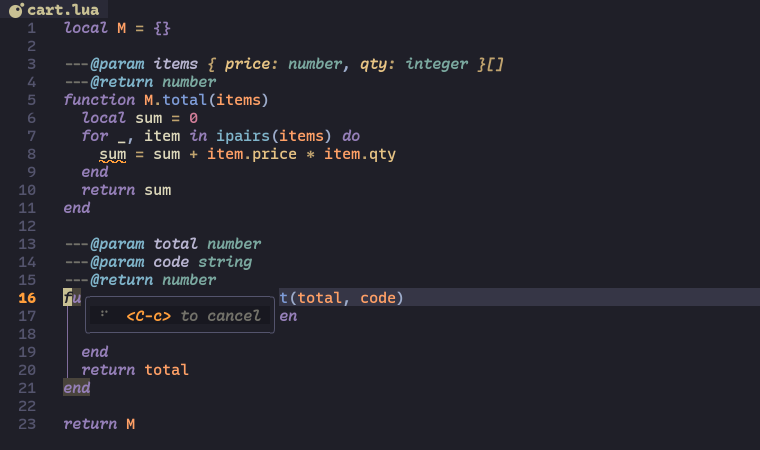
In normal mode, the reply replaces only the cursor line, not the surrounding
context. With a selection, it replaces the selected lines. Review the result
before saving; u undoes the replacement. <C-c> cancels a running quick chat.
Use it for narrow requests such as "Add type annotations to this function" or "Turn this list into a table". By default it sends nearby or selected text and the closest error/warning diagnostics, not your whole project. Use the panel for broader conversations.
Pass instructions directly instead of opening the prompt:
:Opencode quick_chat Add a Lua type annotation above this line
:'<,'>Opencode quick_chat Add type annotations to this function
:'<,'>Opencode quick_chat Fix the errors and warnings in this selection #errors #warnings
:'<,'>Opencode quick_chat Turn this list into a Markdown table
:'<,'>Opencode quick_chat Rewrite this paragraph for clarity
The '<,'> range comes from a visual selection. The default instructions
already request replacement output without explanations or code fences.
#errors and #warnings include the closest error and warning diagnostics.
Select the lines needed for the fix so the replacement covers the affected code.
Context tags in the instructions add information: #buffer sends the current
buffer, #file the current file, and #git_diff the Git diff. These augment
the default context; they do not change which lines the reply replaces.
See Context for context configuration.
In your Git commit-message buffer, place the cursor on an empty subject line:
:Opencode quick_chat Generate a conventional commit message from #git_diffStage the changes you want described first: #git_diff sends
git diff --cached --minimal, not unstaged changes. The reply replaces that
line with the generated message. Review and edit it before completing the
commit.
To reuse this request, add a Neovim command after your plugin setup:
vim.api.nvim_create_user_command('AICommitMessage', function()
  require('opencode.api').quick_chat('Generate a conventional commit message from #git_diff')
end, { desc = 'Generate a commit message on the current line' })
Run :AICommitMessage from the commit-message buffer. It generates text only;
it does not stage files or create a commit.
Define a range-aware command to avoid typing the same instruction each time:
vim.api.nvim_create_user_command('AIAnnotate', function(opts)
  require('opencode.api').quick_chat('Add type annotations', {
    start = opts.line1,
    stop = opts.line2,
  })
end, { range = true, desc = 'Annotate the selected lines' })
Select a function and run :'<,'>AIAnnotate. Without a range, this command
replaces only the current line.
Options under quick_chat set the model (default_model), agent
(default_agent), and change system instructions (instructions). The default
instructions handle output format and indentation; no override is needed to
repeat those rules. Custom instructions replace the defaults rather than
append to them.
To inspect what happened, set debug.quick_chat.keep_session = true; the
temporary sessions then stay in your session list.