
PC-style production control directly from your phone
Stream • Record • Create • Control • Produce


LiveLens brings OBS-style, empty-canvas production workflow directly to mobile creators. Instead of forcing you into pre-defined layouts or rigid templates, LiveLens gives you an empty canvas where you can place, layer, transform, and arrange your own sources to build custom streaming setups.
Whether you are a Gamer, IRL Streamer, Content Creator, VTuber, or Influencer, LiveLens puts studio-grade production power right in your pocket.
"Freedom in your pocket, not a smaller version of a locked-down tool."
LiveLens was born from real streaming experience. It is developed and led by Arpan Das, an independent creator and streamer based in Kolkata, India, under Bycon Studio.
Tired of the limitations, mandatory watermarks, intrusive ads, and subscription paywalls of existing mobile streaming tools, Arpan spent years self-teaching OpenGL ES rendering, hardware video encoding pipelines, and audio mixing to build a zero-compromise tool for the community.
- 🚫 Zero Watermarks & Zero Forced Ads – Your broadcast belongs to you.
- 🔐 Privacy First – No mandatory account creation or data harvesting.
- 🎨 Empty-Canvas Freedom – Complete control over your scene layouts.
- 💡 Community Funded – Supported by sponsorships and optional user contributions.
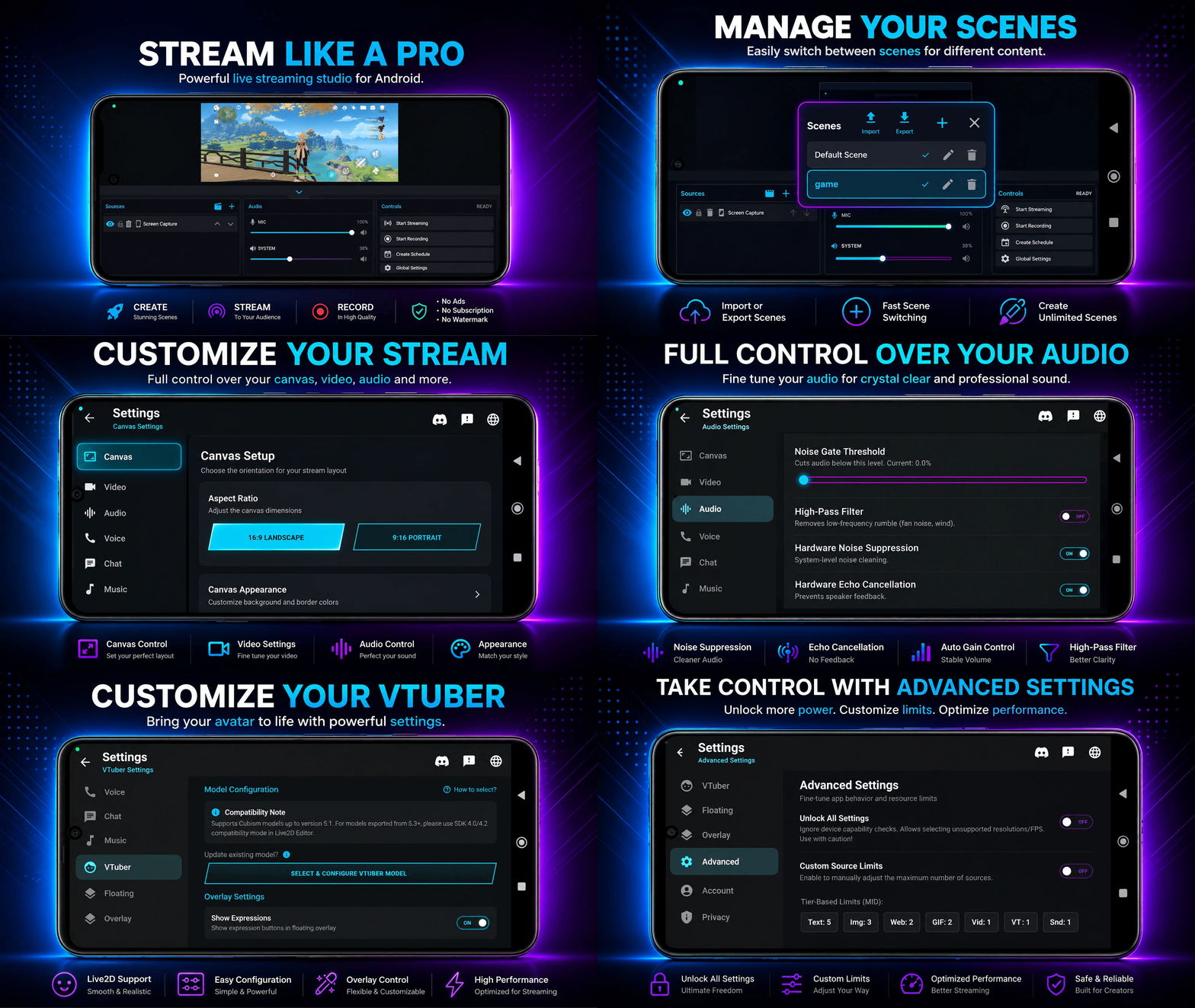
Desktop-Class Production on Mobile
- ⚡ GPU-Accelerated OpenGL ES: Ultra-low latency FBO-based composition.
- 🔄 Real-Time Transforms: Scale, rotate, crop, and layer sources dynamically.
- 🖼️ Unified Scene Pipeline: Single composition pass for live preview, streaming, and local recording.
- ⚡ 60 FPS Hardware Encoding: Smooth high-framerate output on modern mobile GPUs.
- 🌐 Multi-Platform RTMP / RTMPS: Direct streaming to Twitch, YouTube Live, Facebook Live, Kick, Instagram, and custom servers.
- 📹 4K & High Bitrate Recording: Concurrent local recording up to 4K resolution at 30/60 FPS.
- ⚙️ H.264 & H.265 (HEVC): Flexible hardware encoder selection.
- 📊 Adaptive Bitrate (ABR): Dynamic quality scaling based on network conditions and device thermal load.
Combine any of the following sources into custom scenes:
| Source | Description | Documentation |
|---|---|---|
| 🖥️ Screen Capture | Low-latency game screen recording & live streaming | Guide |
| 📹 Camera | Front & Back camera capture with exposure, focus & zoom control | Guide |
| 📝 Text | Dynamic text overlays, titles, custom fonts, and colors | Guide |
| 🖼️ Image | PNG/JPG overlay graphics, logos, and banners | Guide |
| 🖼️ GIF | Animated stickers, alert animations, and badge overlays | Guide |
| 🎥 Video | Background video loops, intros, and media playback | Guide |
| 🌐 Web Source | Real-time web pages, custom alert boxes, and browser overlays | Guide |
| 💬 Chat Box | Embedded live stream chat overlay for viewer interaction | Guide |
| 👾 VTuber Avatar | Native Live2D Cubism v5.1 (5.3+ compat) with mic lip-sync & physics | Guide |
| 🔌 UVC (Capture Card) | Connect external HDMI capture cards via USB-C (Beta) | Guide |
| 🔊 Sound | Background music tracks, sound effects, and audio clips | Guide |
- 🎚️ Dual-Channel Capture: Record internal system audio and microphone simultaneously.
- 🛡️ Advanced Filters: Hardware Noise Suppression, Echo Cancellation, and Automatic Gain Control (AGC).
- 📈 Real-Time Level Meters: Floating audio level adjusters and multi-channel audio mixing.
- 🚀 Account-Free Voice Rooms: Instant room creation with zero sign-up.
- 🔗 Deep-Link Sharing: Join team chat via a single shareable link.
- 💻 Cross-App Communication: Full interoperability between LiveLens & LiveLens Lite.
LiveLens automatically categorizes your device into a Performance Tier based on its SoC (processor) to maintain stable framerates and prevent thermal throttling.
| Tier | Example Devices | Recommended Limits (Text / Image / Web / Video / Sound) | Max FPS / Res |
|---|---|---|---|
| Entry | Helio G80 / Snapdragon 680 | 3 / 2 / 1 / 0 / 1 | 720p 30 FPS |
| Low-Mid | Snapdragon 720G / Dimensity 700 | 4 / 2 / 1 / 0 / 1 | 720p 30 FPS |
| Mid | Snapdragon 778G / Dimensity 1080 | 5 / 3 / 2 / 1 / 1 | 1080p 30 FPS |
| Upper-Mid | Snapdragon 870 / Dimensity 8100 | 6 / 4 / 2 / 1 / 1 | 1080p 60 FPS |
| Flagship | Snapdragon 8 Gen 1 / Dimensity 9000 | 8 / 5 / 3 / 2 / 2 | 1080p 60 FPS / 4K |
| Ultra Flagship | Snapdragon 8 Gen 2/3 / Dimensity 9300+ | 10 / 6 / 4 / 3 / 2 | 4K 60 FPS |
Due to extreme CPU/GPU rendering demands or Android system limits, the following sources have a fixed limit of 1:
- 👾 VTuber Source: Fixed at 1 (Live2D physics & lip-sync rendering pipeline).
- 🔌 UVC Capture Card: Fixed at 1 (USB video bandwidth restriction).
- 🖥️ Screen Capture: Fixed at 1 (Android OS media projection limit).
- 📹 Camera: Fixed at 1 active camera feed on most tiers.
Advanced users can manually override default tier limits:
- Navigate to Global Settings → Advanced.
- Enable Custom Source Limits to boost limits up to 20 Text, 15 Images, 10 Web, and 5 Videos.
- Toggle Unlock All Settings to force-enable 4K resolution or 60 FPS modes on supported hardware.
For full details, see Performance Limits & Source Tiers.
| Feature | LiveLens | Most Mobile Streaming Apps |
|---|---|---|
| 🎨 Empty Canvas & Multi-Scene | ✅ Full OBS Freedom | ❌ Fixed Templates |
| 👾 Live2D / VTuber Support | ✅ Native Cubism v5.1/5.3+ | ❌ None / Restricted |
| 🌐 Web & Custom HTML Sources | ✅ Full Interactive Support | |
| 🔌 USB Capture Card (UVC) | ✅ Supported (Beta) | ❌ Unsupported |
| 🎙️ Concurrent Mic + Game Audio | ✅ Supported | |
| 🎧 Integrated Team Voice Chat | ✅ Account-Free Rooms | ❌ None |
| 🧩 Scene Import / Export | ✅ JSON Config Sync | ❌ None |
| 🚫 Watermarks & Forced Ads | ❌ ZERO Watermarks / Ads | |
| 🔐 Account Required | ❌ No Mandatory Sign-in |
- Android Version (Primary Focus): Actively developed and optimized first.
- iOS Version (Phase 2): Planned following the official Android release and community funding/hardware setup (Mac & iPhone hardware).
- ⚡ Enhanced 4K Rendering Stability: Optimized pipeline for long 4K broadcasts.
- 🎚️ Professional Audio Mixer: Multi-track gain sliders, noise gate controls, and compressor presets.
- 🎭 Advanced VTuber Animations: Smooth expression transitions and character motion blending.
- 🎨 Custom Theme Engine: Extended styling options for overlays and floating control bars.
Check out the Upcoming Features Guide for full details.
| Issue | Cause | Solution |
|---|---|---|
| 📷 Black Camera Screen | Permission or App Conflict | Grant Camera permissions; close background camera apps; toggle front/back camera in settings. |
| Missing or Moved File | Open Scene Manager → Missing Assets to relink the file to its new path. | |
| 🔇 Game Audio Not Streamed | Game Security Restriction | Ensure "Mute Internal Audio" is OFF in Audio Settings. Use a headset on Android 10+. |
| 🔊 Metallic Mic Audio or Echo | Speaker Feed-through | Always use headphones while streaming with a microphone; enable Hardware Noise Suppression. |
| 📉 Stream Lag or Frame Drops | Bitrate or Hardware Overload | Lower bitrate to 3500 kbps, drop to 720p 30 FPS, or enable Adaptive Bitrate (ABR). |
For in-depth help, view the Complete Troubleshooting Guide and FAQ.
LiveLens is built on a creator-first monetization model. We believe creators should never be forced to display watermarks or pay recurring subscriptions for essential tools.
If you love LiveLens and want to keep it ad-free and free for everyone, consider supporting:
- 🌸 GitHub Sponsors: Sponsor ByconStudio on GitHub
- 🌐 Website Support Page: View All Support Options
Brands and organizations can support LiveLens development while gaining high-visibility partner positioning:
- 🚀 Splash Screen Branding: Dedicated logo placement during startup.
- ⚙️ Settings Screen Card: Clickable promotional banner linking to official brand websites.
- 🤝 Official Partner Title: Co-branding and sponsor positioning opportunities.
Learn more about brand benefits in Sponsorship Benefits and our Monetization Philosophy.
Explore the full documentation hosted directly in this repository:
- 📖 What is LiveLens? – App philosophy & core design
- 🎓 Getting Started Guide – Step-by-step 5-minute setup
- 👨💻 Developer & Studio Info – Story behind Bycon Studio
- ❓ Frequently Asked Questions (FAQ) – Complete Q&A
- 🟣 Twitch Setup Guide
- 🔴 YouTube Live Setup Guide
- 🔵 Facebook Live Setup Guide
- 🟢 Kick Setup Guide
- ⚙️ General Stream Setup
- 📹 Video Settings | 📡 Streaming Settings | 📹 Recording Settings
- 🎙️ Audio Settings | 📐 Canvas & Resolution | 👾 VTuber Settings
- 💬 Chat Settings | 🎨 Overlay Customization | 🎛️ Floating Controls
- 🔒 Privacy Settings | 🛠️ Advanced Settings | 🗣️ Voice Chat Settings
- 📊 Performance Tiers & Limits
- 🛠️ Troubleshooting Guide
- 💻 CPU Compatibility Info
- 💡 Upcoming Features & Roadmap
- 🤝 Support & Contribute
- 💼 Sponsorship Benefits
- 📜 Monetization Philosophy
- Android OS: Android 10 or higher (Required)
- RAM: 4GB RAM
- Storage: 100MB free space
- Camera & Mic: Standard phone camera & microphone
- Android OS: Android 12 or higher
- RAM: 8GB+ RAM
- Processor: Snapdragon 870 / Dimensity 8100 or higher
- Storage: 256GB+ for 4K local recording
- Network: 15+ Mbps upload speed for high-bitrate streaming
- 💬 Discord Community: Join LiveLens Discord
- 💡 Community Discussions: GitHub Discussions
- 🐛 Issue Tracker: Report a Bug
- 📧 Support Email: support@livelens.live
All rights reserved © LiveLens / Bycon Studio

This project is proprietary software.
Unauthorized copying, modification, or distribution is strictly prohibited.
For licensing inquiries, contact: support@livelens.live