


Seyk is local search for AI agents over private files. It finds passages by meaning, keywords and file names, and returns exact source locations: a line range, a PDF page, an audio time window. Use it alongside grep: grep finds every exact string, Seyk finds the passage that answers a question in other words, including in PDFs and recordings.
When you extract a passage, Seyk re-checks the file and refuses text that changed since indexing. It never writes answers; your agent reads the evidence and decides what it means. Seyk runs as an MCP server, a CLI, and a Rust library (pre-1.0).
Status: pre-1.0. Install from source for now; the model is a 0.5 GB download. Indexing can use several GB of memory on dense files, and a fix is in progress (#95).
- Let an agent cite your decision records. An agent asks "why did we pick
SQLite over Postgres?", gets
0007-storage-sqlite.md:13-18, and reads exactly those lines. Try it on the example decision records. - Search the files grep can't read well. Ask a question of notes, PDFs or meeting recordings and get back a line range, a page, or a time window. For code, Seyk complements grep; it does not parse functions yet.
- Embed retrieval in a Rust application. Link the library, point it at a folder, get hits with byte ranges, with no server to run. Pre-1.0 and not on crates.io yet; see examples/embed_search.rs.
Three searches over the example decision records, run from that folder. Results are trimmed to the top hit or two:
$ seyk search "how do we sign someone out right away?" decisions -n 1
0.908  decisions/0015-auth-sessions.md:6-10  § 0015. Use server-side sessions instead of JWTs for the web app > Context  [meaning 0.72+words]
       The web app stored a signed JWT in local storage. Logging a user out, or locking an account after a password reset, could not take effect until the token expired an hour later.

$ seyk search "Sunset header" decisions -n 1
1.000  decisions/0009-api-versioning.md:12-17  § 0009. Version the public API in the URL path > Decision  [meaning 0.70+words]
       Every public endpoint lives under a version prefix such as `/api/v2/`. A breaking change creates a new version. The previous version keeps working for at least twelve months after its replacement ships, and responses from a deprecated…

$ seyk search "0015-auth-sessions.md" decisions -n 1
1.000  decisions/0015-auth-sessions.md:1-4  § 0015. Use server-side sessions instead of JWTs for the web app  [meaning 0.82+words+name]
       Date: 2026-08-27 Status: Accepted. Supersedes the token section of 0003.
The first question shares only the word "out" with the record it found; meaning ranked it first. The tag in brackets shows which signals found each hit: meaning (with its similarity), words, or the file name. The score at the start ranks hits within one search; 1.000 means first on every signal that found anything.
To use a hit as evidence, extract it. Seyk re-hashes the whole file first and fails instead of returning text from a file that changed since the search:
$ seyk search "why did we pick SQLite over Postgres?" decisions --json -n 1 | seyk extract --from-json -
## Decision

We store tickets in a single SQLite database file in write-ahead-log mode,
next to the application. Backups copy that one file with the SQLite online
backup API. We keep the schema portable so a move to Postgres stays possible
if a customer outgrows one machine.- Local and private. Seyk sends no files, queries or embeddings over the network. The model runs on a laptop CPU. Only explicit model setup commands use the network.
- Meaning, keywords and file names together. The default hybrid mode
combines semantic similarity, BM25 keyword scores and file-name matches. A
question can find a passage that uses different words, and an
identifier such as
INC-18372orSession::restorestill finds the passage that contains it. Each hit reports which signals matched. - Exact locations. Line and byte ranges for text and code, pages for PDFs, time windows for audio.
- Evidence you can re-check.
seyk extracthashes the whole file and fails instead of returning text if the file changed since indexing. Search leaves out a preview it cannot verify. A matching hash shows the file is unchanged; it does not show who wrote it or whether it is true. - One engine, three interfaces. The MCP server and the CLI are thin layers over the Rust library. On Unix, all agent sessions share one loaded model.
Build and install from source (Rust 1.89 or newer):
cargo install --locked --git https://github.com/CertaMesh/seykPrebuilt binaries for macOS (Apple Silicon), Linux (x86_64 and ARM64) and Windows (x86_64) return with the next release. Linux needs glibc 2.38 or newer, and there is no Intel Mac build.
Download the model weights once (about 0.5 GB):
seyk model downloadSearch a folder (recursively). Embeddings are cached as you go:
seyk search "how I fixed my sleep" ~/notesSearching never downloads anything. Without the model weights, search still returns keyword and file-name matches. For every option, see Install Seyk, Model setup and the CLI reference.
seyk mcp is a Model Context Protocol server
over stdio. Agents get three tools: search finds ranked passages with path,
line range, heading, score and preview; extract reads evidence from a selected
hit; index_status reports indexing progress and model diagnostics. The agent
reads the evidence and writes the answer.
# Claude Code: make your notes searchable in every session
claude mcp add --scope user seyk -- seyk mcp /absolute/path/to/notes

# Or per project, for a codebase
claude mcp add seyk -- seyk mcp /absolute/path/to/codebase

# Codex
codex mcp add seyk -- seyk mcp /absolute/path/to/codebase
Replace the example folders with absolute paths. seyk mcp . indexes the
agent's start folder, which can be $HOME. GUI-launched agents may lack seyk
on PATH; use the absolute binary path from command -v seyk in their setup.
For Codex, the default 10 s startup and 60 s tool timeouts can be too short for a
cold first search. See Codex setup to raise them.
On Unix, a shared background daemon loads the model once for all sessions.
The server indexes your folders in the background and re-indexes when files
change. The search tool refuses paths outside the folders the server was
started with.
Privacy. Seyk itself sends nothing anywhere, but a cloud-hosted agent sends the passages it reads to its provider. Point the server only at folders you are happy for that agent to read. See Use Seyk from an agent (MCP).
The crates are not on crates.io yet. Use a Git dependency:
[dependencies]
seyk = { git = "https://github.com/CertaMesh/seyk" }
use seyk::embedder::gemma::{GemmaConfig, GemmaEmbedder};
use seyk::{Dimension, SearchEngine, SqliteCache};
let embedder = GemmaEmbedder::load(GemmaConfig {
dimension: Dimension::D256,
..Default::default()
})?;
let engine = SearchEngine::builder()
.embedder(embedder)
.cache(SqliteCache::open_default()?) // omit for an in-memory, ephemeral cache
.build()?;
let results = engine
.search("what did we decide about pricing?")
.paths(["~/notes"])
.limit(10)
.execute()?;You can also use only the EmbeddingGemma 2 backend, without the search engine.
See the Rust library guide.
examples/embed_search.rs is a complete program
that searches and extracts with SearchEngine::lexical(), which needs no model
weights: cargo run --example embed_search.
| Kind | Status |
|---|---|
| Markdown, plain text, source code | ✅ heading-, paragraph- or block-aware segments |
| Images | ✅ found by meaning, one vector per image |
| ✅ embedded text; scanned pages found by meaning, text extraction needs OCR | |
| Audio | Included in the default CLI; seyk setup audio installs audio search and speech-to-text models |
| Video | ❌ not implemented |
Seyk refuses files whose names or paths look like keys, password stores,
.env files or credentials, and there is no override. The check uses names
and paths only, not file contents, so a renamed secret is not detected. See Supported content.
Seyk is at version 0.1.0. Know these before you adopt it:
- CPU only. No GPU or Neural Engine provider is enabled yet.
- The first search of a large folder is slow. A historical measurement on a busy Apple M5 Max (q8, 256 dimensions) took roughly 30 minutes for 10,000 segments; see Benchmarks. After that, Seyk embeds only what changed.
- Hybrid can push a good meaning match down. Use
--mode semanticfor purely thematic queries. - Indexing can use several GB of memory. Files that tokenize densely, such as numeric JSON, make embedding batches large. A fix is in progress (#95).
- Video and scanned-page OCR are not implemented.
- Search is exact by default. Every query is compared with every cached
vector. An opt-in image scan (
--image-scan q4) is experimental and has no recall guarantee; see Multimodal support. - The library API can still change. Resource provider types may change before 1.0, and the filesystem is the only supported provider.
See all Known limitations.
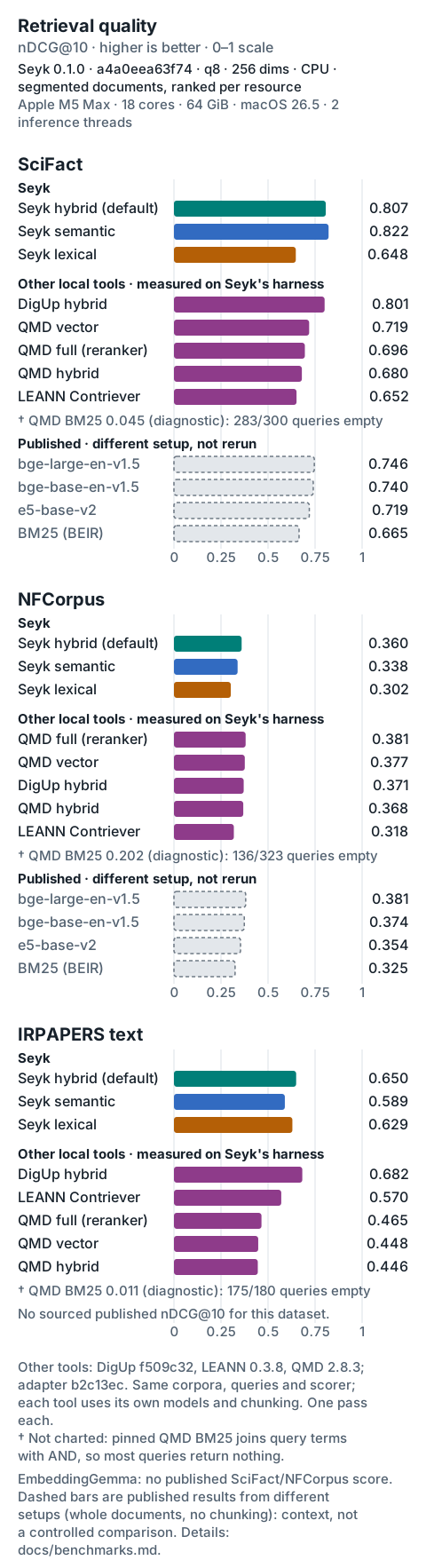
nDCG@10 measures how well the first ten results rank relevant documents. Higher is better. The default hybrid mode still trails semantic-only search on SciFact. The hybrid fusion setting was tuned on these same datasets, so they are not a held-out test. See Performance for the full setup and Benchmarks for sources and reproduction steps.
- Install Seyk and Model setup
- CLI reference: search modes, scores, extraction, audio, progress
- Use Seyk from an agent (MCP)
- Rust library
- Supported content
- Caching and storage: what is cached, where, and how to erase it
- Performance and Known limitations
- Development and Architecture
- What Seyk is for: purpose, evidence contract, non-goals
- Roadmap
- Examples
- All documentation
Apache-2.0. EmbeddingGemma 2 is released by Google under Apache 2.0.