OrgCsstudioUiMenu
This plugin register the proper extensions to create the CSS Menu.
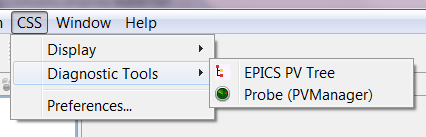
Menu structure:
CSS (id: css)
 - Display (id: display)
 - Alarm (id: alarm)
 - Diagnostic (id: diag)
 - Debugging (id: debugging)
 - Configuration (id: configuration)
 - Management (id: management)
 - Editors (id: editors)
 - Utilities (id: utility)
 - Trends (id: trends)
 - Test (id: test)
 - Other (id: other)
This adds a command to the display submenu in the plugin.xml:
<plugin>
   ...
   <extension
         point="org.eclipse.ui.menus">
      ...
      <menuContribution
            allPopups="false"
            locationURI="menu:display">
         <command
               commandId="org.csstudio.display.waterfall.[[OpenView]]"
               icon="icons/water.png"
               style="push">
         </command>
      </menuContribution>
      ...
   </extension>
   ...
</plugin>
To get more examples, you can look at other CSS application plugins.