因为更新内容较多,且部分优化不足(因为添加的功能主要是为了解决我的个人需求,所以代码没有进行过多优化),使打包后的js文件达到了108KB,所以我感觉这个PR(#696)不会被通过TAT,但是如果我更新的内容包括你想要使用的功能,可以直接到我的分支里下载打包后的js文件:APlayer.min.js,如果你能帮助我进行优化,那么感激不尽!分支仓库地址:APlayer (https://github.com/Eling486/APlayer)
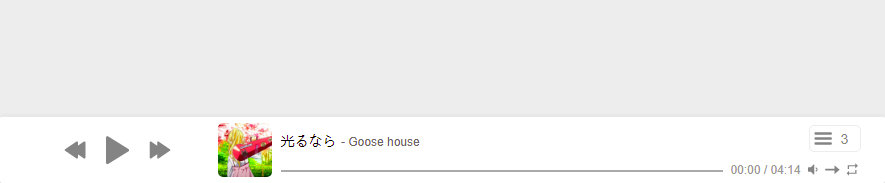
新模式:fixedBar - New mode: fixedBar
使用方法 - How to use it? :
const ap = new APlayer({
    container: document.getElementById('player'),
    fixedBar: true,
    audio: [{
        name: 'name',
        artist: 'artist',
        url: 'url.mp3',
        cover: 'cover.jpg',
    }]
});
效果 - What does it look like? :
以及播放列表样式 - & the style of its play list:

新功能 - New functions
默认封面&标题 - defaultTitle & defaultCover
You can set the default title & cover now.
你现在可以设置默认的封面及标题了!
such as:

const ap = new APlayer({
    container: document.getElementById('player'),
    defaultTitle: 'Your Title', // Default: 'No audio'
    defaultCover: 'Your_Image.jpg',
});
保存播放列表到localStorage - store your play list to localStorage
设置storeList参数为true来让播放器保存播放列表到localStorage
只在fixedBar(吸底播放栏)模式下推荐使用(因为其他模式下没有清空播放列表按钮)
推荐同时设置storageName来避免与其他播放器冲突
Setting storeList to save your play list to localStorage.
ONLY recommended in the fixedBar mode! (Because there are NOT [Clear the playlist] button in other modes.)
It is recommended to set storagename at the same time to avoid conflicts with other APlayers.
const ap = new APlayer({
    container: document.getElementById('player'),
    fixedBar: true,
    storageName: 'my-aplayer',
    storeList: true,
    audio: [{
        name: 'name',
        artist: 'artist',
        url: 'url.mp3',
        cover: 'cover.jpg',
    }]
});
设置歌词字号 - Set the font size for your lrc
你现在可以通过lrcFontSize自定义lrc歌词的字号了!
You can set the font size of lrc by lrcFontSize now.
const ap = new APlayer({
    container: document.getElementById('player'),
    lrcFontSize: 18,
});
注意:播放器的高度会随字号大小发生变化,请注意进行调试!
设置歌词出错时/加载时的提示消息文本 - Set the defaultLrcErrText & defaultLrcLoadingText
你可以自定义lrc歌词在出错、未找到歌词时,在歌词位置显示的默认文本了!
You can set defaultLrcErrText & defaultLrcLoadingText to what you want to show!
const ap = new APlayer({
    container: document.getElementById('player'),
    defaultLrcErrText: '纯音乐,请欣赏', // Default: 'Not available'
    defaultLrcLoadingText: '歌词加载中', // Default: 'Loading'
});
你也可以将lrcErrNotice设置为false来禁用当歌词出错时的播放器消息提示。
You can also set the lrcErrNotice to false to disable error notice
such as:
const ap = new APlayer({
    container: document.getElementById('player'),
    lrcErrNotice: false
});
因为更新内容较多,且部分优化不足(因为添加的功能主要是为了解决我的个人需求,所以代码没有进行过多优化),使打包后的js文件达到了108KB,所以我感觉这个PR(#696)不会被通过TAT,但是如果我更新的内容包括你想要使用的功能,可以直接到我的分支里下载打包后的js文件:APlayer.min.js,如果你能帮助我进行优化,那么感激不尽!分支仓库地址:APlayer (https://github.com/Eling486/APlayer)
新模式:fixedBar - New mode: fixedBar
使用方法 - How to use it? :
效果 - What does it look like? :
以及播放列表样式 - & the style of its play list:
新功能 - New functions
默认封面&标题 - defaultTitle & defaultCover
You can set the default title & cover now.
你现在可以设置默认的封面及标题了!
such as:
保存播放列表到localStorage - store your play list to localStorage
设置
storeList参数为true来让播放器保存播放列表到localStorage只在fixedBar(吸底播放栏)模式下推荐使用(因为其他模式下没有清空播放列表按钮)
推荐同时设置
storageName来避免与其他播放器冲突Setting
storeListto save your play list to localStorage.ONLY recommended in the fixedBar mode! (Because there are NOT [Clear the playlist] button in other modes.)
It is recommended to set
storagenameat the same time to avoid conflicts with other APlayers.设置歌词字号 - Set the font size for your lrc
你现在可以通过
lrcFontSize自定义lrc歌词的字号了!You can set the font size of lrc by
lrcFontSizenow.注意:播放器的高度会随字号大小发生变化,请注意进行调试!
设置歌词出错时/加载时的提示消息文本 - Set the defaultLrcErrText & defaultLrcLoadingText
你可以自定义lrc歌词在出错、未找到歌词时,在歌词位置显示的默认文本了!
You can set defaultLrcErrText & defaultLrcLoadingText to what you want to show!
你也可以将
lrcErrNotice设置为false来禁用当歌词出错时的播放器消息提示。You can also set the
lrcErrNoticetofalseto disable error noticesuch as: