
Minimal terminal UI for managing telemt on Debian, Ubuntu, Fedora, and Arch Linux


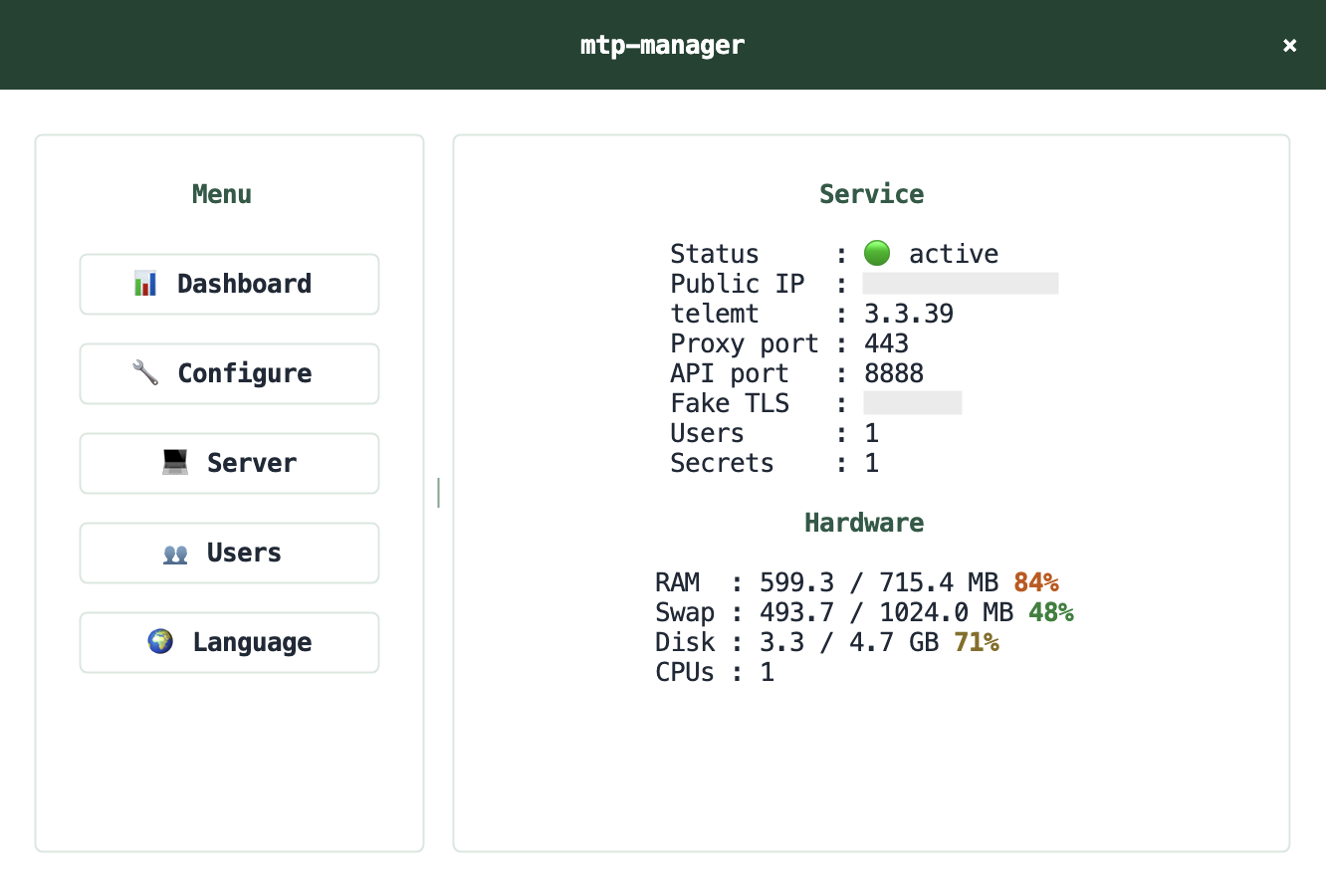
mtp-manager is a lightweight TUI for installing, configuring, and operating telemt proxies. It supports native MTProto with Fake TLS, Telegram WEB proxy over HTTPS, or both transports together.
- install and update
telemt - install a specific tag or commit
- manage users and secrets
- export
raw,dd, andeelinks - configure Telegram WEB proxy, including HTTPS transport compatible with iPhone
- export
tg://webproxylinks for domains and optional paths - generate NGINX and Caddy HTTPS frontend templates
- inspect service status and logs
- run cleanup tasks for logs, cache, and runtime artifacts
- switch the interface between English, Russian, and Chinese
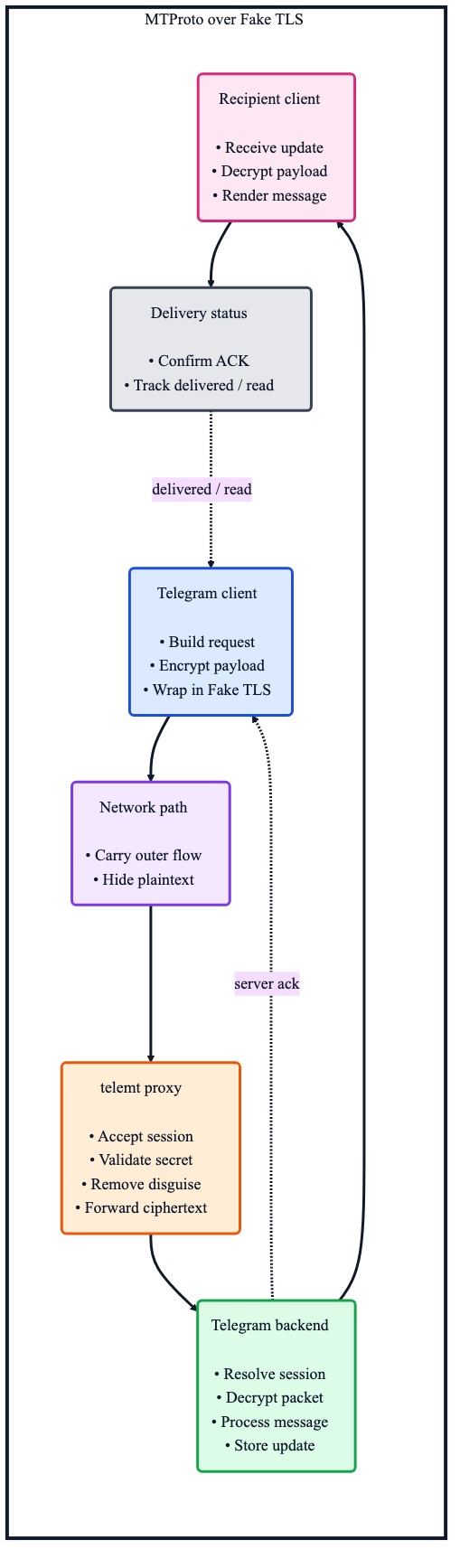
The diagram below shows the high-level path of an MTProto message when telemt is used as the proxy layer with Fake TLS enabled.
Install the latest published version from PyPI:
python3 -m pip install mtp-managerRun the application:
mtp-manager
mtp-managerperforms system-level operations such as service management, firewall updates, and cleanup tasks, so it is typically expected to run with root privileges.
Clone the repository and use the bootstrap script:
source setup.sh
sudo "$VIRTUAL_ENV/bin/mtp-manager"
setup.sh is meant to be sourced from bash or zsh. It prepares .venv, installs the project in editable mode, validates the entrypoint, and activates the environment in the current shell.
Run the script as your normal user; it uses sudo for system packages. Start the
TUI with the explicit environment path above so sudo uses the installed command.
If already root, run mtp-manager after setup. Cache files left by previous root
runs are skipped when they cannot be removed. An incomplete .venv is repaired,
and required installation failures return an error without activating it.
- Python
3.11+ - Debian, Ubuntu, Fedora, or Arch Linux
systemd- root privileges for install, service, firewall, and cleanup operations
Run mtp-manager as root, open Configure → Setup, and choose MTProto,
WEB (HTTPS), or MTProto + WEB. The wizard installs dependencies, installs
or builds a compatible telemt binary, creates the first user and secret, writes
configuration, enables startup on boot, and starts the services. Repeating Setup
keeps existing enabled secrets.
WEB setup uses two short steps: choose the mode, then enter the domain and public IP. The public IP is prefilled when detected. The only external prerequisites are:
- a domain with an A/AAAA record pointing directly to this server's stable public IP;
- inbound TCP ports 80 and 443 reachable through the provider's firewall/NAT;
- free ports for the selected listeners and root privileges.
Press Install & start. The manager automatically downloads and verifies Caddy,
configures a dedicated mtp-manager-web.service, opens the host firewall ports,
and obtains a public TLS certificate. Caddy renews the certificate automatically.
Setup checks DNS before installation, waits for telemt's listeners, and verifies
HTTPS with the domain's certificate before reporting success. DNS and certificate
errors stay in the TUI and preserve the entered settings for retry.
The result screen contains working-format links and a copy button. WEB links use
tg://webproxy without a port. Root links use hexadecimal secrets; optional path
links use Telemt's 0x70 base64url format. carrier = "https" supports Telegram
on iPhone; WEB accepts raw and dd secrets, while ee Fake TLS applies to native
MTProto. See the upstream WEB documentation.
In combined mode the wizard chooses 8443 for native MTProto when its current
port is 443. Telemt's private WEB listener defaults to 127.0.0.1:18080 and is never
opened in the firewall. The API, MTProto, and WEB listeners must have distinct
ports; automatic HTTPS reserves 80/443.
Advanced settings contains listener ports, an optional path such as
telegram/web, the first user's name, a telemt tag/commit, and a custom static
site directory. Leave the directory blank for the managed welcome page. Custom
sites need an absolute directory containing index.html, no symlinks, and files
within Telemt's snapshot limits. After changing a path, reimport the newly
exported link. User disabling, deletion, and secret rotation apply to both
transports.
The manager installs Caddy separately from any existing web server. If another service owns 80/443, Setup reports the conflict and does not replace that service's configuration. For an already configured NGINX/Caddy frontend, explicitly choose Existing HTTPS frontend in Advanced settings; Configure → WEB HTTPS setup then shows generated frontend examples. This option leaves TLS management to the existing frontend. Older WEB settings using examples migrate to this external mode. New setups default to automatic Caddy.
Configure → Edit Settings applies changes to a deployed proxy, including the managed HTTPS frontend. Enabling automatic WEB on an existing MTProto installation provisions the required components from the same TUI action. Server → HTTPS logs shows certificate and frontend diagnostics. The dashboard displays HTTPS status.
If the latest telemt release lacks WEB, Setup builds upstream main. Build
packages and a suitable Rust toolchain are provisioned automatically; the managed
Rust installation stays under /var/lib/mtp-manager/rust and does not change the
shell profile. An explicitly selected incompatible revision is rejected.
Setup verifies local listeners and the TLS certificate. A real Telegram connection still verifies the complete path from the client through the provider's network.
python -m unittest discover -s tests -vThe tests use temporary state directories and mocked host services. They cover settings migration, WEB config and link generation, secret lifecycle, firewall changes, automated installation and certificate readiness, retries, and headless Textual dialogs at 48×20, 80×24, and 120×40 in all three UI languages.
| Path | Purpose |
|---|---|
src/app.py |
CLI entrypoint and internal service commands |
src/bootstrap.py |
Dependency wiring and startup migration glue |
src/controller.py |
Application actions used by the TUI |
src/infra/ |
shell, locale, storage, firewall, public IP, systemd |
src/models/ |
typed domain models |
src/services/ |
install, runtime, diagnostics, cleanup, inventory |
src/ui/backend.py |
UI backend abstraction used by the app entrypoint |
src/ui/textual_app.py |
main TUI orchestration |
src/ui/modals.py |
modal screens and shared popup UI |
src/ui/dashboard.py |
dashboard rendering and host metrics |
src/ui/actions.py |
action definitions and menu helpers |
src/ui/lists.py |
sections, users, and secrets list helpers |
src/i18n/ |
English, Russian, and Chinese catalogs |
| Path | Purpose |
|---|---|
/etc/mtp-manager |
managed config directory |
/var/lib/mtp-manager |
app data |
/var/lib/mtp-manager/web-public |
default WEB static site |
/etc/mtp-manager/web-*.example |
external HTTPS frontend examples |
/etc/mtp-manager/Caddyfile |
managed HTTPS configuration |
/opt/mtp-manager-caddy |
dedicated Caddy binary |
/var/lib/mtp-manager/caddy |
persistent certificate storage |
/etc/systemd/system/mtp-manager-web.service |
managed HTTPS service |
/opt/telemt |
installed telemt binary |
/etc/systemd/system/telemt.service |
main service unit |
/etc/systemd/system/telemt-config-refresh.* |
config refresh service and timer |
/etc/systemd/system/mtp-manager-cleanup.* |
cleanup service and timer |
- shell execution is routed through the infra layer
- generated files are written atomically
- managed
systemdunits invoke the installedmtp-managerentrypoint - migration logic for older
mtproxylayouts is included