


Lightweight, ultra-low-overhead fan control, sensor monitor, and feedforward AI thermal manager for Intel Macs running Windows 10/11 through Boot Camp.
Specially engineered and optimized for Apple T2 chip models (MacBook Pro 16" 2019, MacBook Pro 13"/15" 2018-2020, MacBook Air 2018-2020, iMac Pro, Mac mini 2018), while providing full backwards compatibility with earlier Intel Macs.
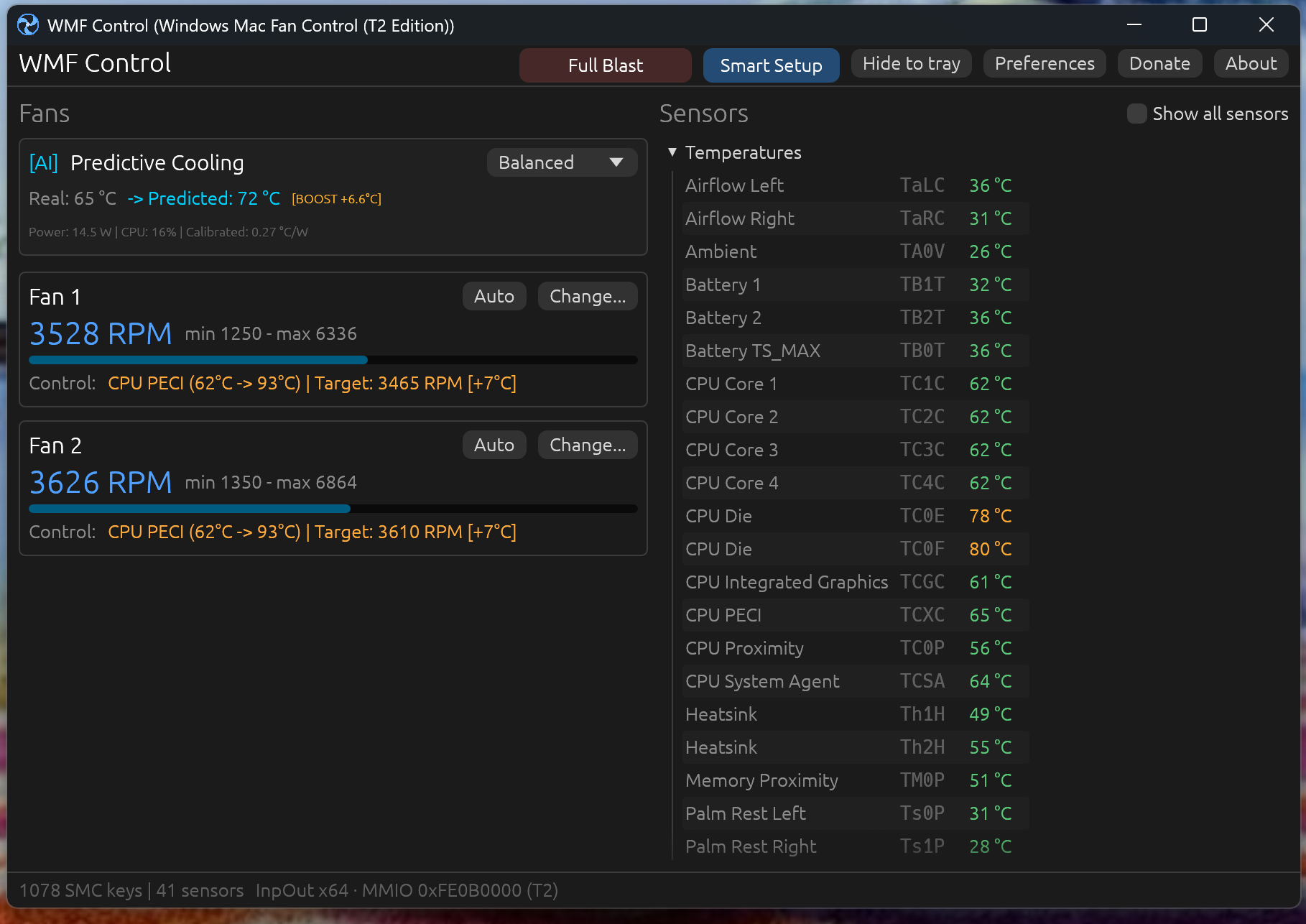
WMF Control (Apple T2 & AI Thermal Edition) | License: MIT
Traditional fan control is reactive: it waits for the silicon crystal to reach 85-95 °C and throttle before spinning up fans. Because copper heat pipes and aluminum heatsinks have significant thermal inertia, heat saturates the chassis long before the fans catch up.
WMF Control v1.3.0 introduces an Adaptive Feedforward AI Thermal Engine that anticipates heat surges in advance and ramps up cooling before silicon temperatures spike.
-
Multivariate Feedforward Telemetry: Continuously monitors instantaneous CPU Package Power (Watts via SMC
PCPT/PCTR/PCPC), real-time microsecond CPU load (GetSystemTimeswith <0.01% overhead), and temperature rate of change ($dT/dt$ in °C/sec). -
Virtual Predicted Temperature Engine: Calculates an anticipatory virtual temperature fed directly into the fan curve:
$$\text{PredictedTemp} = \text{RealTemp} + \text{ThermalGain} \cdot \max(0, P - P_{\text{idle}}) + \text{DerivativeGain} \cdot \max(0, dT/dt)$$ -
Smart Idle Power Deadzone (Silence in Daily Tasks): A calibrated power threshold (
$P_{\text{idle}}$ : 20W in Balanced, 25W in Silent, 14W in Aggressive) ensures that transient browser tab opening, document editing, and 1080p video streaming maintain 0.0 °C boost, keeping the fans at dead-silent idle (~1800 RPM). -
Acoustic Power Curve (
$\text{ratio}^{1.4}$ ): Non-linear acoustic mapping replaces aggressive linear ramps. Between 60 °C and 75 °C, fans remain whispering quiet (2000-3400 RPM), seamlessly accelerating toward maximum power only when temperatures approach 85-95 °C under heavy sustained workload. -
Spike Immunity (Attack Delay ~1.5-2.0s): Ignores transient 1-second micro-spikes (like opening an app or searching a directory), preventing annoying fan revving cycles.
-
Smooth Release & Latent Heat Purge (4-6s): When heavy workload ceases, the engine holds fan RPM momentarily to flush out latent heat trapped in the fin stacks before gently returning to base RPM.
-
Continuous Online Self-Calibration: The AI engine continuously self-calibrates the thermal gain coefficient (
$\text{ThermalGain}$ ) against physical heating deltas, automatically adapting to your MacBook's specific thermal paste condition, ambient temperature, and chassis airflow. -
1-Click Smart AI Setup: One click in the top bar automatically detects available SMC sensors, picks the optimal CPU sensor (
TCXCPECI$\to$ TC0E/TC0FDie$\to$ TC0PProximity$\to$ TC1C), identifies discrete GPUs (TG0D/TG0P), configures tailored acoustic fan curves (62 °C$\to$ 93 °C), activates Balanced AI mode, and saves toconfig.json. -
Safe Overheat Guard (98 °C / 90 °C): Monitors primary die sensors with hysteresis, safeguarding against thermal runaway without false-tripping on short Intel Turbo Boost single-core spikes.
-
Compact Color-Coded Sensors View: Default clean view displays essential thermals and power rails with real-time color indicators: Green (<65 °C), Yellow/Orange (65-82 °C), Red (>82 °C), and a 1-click toggle to expand all 50+ raw SMC keys.
- Dual-Fan T2 Support (Fan 2 0x86 SMC Error Fix):
On Apple T2 machines (e.g. MacBookPro16,1), writing to minimum fan speed registers (
F0Mn,F1Mn) is unsupported and returns hardware error0x86. WMF Control eliminatesFnMnwrites, controlling both fans via target speed keys (F0Tg,F1Tg) in forced mode (FnMd=1) with big-endianfpe2encoding. - Ultra-Low Background CPU Usage (~0.1% - 0.3%): When minimized to tray, polling of dormant sensors halts entirely. Background monitoring checks only the active curve sensors, emergency guards, and live RPMs at a relaxed 2000 ms interval.
- Battery-Safe Windows Autostart:
Task Scheduler configuration enforces
<DisallowStartIfOnBatteries>false</DisallowStartIfOnBatteries>and<StopIfGoingOnBatteries>false</StopIfGoingOnBatteries>, guaranteeing startup on battery power without hanging inQueuedstate. - Zero Console Window / Silent Tray Startup:
Pure Windows GUI application (
#![windows_subsystem = "windows"], noAllocConsole()). Supports--minimizedto launch directly into tray without flickering terminal boxes. - Shared Memory CPU Temp for External Widgets (
Local\WMF_CpuTemp): Writes current silicon temperature into a Windows named shared memory section (Local\WMF_CpuTemp, 4-bytef32) for Rainmeter skins and third-party monitoring utilities.
- Real-time RPM for each fan (current / min / max).
- Three control modes per fan:
- Auto: default Apple SMC hardware control.
- Constant RPM: fixed custom speed.
- Sensor-based: smooth acoustic temperature curve between user-defined min and max thresholds.
- 50+ temperature, power (Watts), voltage, and current sensors read directly from SMC registers.
- Adaptive Predictive AI Cooling: feedforward thermal control with continuous self-calibration.
- 1-Click Smart Setup: automated hardware sensor detection and curve optimization.
- Full Blast: instant toggle to spin all fans up to 100% max speed.
- Emergency Overheat Guard: safety threshold automatically boosts fans if silicon reaches 98 °C.
- Clean SMC Reset: switching to Auto or quitting cleanly restores default Apple SMC automatic management (
FnMd=0). - °C / °F units, configurable polling interval, and dark-themed interface built with
egui.
- Download
WMF-Control-T2-v1.3.0-win64.zipfrom Releases. - Extract the archive into a folder of your choice (e.g.
C:\Users\<YourUser>\AppData\Local\Programs\WMFControlor any portable directory). - Right-click
wmf-control.exeand select Run as administrator (or approve the UAC prompt). The includedinpoutx64.dlldriver provides physical MMIO access to the T2 chip (0xFE0B0000). - Click
Smart Setup(or let it configure automatically on initial launch) to apply recommended sensors and acoustic fan curves. - Check Start with Windows (Task Scheduler, no UAC) in Preferences to enable silent autostart on logon.
| Argument | Description |
|---|---|
--minimized, /tray |
Launch directly into the system tray without showing the main window. |
--demo |
Runs on simulated SMC sensor data (no administrator privileges or driver required). |
--dump |
Writes all detected SMC keys and raw values to smc-dump.txt. |
--no-mmio |
Forces legacy port I/O access (for pre-2018 non-T2 Macs). |
--selftest |
Performs diagnostic SMC write tests and writes results to selftest.txt. |
| Driver | Port I/O | MMIO (Apple T2) |
|---|---|---|
| inpoutx64.dll (included) | Yes | Yes |
| WinRing0x64.dll | Yes | Blocked by Windows Defender / driver blocklist |
The SMC on Apple T2 Macs is mapped to physical memory via MMIO (0xFE0B0000, discovered via ACPI APP0001). inpoutx64.dll handles physical memory mapping (MapPhysToLin).
Prerequisites:
- Rust toolchain (edition 2024 / 1.85+)
- MinGW or MSVC toolchain (
x86_64-pc-windows-gnu/x86_64-pc-windows-msvc)
# Clone repository
git clone https://github.com/Gleb200/WMF-Control-T2-Edition.git
cd WMF-Control-T2-Edition

# Build release executable
cargo build --release
build.rs will automatically embed the required administrator manifest and copy driver\inpoutx64.dll next to the compiled target\release\wmf-control.exe.
If you find WMF Control useful and would like to support independent open-source development and hardware optimization for Intel & Apple T2 Macs on Windows:
- Boosty (Bank Cards / International):
https://boosty.to/gringleb/donate - NOWPayments (Crypto — USDT, TON, BTC, and 100+ coins):
https://nowpayments.io/donation/glebgrin

- Linux
applesmckernel driver maintainers and thet2linuxproject for hardware research. - Licensed under the MIT License.