


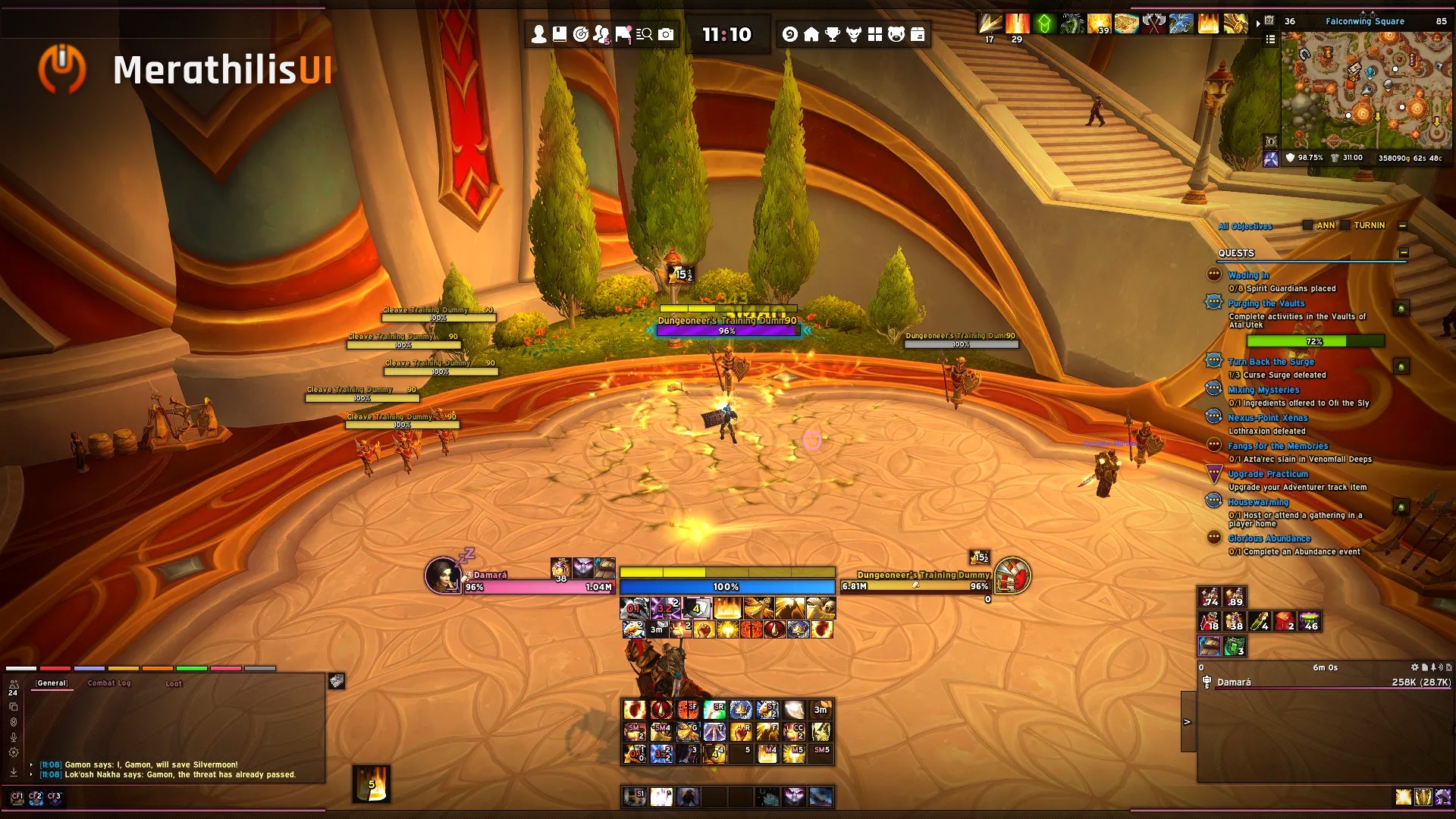
Screenshot also shows other AddOns.







Download Sites: WowUP | Curse | Wago | Github Release
A complete, polished look for ElvUI - plus the features ElvUI doesn't ship.
MerathilisUI is a plugin for ElvUI (Retail). It gives your interface a clean, transparent design with class-colored gradients and adds a set of modules that go beyond what ElvUI offers out of the box. Everything is modular: turn off what you don't need, keep the rest.
- One-click complete UI - The installer sets up ElvUI, your chat, action bars, data texts, nameplates, unit frames and profiles for popular addons in a few steps. Choose between a General, Dark or Gradient layout.
- A consistent design everywhere - Blizzard windows, ElvUI and supported addons get the same shadows, gradients and flat widgets, including the ElvUI options window itself.
- Features ElvUI doesn't have - A categorized bag view, a full Armory character panel, a chat sidebar, Mythic+ info on hover, a buff reminder and more (see below).
- Actively maintained - Regular updates for the current Retail patch, and bugs reported on Discord get fixed.
- Categorized Bags - Replaces the bag frame with a category sidebar: pinned and recent items, custom categories, sub-headers per expansion and per equipment set
- Merges identical stacks into one slot and shrinks the bag and bank windows to fit their contents
- Shows which items are part of an equipment set
- Redesigned character and inspect frame with class backgrounds
- Item level, enchants and sockets per slot, with a warning for missing enchants
- Shows the highest item level you can reach with the items in your bags
- Built-in equipment set manager and socket panel
- Chat Sidebar - Friends and guild online, durability, voice chat and copy chat in one bar next to the chat
- Location Panel - Zone text and coordinates above the minimap
- Minimap Button Bar - Collects the addon buttons from your minimap into one bar
- NameHover - Unit info at your cursor; in Mythic+ it shows how much Enemy Forces an enemy is worth and your current pull progress
- Buff Reminder - Reminds you of missing raid buffs, flasks, food, runes, weapon enchants and poisons
- Movement Alert - Shows the cooldowns of your movement spells, optionally with Text to Speech
- Loot Spec Manager - Switches your loot specialization automatically per boss in raids and Mythic+
- Spec Bar - Switch your specialization with one click
- Vehicle / Skyriding Bar - Styled vehicle bar with a vigor bar and speed display
- Faction Indicator - Faction crest of the opposing faction on unit frames and nameplates
- Rare mobs, new mail, Great Vault rewards, Call to Arms, low durability, full bags, guild events, Quick Join requests and currency cap warnings
- Mail: open or delete multiple mails at once, send templates and quick attach
- Profession tabs, Pet Journal filter by type, tertiary stats in the auction house
- Copy your current transmog as a list, Wowhead links in the Achievement and World Map frame
- Styled game menu, AFK screen and cursor ring with GCD and cast progress
- Gradient, Dark and class-colored health, power and castbars
- Additional styling for player, target, party, raid and boss frames
The installer starts automatically the first time you log in with MerathilisUI. You can open it again at any time with the Install button in the MerathilisUI options. Each step can be skipped if you want to keep your current ElvUI settings.
Tip: Apply MerathilisUI to a new ElvUI profile, then you can always switch back.
Note: Running the installer again after an update overwrites your own changes in the steps you apply.
Recommended: mMediaTag & Tools
BigWigs, Details!, ls: Toasts, Capping, TomTom, Permoks Account Manager, Skiron Cooldown Manager, WindTools, mMediaTag and a Blizzard Edit Mode layout.
BigWigs, Details!, BugSack, BagSync, Capping, Clique, ls: Toasts, Pawn, WIM, WowLua, Paragon Reputation, KeystoneLoot and more.
Please join the Discord and read the bug report guidelines before posting. A good report (error message, steps to reproduce, list of your addons) helps a lot.
You can also open an issue here on GitHub.
Special thanks to Benik for the help from the very beginning, and to Elv, Simpy, DarthPredator, Blazeflack, Azilroka and all other addon authors whose work inspired MerathilisUI. See CREDITS.md for the full list.