Convert videos to high-quality GIFs and optimized MP4s with a multi-segment timeline editor and AI-powered shot detection.
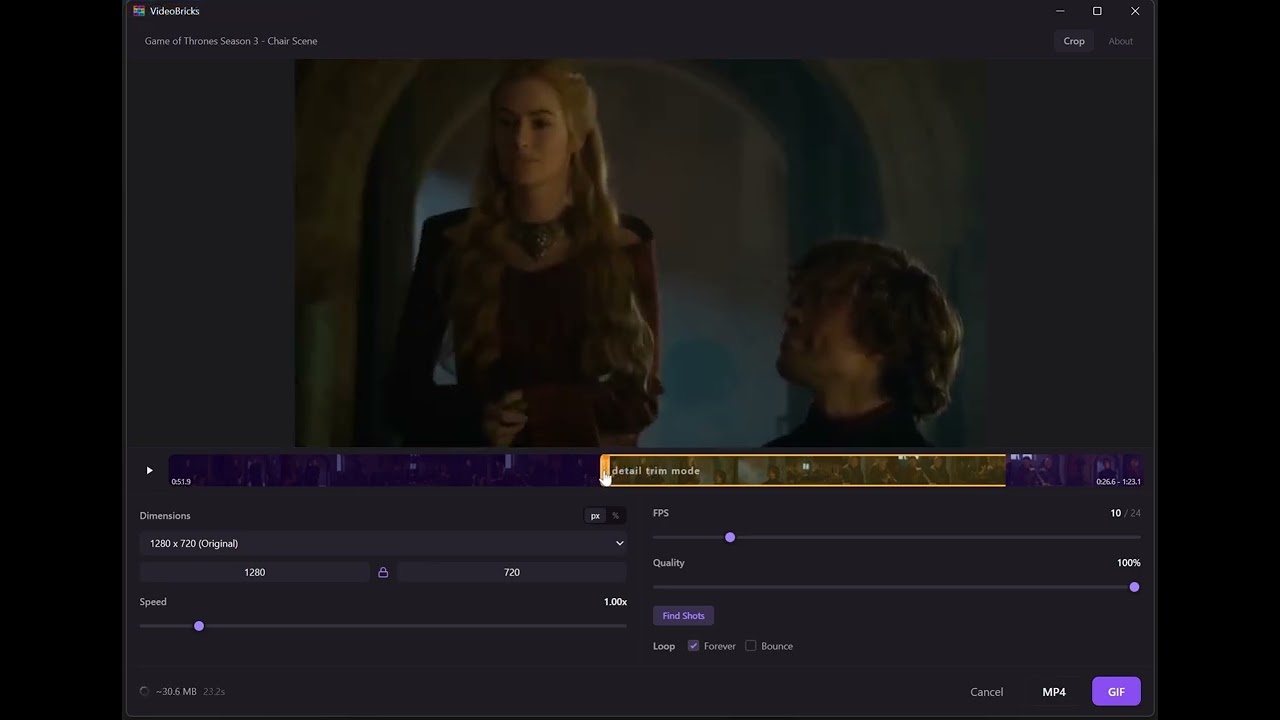
- High-quality GIF encoding powered by the gifski encoder
- MP4 export with FFmpeg for optimized video output
- Multi-segment timeline -- create multiple trim segments on a single video, then choose to merge them into one file or export each segment as an individual file
- Precision trim controls -- drag a trim handle to roughly position it, then hold still to enter a detail mode that zooms into that region of the timeline, letting you land on the exact frame you want
- AI shot detection -- automatically find scene boundaries using TransNetV2 and split your video into clips with one click (model is bundled -- no setup required)
- Crop and resize with aspect ratio presets and freeform editing
- Real-time preview with loop and bounce playback modes
- Adjustable FPS, speed, and quality controls
- Estimated output size shown before conversion
The easiest way to install is via Homebrew. This handles everything -- no scary warnings, no extra steps:
brew install --cask alonsorobots/tap/videobricksThis installs VideoBricks and its FFmpeg dependency automatically. To update later, run brew upgrade --cask videobricks.
Alternative: manual install from DMG
Download VideoBricks_x.x.x_aarch64.dmg from the GitHub Releases page, open it, and drag VideoBricks to Applications. The app is ad-hoc signed rather than notarized, so the first launch needs a right-click on the app and Open (double-clicking shows "unidentified developer"). The Homebrew cask above avoids this.
Because the app is not signed with an Apple Developer certificate, macOS Gatekeeper will block the first launch. To allow it:
- Option A: Right-click (or Control-click) the app > Open > click Open in the dialog.
- Option B: Run this in Terminal after copying to Applications:
xattr -cr /Applications/VideoBricks.appYou also need FFmpeg installed separately:
brew install ffmpegDownload the .exe (NSIS) or .msi installer from the GitHub Releases page. Everything is bundled -- FFmpeg, the TransNetV2 AI model, and (since 1.0.4) a self-contained Python runtime for shot detection. No separate downloads or setup required.
If you want to build from source or contribute:
- Rust 1.77+
- Node.js 18+
- FFmpeg & FFprobe binaries
- Python 3.9+ with
onnxruntime,numpy, andffmpeg-python(for AI shot detection)
# Clone the repository
git clone https://github.com/AloAlto/VideoBricks.git
cd VideoBricks

# Install frontend dependencies
npm install

# Place FFmpeg binaries (not committed to the repo due to size ~190 MB each)
#
# Windows: fetch them automatically...
pwsh -File src-tauri/scripts/vendor-ffmpeg.ps1
# ...or drop your own into src-tauri/binaries/ffmpeg.exe and ffprobe.exe
#
# macOS: install via Homebrew (no need to copy binaries -- found via PATH)
brew install ffmpeg

# Vendor the self-contained Python runtime that ships with the app
# (CPython + onnxruntime/numpy/ffmpeg-python, ~90-95 MB). Not committed
# to the repo; only needed for release builds.
#
# Windows:
pwsh -File src-tauri/scripts/vendor-python.ps1
# macOS:
bash src-tauri/scripts/vendor-python.sh

# Alternatively, for development, use your own Python for shot detection.
# The app falls back to system Python (then conda) when no bundled runtime
# is present.
pip install -r src-tauri/scripts/requirements.txt# Development mode (hot-reload frontend + Rust backend)
npm run tauri dev
# Production build (creates installer)
#
# Releases are normally cut by CI instead: pushing a `v*` tag runs
# .github/workflows/release.yml, which builds macOS (arm64 + Intel) and
# Windows and attaches the installers to the GitHub release. It can also be
# run manually from the Actions tab against an existing tag.
npm run tauri build
# Output: src-tauri/target/release/bundle/VideoBricks/
src/ # React + TypeScript frontend
src-tauri/
src/ # Rust backend (Tauri commands, gifski bridge, FFmpeg)
binaries/ # FFmpeg/FFprobe executables (not committed)
scripts/
transnet_detect.py # Shot detection script (ONNX or PyTorch)
transnetv2.onnx # Pre-exported ONNX model (~30 MB, committed)
export_transnet_onnx.py # One-time PyTorch-to-ONNX export tool
requirements.txt # Python deps for shot detection
icons/ # App icons
Cargo.toml # Rust dependencies
tauri.conf.json # Tauri config (window, bundle, resources)
dist/ # Built frontend (generated)
package.json # Node dependencies and scripts
vite.config.ts # Vite + Tailwind CSS config
VideoBricks builds on the work of several open-source projects:
- gifski by Kornel Lesinski -- high-quality GIF encoder (AGPL-3.0)
- Gifski for macOS by Sindre Sorhus -- the original inspiration
- FFmpeg -- video processing (LGPL-2.1+)
- TransNetV2 by Tomas Soucek -- shot boundary detection (MIT)
- Tauri -- desktop application framework (MIT / Apache-2.0)
- React -- UI framework (MIT)
This project is licensed under the AGPL-3.0 license, as required by its use of the gifski encoder library.
You are free to use, modify, and distribute this software. If you distribute modified versions, you must make the source code available under the same license.
Found a bug or have an idea? Email alonsorobots@gmail.com.
If you find VideoBricks useful, consider buying me a coffee.