


Warning
While NRG is at v0, breaking changes can land in any release and will not bump the major version. Pin an exact version and review the release notes before upgrading.
Build Node-RED nodes with Vue 3, TypeScript, JSON Schemas, Vite and Vitest.
Scaffold a new project with everything wired up:
pnpm create @bonsae/nrgA node is a class (the logic) and a config schema (drives the editor form + validation). Here's a small greeting node — one typed input, one output, and a few config fields:
src/server/nodes/greeting.ts
import { Node, IONode, type Infer, type Input, type Outputs, type Port } from "@bonsae/nrg/server";
import { ConfigsSchema } from "@/schemas/greeting";

type GreetingConfig = Infer<typeof ConfigsSchema>;
type GreetingInput = Input<Port<{ name: string }>>;
type GreetingOutputs = Outputs<{ greeting: Port<{ text: string }> }>;

@Node({ type: "greeting", config: ConfigsSchema })
export default class Greeting extends IONode<{
  config: GreetingConfig;
  input: GreetingInput;
  outputs: GreetingOutputs;
}> {
  override async input(msg: GreetingInput) {
    const { greeting, style, repeat } = this.config;
    const suffix = style === "excited" ? "!" : style === "friendly" ? " :)" : "";
    const text = Array.from({ length: repeat }, () => `${greeting}, ${msg.name}${suffix}`).join(" ");
    this.send("greeting", { text });
  }
}
The class is pure typed logic — config, the input msg, and the send payload are all statically typed. Those config types are inferred from a schema, and that same schema is the single source of truth for the fields' defaults, validation, and the editor form:
src/shared/schemas/greeting.ts
import { SchemaType, defineSchema } from "@bonsae/nrg/schema";

export const ConfigsSchema = defineSchema(
  {
    greeting: SchemaType.String({ default: "Hello", description: "The greeting word placed before the name.", "x-nrg-form": { icon: "comment" } }),
    style: SchemaType.Union(
      [SchemaType.Literal("plain"), SchemaType.Literal("excited"), SchemaType.Literal("friendly")],
      { default: "plain", description: "Tone of the greeting.", "x-nrg-form": { icon: "paint-brush" } },
    ),
    repeat: SchemaType.Number({ default: 1, description: "How many times to repeat the greeting.", "x-nrg-form": { icon: "repeat" } }),
    note: SchemaType.Optional(
      SchemaType.String({ default: "", description: "Optional note shown under the node.", "x-nrg-form": { icon: "pencil" } }),
    ),
  },
  { $id: "GreetingConfigsSchema" },
);
You wrote no editor HTML, no jQuery, no oneditprepare — nrg generates the entire edit dialog from the schema and types above: the style union becomes a dropdown, strings and numbers become validated inputs, every non-Optional field is marked required with a * (so greeting, style, and repeat get one; note, wrapped in Optional, doesn't), and the input/output ports and lifecycle wiring come for free.
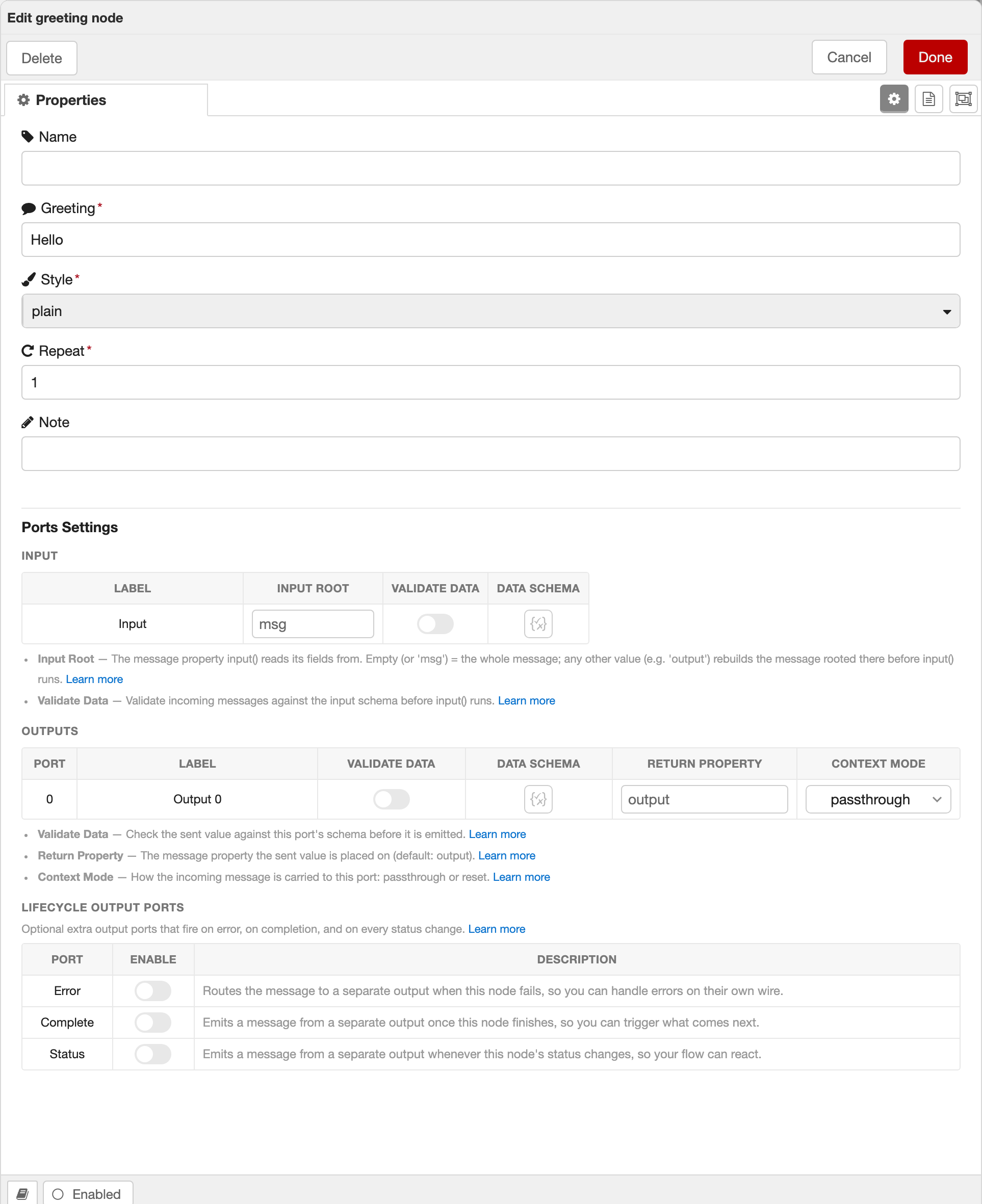
A classic Node-RED node hand-writes hundreds of lines of HTML for its edit form and keeps it in sync with the runtime by hand. Here it's derived from your schema and types — so it can't drift, and every field is validated for free.
In stock Node-RED any output can wire into any input: a node that emits { payload: "hello" } connects happily to one expecting a number, the deploy succeeds, and the mismatch surfaces at runtime. Because nrg node ports are typed (Port<T>), nrg compiles your whole flow on every deploy and asks the TypeScript compiler whether each connection actually type-checks — then lists the bad ones in a Type errors tab and paints them red on the canvas, before the flow ever runs.
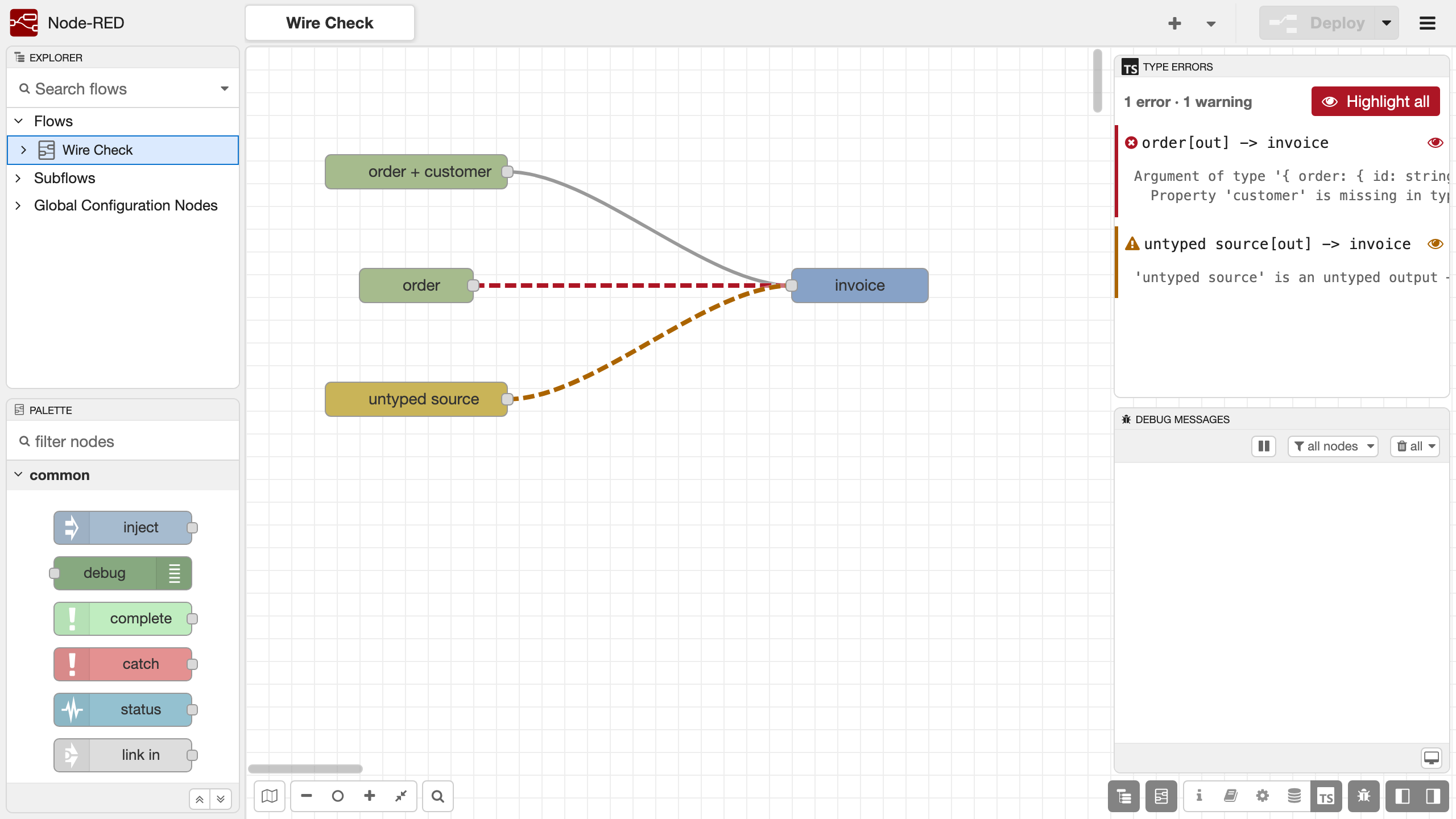
The middle wire reds because invoice reads a customer field nothing upstream adds — with tsc's own message. The bottom wire is yellow: it's still valid, but one endpoint is untyped, so the check says so rather than pretending.
The check is an opt-in dev dependency — npm install --save-dev @bonsae/node-red-type-check-plugin and nrg dev picks it up; without it nothing changes. See The Wire Check for how it works and Reading the Verdicts for every verdict, including how a port's Data Schema can narrow its type per instance.
See the documentation for the full walkthrough — schemas, the generated editor form, testing, and building — or the node-red-salesforce repo for a real-world reference.
MIT