
Recursive Evolutionary Autonomous Pipeline
A self-evolving development pipeline where AI and humans co-evolve software across generations.
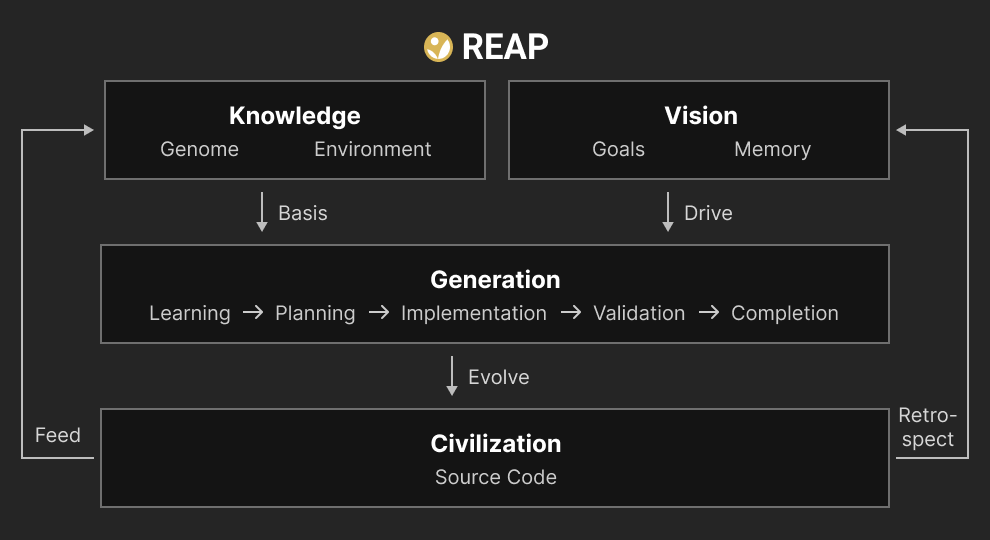
REAP is a generation-based development pipeline where AI and humans collaborate to build and evolve software. The human provides vision and makes key decisions. The AI learns the project's knowledge — Genome (architecture, conventions, constraints) and Environment (codebase, dependencies, domain) — then works through structured generations to implement, verify, and adapt. Each completed generation feeds lessons back into the knowledge base. Over time, both the knowledge and the source code (Civilization) self-evolve.
- What is REAP?
- Installation
- Uninstalling
- Quick Start
- Life Cycle
- Core Concepts
- Merge Lifecycle
- Self-Evolving Features
- Slash Commands
- Agent Integration
- Project Structure
- Configuration
- Upgrading from v0.15
What is REAP? ↗
Have you ever run into these problems when developing with AI agents?
- Context loss — The agent forgets everything when you start a new session
- Scattered development — Code gets modified with no clear direction or goal
- Design-code drift — Documentation diverges from actual implementation
- Forgotten lessons — Hard-won insights never carry forward
- Collaboration chaos — Multiple agents or developers produce conflicting changes
REAP solves these with a self-evolving generation model:
- Each generation follows a structured lifecycle: learn the current state, plan a goal, implement, validate, and reflect
- The AI agent automatically restores full project context at every session start
- Prescriptive knowledge (Genome) evolves through human-approved adaptations at each generation's completion
- The AI automatically selects goals by analyzing the gap between vision and current state
- Clarity-driven interaction ensures the AI communicates with structure, examples, and honest opinions
- Parallel work across branches is reconciled through a genome-first merge workflow
Global installation required.
npm install -g @c-d-cc/reapRequirements: Node.js v18+ and one supported AI agent:
- Claude Code CLI (default)
- OpenCode — set
agentClient: opencodein.reap/config.ymlafter/reap.init
npm uninstall -g @c-d-cc/reap removes the package and nothing else. Everything REAP placed in your home directory — slash commands, agent definitions, the SessionStart hook in ~/.claude/settings.json, ~/.reap/ — was written by REAP's own code and npm has never heard of it. npm also runs no code at uninstall time, so REAP cannot clean up from a package hook.
Remove REAP with REAP instead, before uninstalling the package:
reap uninstall            # shows what will go
reap uninstall --confirm  # does it, and hands the packages to npm
It removes REAP's files from both Claude Code and OpenCode locations, takes REAP's entries back out of settings.json, deletes what REAP itself wrote into ~/.reap/ — an allowlist, never the whole directory — and then hands its npm packages to npm uninstall -g. Your own files in those directories are left alone, including anything named reapdev.* and anything else you keep in ~/.reap/.
Already removed the package? Then you have no reap command, and the files are still there. Run it without installing anything:
npx @c-d-cc/reap uninstall --confirmreap destroy is a different thing — it removes REAP from one project (.reap/, the CLAUDE.md section, the .gitignore entries) and leaves the machine alone.
Quick Start ↗
Open your AI agent (Claude Code or OpenCode) and use slash commands:
# Initialize REAP in your project (auto-detects greenfield vs existing codebase)
/reap.init

# Run a full generation
/reap.evolve
/reap.evolve drives the entire generation lifecycle — from learning through completion. The AI explores the project, plans the work, implements it, validates, and reflects. This is the primary command for day-to-day development.
OpenCode users: After
/reap.init, edit.reap/config.ymlto setagentClient: opencode, then runreap updateto regenerate client-specific assets (opencode.json,.opencode/plugins/reap-plugin.ts,AGENTS.md, and slash commands at~/.config/opencode/commands/).
Note: Users interact with REAP through
/reap.*slash commands in their AI agent. The CLI is the internal engine that powers those commands.
Life Cycle ↗
Each generation follows a five-stage lifecycle.
learning → planning → implementation ⟷ validation → completion
| Stage | What happens | Artifact |
|---|---|---|
| Learning | Explore the project, build context, review genome and environment | 01-learning.md |
| Planning | Define goal, decompose tasks, map dependencies | 02-planning.md |
| Implementation | Build with AI-human collaboration | 03-implementation.md |
| Validation | Run tests, verify completion criteria | 04-validation.md |
| Completion | Reflect, collect fitness feedback, adapt genome, archive | 05-completion.md |
Core Concepts ↗
Genome — How to Build ↗
The project's prescriptive knowledge. Three files, always fully loaded:
.reap/genome/
  application.md    # Project identity, architecture, conventions, constraints
  evolution.md      # AI behavior guide, evolution direction, soft lifecycle rules
  invariants.md     # Absolute constraints (human-only edits)
Environment — What Exists Now ↗
The project's descriptive knowledge. Two-tier loading strategy:
.reap/environment/
  summary.md        # Always loaded at session start (~100 lines)
  domain/           # Domain knowledge (on-demand)
  resources/        # External reference documents — API docs, SDK specs (on-demand)
  docs/             # Project reference documents — design docs, specs (on-demand)
  source-map.md     # Current code structure + dependencies (on-demand)
Vision — Where We're Going ↗
Long-term goals and direction. The AI references vision during the adapt phase to decide what's most valuable next.
.reap/vision/
  goals.md          # North star objectives
  docs/             # Planning documents
  memory/           # AI memory (3-tier: longterm, midterm, shortterm)
Backlog ↗
Issues discovered during a generation are never fixed on the spot. They are logged as backlog items in .reap/life/backlog/:
type: genome-change— genome modifications to apply at adapt phasetype: environment-change— environment updatestype: task— work items for future generations
Backlog items carry over between generations automatically. Consumed items are archived with the generation's lineage.
Lineage — What We've Learned ↗
Archive of completed generations with two-level automatic compression:
- Level 1: Generation folder (5 artifacts) → single summary file
- Level 2: 100+ Level 1 files → single
epoch.md
DAG metadata is preserved for branch-aware lineage traversal.
Hooks ↗
File-based lifecycle event hooks in .reap/hooks/:
.mdfiles: AI prompts executed by the agent.shfiles: Shell scripts executed directly
- Genome Immutability: The genome is never modified during a generation. Issues are logged in the backlog and applied at completion's adapt phase.
- Environment Immutability: The environment is never modified directly during a generation. Changes are recorded in the backlog and applied at completion's reflect phase.
- Human Judges Fitness: No quantitative metrics. The human's natural language feedback is the only fitness signal.
- Self-fitness Prohibited: The AI never scores its own success. Only self-assessment (metacognition) is allowed.
Merge Lifecycle ↗
When multiple developers or agents work in parallel, REAP provides a genome-first merge workflow.
detect → mate → merge → reconcile → validation → completion
| Stage | Purpose |
|---|---|
| Detect | Identify divergence between branches |
| Mate | Resolve genome conflicts first (human decides) |
| Merge | Merge source code guided by finalized genome |
| Reconcile | Verify genome-source consistency |
| Validation | Run tests |
| Completion | Commit merged result and archive |
Self-Evolving Features ↗
The AI automatically selects the next generation's goal by analyzing the gap between vision and current state. It cross-references unchecked goals in vision/goals.md with pending backlog items, prioritizes by impact, and proposes the most valuable next step. The human approves or adjusts.
No quantitative metrics. The human's natural language feedback during the fitness phase is the only fitness signal. The AI never scores its own success — only self-assessment (metacognition) is allowed.
The AI adjusts its communication style based on how well-defined the current context is:
- High clarity (clear goal, defined tasks) → Execute with minimal questions
- Medium clarity (direction exists, details unclear) → Present 2-3 options with tradeoffs
- Low clarity (ambiguous goal) → Active dialogue with examples to build shared understanding
Pre-approve N generations for autonomous execution:
- The AI selects goals from vision gaps and runs the full lifecycle autonomously
- If uncertainty or risk is detected, cruise pauses and requests human feedback
- After all N generations complete, human reviews the batch
Slash Commands ↗
| Command | Description |
|---|---|
/reap.evolve |
Run an entire generation (recommended) |
/reap.start |
Start a new generation |
/reap.next |
Advance to the next stage |
/reap.back |
Return to a previous stage |
/reap.early-close |
Lightweight termination — preserves partial value, auto-defers incomplete tasks |
/reap.abort |
Abort current generation |
/reap.knowledge |
Review and manage genome/environment |
/reap.merge |
Merge lifecycle operations |
/reap.pull |
Fetch + merge lifecycle |
/reap.push |
Validate + push |
/reap.status |
Check current state |
/reap.help |
Show available commands |
/reap.init |
Initialize REAP in a project |
/reap.run |
Execute a lifecycle command directly |
/reap.config |
View/edit project configuration |
/reap.report |
Submit a bug report or feature request |
REAP integrates with AI agents through an adapter layer keyed by the agentClient config field. Currently supported clients:
- Claude Code (
agentClient: claude-code, default) — static knowledge via@imports inCLAUDE.md; dynamic state viaSessionStarthook (reap load-context); slash commands installed to~/.claude/commands/reap.*.md. - OpenCode (
agentClient: opencode) — static knowledge viaopencode.json'sinstructionsfield; dynamic state via.reap/.session-state.md, auto-refreshed by the bundled OpenCode plugin (.opencode/plugins/reap-plugin.ts) onsession.created/tool.execute.before; slash commands installed to~/.config/opencode/commands/reap.*.md($XDG_CONFIG_HOMEis honoured when set).
Switch clients by editing .reap/config.yml, then run reap install-skills followed by reap update. REAP regenerates the entry-point file (CLAUDE.md vs AGENTS.md), the session integration, and any client-specific assets. The reap. prefix in slash command directories is reserved — installs are cleanup-then-copy and will overwrite any reap.*.md file in those locations. Use a different prefix (mytool.md, team.md, etc.) for custom commands.
- Entry-point file (
CLAUDE.mdfor claude-code,AGENTS.mdfor opencode) instructs the AI to load genome, environment, and reap-guide at session start - Slash commands —
/reap.start,/reap.status,/reap.evolve, etc. work in both Claude Code and OpenCode; each invokesreap run <cmd>, which returns structured JSON instructions for the AI - Signature-based locking (nonce chain) enforces stage ordering at the code level — no skipping, no forgery, no replay
- Dynamic state dump — every REAP lifecycle command synchronously writes
.reap/.session-state.md, so OpenCode users always see the post-command state on the next session
/reap.evolve can delegate the entire generation to a subagent that runs autonomously through all stages, surfacing only when genuinely blocked.
REAP ships a second subagent definition, reap-evaluate, that runs as an independent reviewer of the builder's work. It is read-only (Read/Glob/Grep/Bash only), produces qualitative assessments (no scores), and acts as an advisor — its concerns surface to you, but the builder owns the final lifecycle verdict.
Enable it by adding one line to .reap/config.yml:
evaluator: true # default: falseWhen enabled, the validation stage instructs the builder to launch reap-evaluate as a subagent before declaring pass/partial/fail. The evaluator:
- runs typecheck, build, and the full test suite independently,
- cross-checks completion criteria from
02-planning.mdagainst the implementation, - surfaces concerns about genome convention drift, sycophancy red flags, and regression risk,
- escalates per a confidence × impact matrix.
If the subagent invocation fails for any reason, the builder continues normal validation — the evaluator is opt-in advice, not a gate.
Agent definitions are installed automatically by reap install-skills and reap update:
- Claude Code →
~/.claude/agents/reap-*.md - OpenCode →
~/.config/opencode/agent/reap-*.md($XDG_CONFIG_HOMEis honoured when set)
Fitness phase + cruise mode (gen-067): the evaluator also runs during the fitness phase. After receiving its reply, the builder persists the verdict on the generation state via reap run validation --phase report-evaluator --severity <high|low|none> --summary "...". High-severity concerns recorded during validation automatically abort cruise mode when the next fitness phase runs — cruiseCount is cleared from config.yml, the cruise prompt is replaced with a supervised fallback, and the human reviews the concern before composing fitness feedback. Cruise can be resumed manually with reap cruise <N> once the concern is resolved. Low-severity concerns surface in the prompt's "Prior Evaluator Concerns" section without aborting cruise.
REAP ships a code index. Nothing to install, nothing to start, no background process.
A Tree-sitter parser walks every tracked file, records the symbols it defines and the calls and imports between them, and stores the result in .reap/.index/ as gzipped JSON. Fifteen languages ship with it, and there is no native build — the grammars are WebAssembly.
reap index                     # update — the default
reap index status              # counts, import resolution rate, indexed commit
reap index impact <file>       # what breaks if you change this file
reap index search <query>      # find a definition, with file:line
reap index callers <symbolId>  # who calls this   (src/core/lifecycle.ts::nextStage)
reap index callees <symbolId>  # what this calls
The unit of change is a commit. The index records the SHA it describes, so deciding what to re-parse is one git diff and deciding whether to bother is one string comparison. A full index of this repository takes about a third of a second; a no-op re-index takes none. Queries refresh the index themselves when HEAD has moved — after a commit, a branch switch, a rebase or a pull — so REAP refreshes eagerly only where it has just committed: at the end of completion, and in early-close.
The trade-off is that uncommitted work is not in the index. Use Grep for that; reap index status always names the commit it describes.
Read status before trusting impact. Everything impact knows comes from resolved import edges, so a low imports rate means the graph is incomplete and an empty blast radius means unknown, not none:
symbols: 1530  (function 902, method 341, class 187, type 100)
edges:   3688  (CALLS 3145, IMPORTS 543)
imports: 543/543 resolved (100%)
commit:  1a2b3c4
(Illustrative figures.) The line that matters is imports. Everything impact knows comes from resolved import edges, so a low rate means the graph is incomplete — and an empty blast radius then means unknown rather than none. A resolver that cannot map a ./x.js specifier to the x.ts that produces it reports zero here, which is why the rate is on screen rather than inferred from whether indexing ran.
The index lives in .reap/.index/ and is gitignored. Deleting it is always safe; the next command rebuilds it.
my-project/
  src/                        # Your code
  .reap/
    config.yml                # Project configuration
    genome/                   # Prescriptive knowledge (3 files)
      application.md
      evolution.md
      invariants.md
    environment/              # Descriptive knowledge (2-tier)
      summary.md
      domain/
      resources/              # External reference docs (API, SDK)
      docs/                   # Project reference docs (design, specs)
      source-map.md
    vision/                   # Long-term goals
      goals.md
      docs/
      memory/                 # AI memory (longterm/midterm/shortterm)
    life/                     # Current generation
      current.yml
      backlog/
    lineage/                  # Completed generation archive
    hooks/                    # Lifecycle hooks (.md/.sh)
Configuration ↗
Project settings in .reap/config.yml:
project: my-project # Project name
language: english # Artifact/prompt language
autoSubagent: true # Auto-delegate to subagent in evolve
strictEdit: false # Restrict code changes to REAP lifecycle
strictMerge: false # Restrict direct git pull/push/merge
agentClient: claude-code # AI agent client
# cruiseCount: 1/5             # Present = cruise mode (current/total)
# evaluator: true              # Opt-in: launch reap-evaluate during validation
Key settings:
cruiseCount: When present, enables cruise mode. Formatcurrent/total. Removed after cruise completes.strictEdit: Restricts code changes to the implementation stage within the planned scope.strictMerge: Restricts direct git pull/push/merge — use/reap.pull,/reap.push,/reap.mergeinstead.agentClient: Determines which adapter is used for skill deployment.evaluator: Opt-in independent reviewer. Whentrue, the validation stage launches thereap-evaluatesubagent as an advisor (read-only, qualitative-only). Defaultfalsekeeps validation byte-identical to pre-gen-066 behaviour. See Evaluator Agent above.
Upgrading from v0.15 ↗
REAP v0.16 is a complete rewrite built on the Self-Evolving Pipeline architecture.
-
Install v0.16:
npm install -g @c-d-cc/reap
This automatically installs v0.16 skills to
~/.claude/commands/and removes legacy v0.15 project-level skills. -
Open Claude Code in your project and run:
/reap.update -
Follow the multi-phase migration:
Phase What happens Your role Confirm Shows what will change, creates backup at .reap/v15/Review and confirm Execute Restructures directories, migrates config/hooks/lineage/backlog Automatic Genome Convert AI reconstructs genome from v0.15 files into new 3-file structure Review AI's work Vision Set up vision/goals.md and memory Provide project direction Complete Summary of migration results Verify -
Verify your project works:
/reap.status
/reap.evolve
If the migration is interrupted (API error, session disconnect, etc.), your progress is saved in .reap/migration-state.yml. Simply run /reap.update again — it will resume from where it left off, skipping already completed steps.
To start over instead, delete .reap/migration-state.yml and run /reap.update again.
All v0.15 files are preserved at .reap/v15/. After verifying the migration, you can safely delete this directory.
Lifecycle redesigned:
- The first stage is now
learning(wasobjective). The AI explores the project before setting goals. - Completion is now 4 phases:
reflect→fitness→adapt→commit(was 5 phases). - New concepts: embryo generations, cruise mode, vision-driven planning.
Vision layer added:
vision/goals.md— long-term objectives, gap-driven goal selection at adapt phasevision/memory/— 3-tier memory (longterm, midterm, shortterm) for cross-generation contextvision/design/— planning documents and specs
Genome restructured (3 files):
application.md— project identity, architecture, conventions, constraintsevolution.md— AI behavior guide, evolution direction, soft lifecycle rulesinvariants.md— absolute constraints (human-only edits)
New features:
- Clarity-driven interaction: AI adjusts communication depth based on context clarity
- Cruise mode: pre-approve N generations, AI runs autonomously with self-assessment
- Merge lifecycle with reconcile stage for genome-source consistency verification
- Vision system with 3-tier memory for cross-generation context
Deprecated commands:
/reap.sync→/reap.knowledge/reap.refreshKnowledge→/reap.knowledge
HyeonIL Choi — hichoi@c-d.cc | c-d.cc | LinkedIn | GitHub
MIT