Thanks to asanchezyali for the initial project and research that inspired this work.
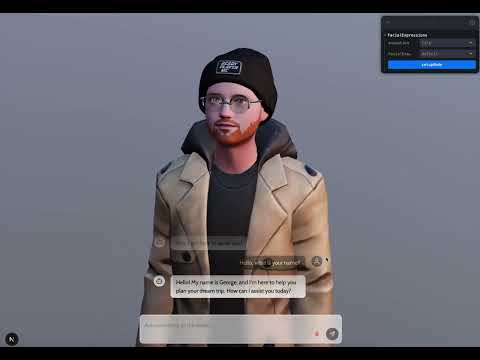
A fun, experimental project that puts a face to all the generative AI models we use today. Chat by text or live voice with a 3D avatar that speaks with your cloned voice and accurate lip sync — then press "Make It Real" to see it transformed into a photoreal person in real time.
Demo Video:
- Framework: Next.js 16 for client and server components.
- Rendering & 3D:
- Three.js combined with React Three Fiber and Drei.
- gltfjsx to convert GLB models into React components with type safety.
- AI & APIs:
- Vercel AI SDK integrated for AI-based functionalities.
- OpenAI for text generation (typed-chat path).
- ElevenLabs for Text-to-Speech with voice cloning, and its Conversational AI agent for live voice conversations over WebSocket.
- Decart Lucy 2.1 realtime video-to-video (WebRTC) for the "Make It Real" photoreal avatar stream.
- Lip sync: a wav2vec2 phoneme-recognition model (
wav2vec2-lv-60-espeak-cv-ft, ONNX) running server-side via transformers.js — real acoustic phonemes at 20ms resolution, ~0.06× realtime, mapped to the avatar's viseme morph targets with coarticulated blending.
- Data Handling: SWR for data fetching/mutations.
- UI & Styles: Tailwind CSS and shadcn UI.
- Utilities: Leva for real-time debugging and control of 3D object transforms.
- Tooling: Yarn 4 (via Corepack) and TurboPack for faster builds.
- Type Safety: Fully typed with TypeScript—both on the server and client components.
Note: This project is a minimalistic, fun showcase, not a production-ready solution.
- 3D Avatar Chat UI: Interact with a generative AI model through a 3D avatar's face and lip movements.
- Live Voice Conversations: Talk to the avatar with your microphone via an ElevenLabs Conversational AI agent (speech-to-text, LLM, and cloned-voice TTS in one stream).
- Text-to-Speech: Converts AI responses into audio with your cloned ElevenLabs voice.
- Accurate Lip Sync: Server-side phoneme recognition drives the full Ready Player Me viseme set with anticipation and coarticulation — no external binaries required.
- "Make It Real": Streams the 3D avatar through Decart's realtime video model with a reference photo, rendering a photoreal person that mirrors the avatar's speech and expressions. Audio is automatically delayed to match the measured video latency, and sessions have a server-enforced duration cap to protect your credits.
- Real-Time Debugging: Leva panel for controlling and tuning the avatar's expressions and movements.
- Node.js v20+
- Yarn 4 (via Corepack)
- Git (for cloning the repository)
No external binaries needed — lip sync runs in-process. The first lip-sync request downloads the phoneme model (~330MB, cached on disk afterwards).
-
Clone the repo:
git clone https://github.com/danieloquelis/chat-avatar-ai.git cd chat-avatar-ai -
Install dependencies:
yarn install
-
Create environment variables:
Create a.envfile in the root of the project (see.env.example):# OpenAI (typed-chat path) OPENAI_API_KEY=your_openai_api_key # ElevenLabs ELEVEN_LABS_API_KEY=your_elevenlabs_api_key ELVEN_LABS_VOICE_ID=your_elevenlabs_voice_id ELEVEN_LABS_AGENT_ID=your_elevenlabs_agent_id ELEVEN_LABS_SIGNED_WEBSOCKET_URL=https://api.elevenlabs.io/v1/convai/conversation/get_signed_url # Decart ("Make It Real") DECART_API_KEY=your_decart_api_key DECART_MAX_SESSION_SECONDS=120
⚠️ The voice-ID variable is intentionally spelledELVEN_LABS_VOICE_ID(missing "E") — the code reads that exact name.- Your ElevenLabs API key needs the Agents (Conversational AI) permission for live voice.
DECART_API_KEYstays server-side; the browser gets short-lived scoped tokens from/api/decart-token.
-
Run the development server:
yarn dev
-
Open in your browser:
Go to http://localhost:3000.
- Chat: Type in the chat input, or press the mic button for a live voice conversation.
- Lip Sync: The avatar's mouth follows the audio phoneme-by-phoneme on both paths.
- Make It Real: Pick a well-lit, front-facing photo (any image format), then press Make It Real. The right panel streams a photoreal version of the avatar; the LIVE badge shows elapsed time, the session cap, and the measured video latency. Press Stop anytime — streaming uses Decart credits and auto-stops at the cap.
- Controls: Use the Leva debug panel to tweak animations, expressions, and individual morph targets.
Contributions are welcome! If you have ideas for improvements, bug reports, or new feature requests, please open an issue or submit a pull request.
This project is open source under the MIT License.
- asanchezyali for the initial project and research that inspired this work.
- Rhubarb Lip Sync — powered lip sync in earlier versions of this project.
- Next.js for the awesome React framework.
- React Three Fiber and Drei for the great 3D abstractions in React.
- gltfjsx for automagical 3D model conversions.
- OpenAI for text generation.
- ElevenLabs for realistic TTS and conversational agents.
- Decart for realtime video-to-video magic.
- Tailwind CSS and shadcn UI for styling.
Have fun exploring and enhancing the conversational AI 3D avatar experience!