


Famous windows-like Ribbons screensaver made with js and Electron wrapped for multi platform support
| Style | Example |
|---|---|
| New modern | 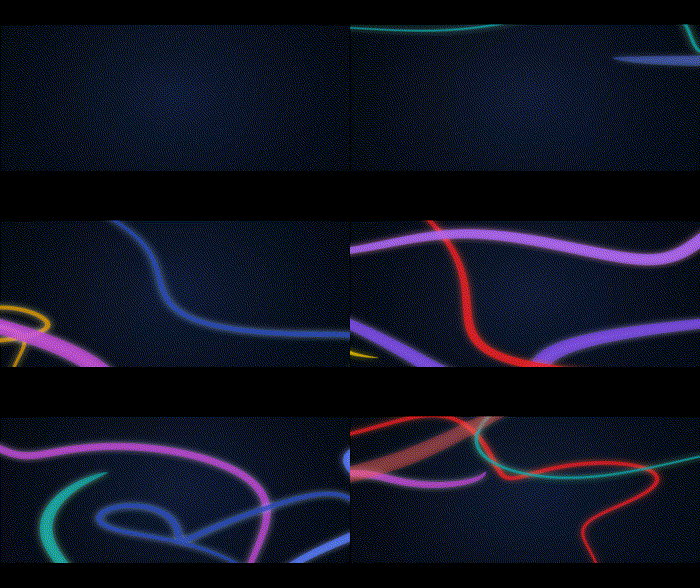 |
| Classic polygon |  |
MacOS 13 (since 1.0.0-RC1), Windows 10+, Linux with modern kernel version (>=6.x) and PipeWire
Go to landing page https://ribbons.drlight.fun, download your platform latest version and follow installation
All app settings are saved in the local user folder in file config.json:
- Windows 10 and newer:
%AppData%\Ribbons screensaver - Linux
~/.config/Ribbons screensaver - MacOS:
~/Library/Application Support/Ribbons screensaver
This app is created to be used as screensaver with idle system detect to run fullscreen animation. For current alpha version it isn't supposed to be:
- "native" windows scr app as there are no native winapi preview and settings implementation
- "native" linux xscreensaver app as there are no plans to develop something for xscreensaver api
- "native" macos screensaver app as there are no plans to develop something for Objective-C and Cocoa framework
Due to wctx this app supports other application's fullscreen to prevent running screensaver when something is run in this mode (since ver. 1.0.0-RC1). But for now it supports the folowing desktop environments in Wayland and X11:
- KDE Plasma 5+
- GNOME 45+ Any other DE works with X11, but Wayland is not officially supported due to it's different compositor's architectures. You could check changes in the official wctx github repo yourself.
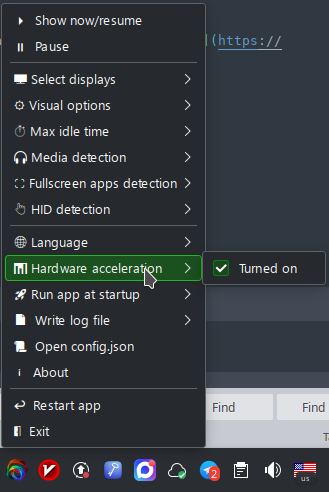
After app startup check it's settings in tray menu:
Build depends on the platform as it uses the system idle detect function.
For Windows:
choco install python312 visualstudio2019community visualstudio2019-workload-nativedesktop visualstudio2019buildtools windows-sdk-10.0
pip install setuptools
For Linux:
apt install libxss-dev pkg-config libusb-1.0-0-dev libpipewire-0.3-dev libx11-dev libpulse-dev
Platform independent steps:
git clone https://github.com/drlight17/ribbons-electron
cd ./ribbons-electron
chmod +x ./prepare.sh
./prepare.sh
To run dev app use:
npm start
In dev mode config path includes '-dev'
To build all platform distributives at once use:
npm run dist
Or you can build specific dist. For example linux rpm package:
npm run build-rpm
If there are any module errors try to npx electron-rebuild before every npm start or npm run dist.
Also check package.json
- madve2 for his electron-screensaver-seed repo that was partly used to create initial Electron app
- fadyehabamer for his Ribbons-Screensaver repo that is the basis for graphics (he "failed with PWA", I made it with Electron =))) )
- CilginSinek for his electron-native-screenshare that is used since 1.0.0-RC1 for capture system sounds
All rights belongs to their authors!