Repository navigation
Releases
FanPilot 0.1.3

Fan control now survives sleep and screen lock, and the menu bar can show how much power your Mac draws.
What's new
- Fan control survives sleep and lock: On some Macs (MacBook Pro, Mac Studio) waking up or unlocking handed the fans back to macOS while FanPilot still showed CUSTOM/CONSTANT, so the fans could stop at 0 RPM. The fan service now notices this within seconds and takes the fans back.
- Power draw: The whole Mac's live power draw in watts appears in the menu bar after the RPM (e.g.
55° 1344 33W). Turn it on or off under Appearance → Menu bar → Show → Power (W). The settings header, a Monitor card, the 10-minute summary and a chart show it too. Shown on Apple Silicon Macs.
Updating
From 0.1.2: use the update banner in the app. From 0.1.1 or earlier, run:
curl -fsSL https://raw.githubusercontent.com/flowerjun/FanPilot/main/scripts/get.sh | bashTested
On a Mac mini (M4 Pro): the power reading under idle and load, the menu bar text, and fan control after reinstalling the service. The sleep/lock fix targets MacBook and Mac Studio and couldn't be reproduced on the Mac mini.
Verify the download
SHA-256 cad7dd5611f5e01f286fdb5c817ab2c4e6622b8e18920f631045ab94550fa532 FanPilot.dmg
한국어
이제 잠자기나 화면 잠금 후에도 팬 제어가 유지되고, 메뉴 막대에 Mac 전체 소비 전력을 표시할 수 있습니다.
바뀐 점
- 잠자기·잠금 후에도 팬 제어 유지: 일부 Mac(맥북 프로, 맥 스튜디오)에서 깨어나거나 잠금을 풀면, 화면에는 커스텀·고정으로 나오는데 실제 팬은 macOS로 넘어가 0 RPM으로 멈출 수 있었습니다. 이제 팬 제어 서비스가 몇 초 안에 이를 알아채고 팬을 다시 잡습니다.
- 전력 표시: Mac 전체의 실시간 소비 전력(W)이 메뉴 막대의 RPM 오른쪽에 나옵니다(예:
55° 1344 33W). **모양 → 메뉴 막대 → 표시 → 전력(W)**에서 켜고 끌 수 있습니다. 설정 상단, 모니터 카드, 최근 10분 요약, 그래프에도 표시됩니다. Apple Silicon Mac에서 표시됩니다.
업데이트
0.1.2에서는 앱의 업데이트 배너를 누르면 됩니다. 0.1.1 이하에서는 아래 명령을 실행하세요.
curl -fsSL https://raw.githubusercontent.com/flowerjun/FanPilot/main/scripts/get.sh | bash테스트
Mac mini(M4 Pro)에서 유휴·부하 시 전력 값, 메뉴 막대 표시, 서비스 재설치 후 팬 제어를 확인했습니다. 잠자기·잠금 수정은 맥북과 맥 스튜디오 대상이라 Mac mini에서는 재현하지 못했습니다.
다운로드 파일 확인
SHA-256 cad7dd5611f5e01f286fdb5c817ab2c4e6622b8e18920f631045ab94550fa532 FanPilot.dmg
FanPilot 0.1.2
Updating FanPilot no longer means deleting the old copy and clicking "Open Anyway" again.
What's new
- In-app updates: FanPilot checks GitHub for a new version shortly after launch and once a day. When one is out, a banner appears; click Update. The app downloads the DMG itself, verifies its SHA-256 against the one GitHub publishes, asks for your admin password once, replaces itself, updates the fan service and reopens. A file the app downloads itself isn't quarantined, so Gatekeeper doesn't ask again. You can turn automatic checks off or check by hand under General.
- One-line install and update from Terminal:
It downloads the latest release, checks the SHA-256 and copies FanPilot into Applications. No "Open Anyway" step, even on a first install.
curl -fsSL https://raw.githubusercontent.com/flowerjun/FanPilot/main/scripts/get.sh | bash
Updating from 0.1.1 or earlier
0.1.1 doesn't have the updater yet, so this one time, run the Terminal line above (or install the DMG). From 0.1.2 on, updates come through the app.
Tested
On a Mac mini (M4 Pro), macOS 27.2: the full in-app update (detect → download → verify → admin prompt → replace → service update → relaunch) against a local test release, and the Terminal installer against the real v0.1.1 release. In both cases the installed app carries no quarantine flag.
Verify the download
SHA-256 1ad9f380847e2a71f82d75b4fdaed7c47ffca1754e05d5989bc21d34ea1c15b5 FanPilot.dmg
한국어
이제 FanPilot을 업데이트할 때 기존 앱을 지우거나 "그래도 열기"를 다시 누를 필요가 없습니다.
바뀐 점
- 앱 안에서 업데이트: 실행하고 조금 뒤, 그리고 하루에 한 번 GitHub에서 새 버전을 확인합니다. 새 버전이 나오면 배너가 뜨고 업데이트를 누르면 됩니다. 앱이 DMG를 직접 받아 GitHub에 올라간 SHA-256과 대조하고, 관리자 암호를 한 번 물은 뒤 앱과 팬 제어 서비스를 바꾸고 다시 실행합니다. 앱이 직접 받은 파일에는 격리 표시가 붙지 않아서 Gatekeeper가 다시 묻지 않습니다. 자동 확인은 일반 탭에서 끄거나 직접 확인할 수 있습니다.
- 터미널 한 줄로 설치·업데이트:
최신 릴리즈를 받아 SHA-256을 확인하고 응용 프로그램 폴더에 넣습니다. 처음 설치할 때도 "그래도 열기" 절차가 없습니다.
curl -fsSL https://raw.githubusercontent.com/flowerjun/FanPilot/main/scripts/get.sh | bash
0.1.1 이하에서 올릴 때
0.1.1에는 아직 업데이트 기능이 없어서, 이번 한 번만 위의 터미널 명령을 실행하거나 DMG로 설치해 주세요. 0.1.2부터는 앱 안에서 업데이트됩니다.
테스트
Mac mini(M4 Pro), macOS 27.2에서 앱 안 업데이트 전 과정(감지 → 다운로드 → 검증 → 관리자 암호 → 교체 → 서비스 업데이트 → 재실행)을 로컬 테스트 릴리즈로, 터미널 설치를 실제 v0.1.1 릴리즈로 확인했습니다. 두 경우 모두 설치된 앱에 격리 표시가 없습니다.
다운로드 파일 확인
SHA-256 1ad9f380847e2a71f82d75b4fdaed7c47ffca1754e05d5989bc21d34ea1c15b5 FanPilot.dmg
FanPilot 0.1.1
A compatibility update: FanPilot now adapts to whichever Mac it runs on.
What's new
- M5 Macs: fixes "Could not set fan speed: smc(132)" on M5 MacBook Pros. M5 renamed the fan mode key (
F0Md→F0md); FanPilot now finds the right key at launch instead of assuming one. - M3/M4 MacBook Pro: performs the
Ftstunlock these models need before macOS hands over the fans, and locks it again when control goes back to macOS. - Intel Macs: universal app (Apple Silicon + Intel). Values are written in each key's own format, and Intel CPU/GPU temperature sensors are read.
- Fanless Macs (MacBook Air): instead of an error, FanPilot clearly says "This Mac has no fan", skips the service install, hides RPM, and works as a temperature and load monitor.
Install / update
Download FanPilot.dmg below and drag FanPilot into Applications, replacing the old copy. When the app shows Update (admin password), click it once to update the fan service.
First launch of a new download: the app isn't notarized, so right-click → Open → Open, or System Settings → Privacy & Security → Open Anyway.
Tested
- Verified on a Mac mini (M4 Pro, one fan), macOS 27.2: Custom, Constant, and return to Auto all work as before.
- Fanless screens checked with a simulated fanless build.
- The M5, M3/M4 MacBook Pro and Intel paths follow the keys those Macs are documented to expose but haven't been run on that hardware yet. If something doesn't work, please open an issue with your model (
sysctl -n hw.model).
Verify the download
SHA-256 f5a19f802b2a928e0da70b9850a29e7dc87282b72a789c98377e49c8aee0344f FanPilot.dmg
한국어
어떤 Mac에서 실행되든 그 Mac에 맞춰 동작하도록 호환성을 넓힌 업데이트입니다.
바뀐 점
- M5 Mac: M5 MacBook Pro에서 *"팬 쓰기 실패: smc(132)"*가 나던 문제를 고쳤습니다. M5는 팬 모드 키 이름이
F0Md에서F0md로 바뀌었는데, 이제 키 이름을 미리 정해 두지 않고 실행할 때 그 Mac에 있는 키를 찾아 씁니다. - M3/M4 MacBook Pro: 이 모델들은
Ftst잠금을 풀어야 macOS가 팬을 넘겨줍니다. 이제 잠금을 자동으로 풀고, macOS 제어로 돌려줄 때 다시 잠급니다. - Intel Mac: Apple Silicon과 Intel을 모두 지원하는 유니버설 앱이 됐습니다. 키마다 다른 값 형식에 맞춰 쓰고, Intel의 CPU/GPU 온도 센서도 읽습니다.
- 팬이 없는 Mac(MacBook Air): 오류를 띄우지 않고 *"이 Mac에는 팬이 없습니다"*라고 분명히 알려 줍니다. 서비스 설치를 권하지 않고, RPM 표시를 숨기고, 온도·사용률 모니터로 동작합니다.
설치·업데이트
아래에서 **FanPilot.dmg**를 받아 FanPilot을 응용 프로그램 폴더로 끌어다 놓고 기존 앱을 대치합니다. 앱에 업데이트 (관리자 암호 필요) 버튼이 보이면 한 번 눌러 팬 제어 서비스도 업데이트하세요.
새로 받은 앱을 처음 열 때는 공증을 받지 않은 앱이라 오른쪽 클릭 → 열기 → 열기를 누르거나, 시스템 설정 → 개인정보 보호 및 보안에서 그래도 열기를 누르세요.
테스트
- Mac mini(M4 Pro, 팬 1개), macOS 27.2에서 커스텀, 고정, 자동 복귀가 이전과 똑같이 동작하는 것을 확인했습니다.
- 팬 없는 Mac 화면은 팬이 없는 상태를 흉내 낸 빌드로 확인했습니다.
- M5, M3/M4 MacBook Pro, Intel은 그 기기들이 쓰는 것으로 알려진 키에 맞춰 만들었지만 실제 기기에서는 아직 돌려 보지 못했습니다. 안 되는 부분이 있으면 모델명(
sysctl -n hw.model)과 함께 이슈로 알려 주세요.
다운로드 파일 확인
SHA-256 f5a19f802b2a928e0da70b9850a29e7dc87282b72a789c98377e49c8aee0344f FanPilot.dmg
FanPilot 0.1.0
The first public release of FanPilot, a tiny, fail-safe fan controller for Apple Silicon Macs that lives in your menu bar.
Highlights
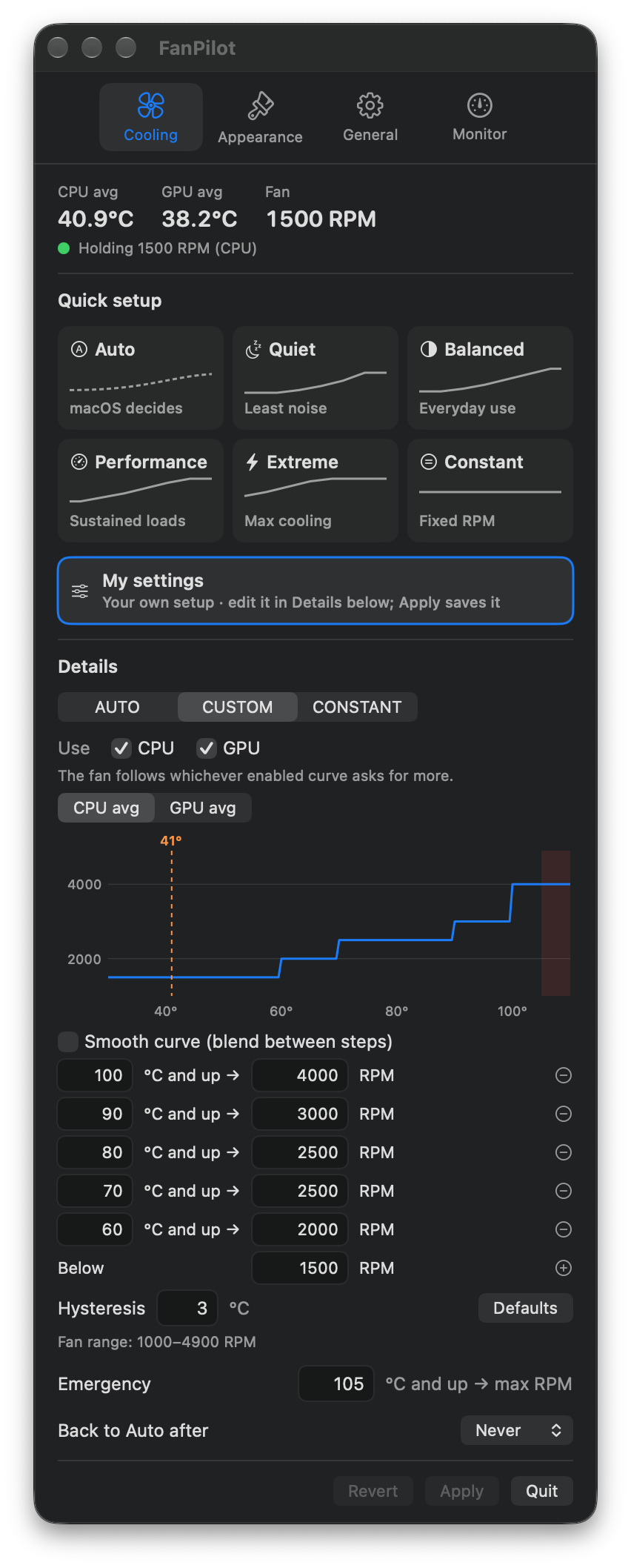
- One-click quick setup: Auto, Quiet, Balanced, Performance, Extreme, Constant, plus My settings for your own curve, which presets never overwrite.
- CPU and GPU curves together: the fan follows whichever asks for more, so GPU-only loads still spin it up. Step or smooth curves, hysteresis, emergency max RPM, and an optional timed return to Auto.
- Every fan: multi-fan Macs get a card per fan, and all fans follow the curve proportionally to their own range.
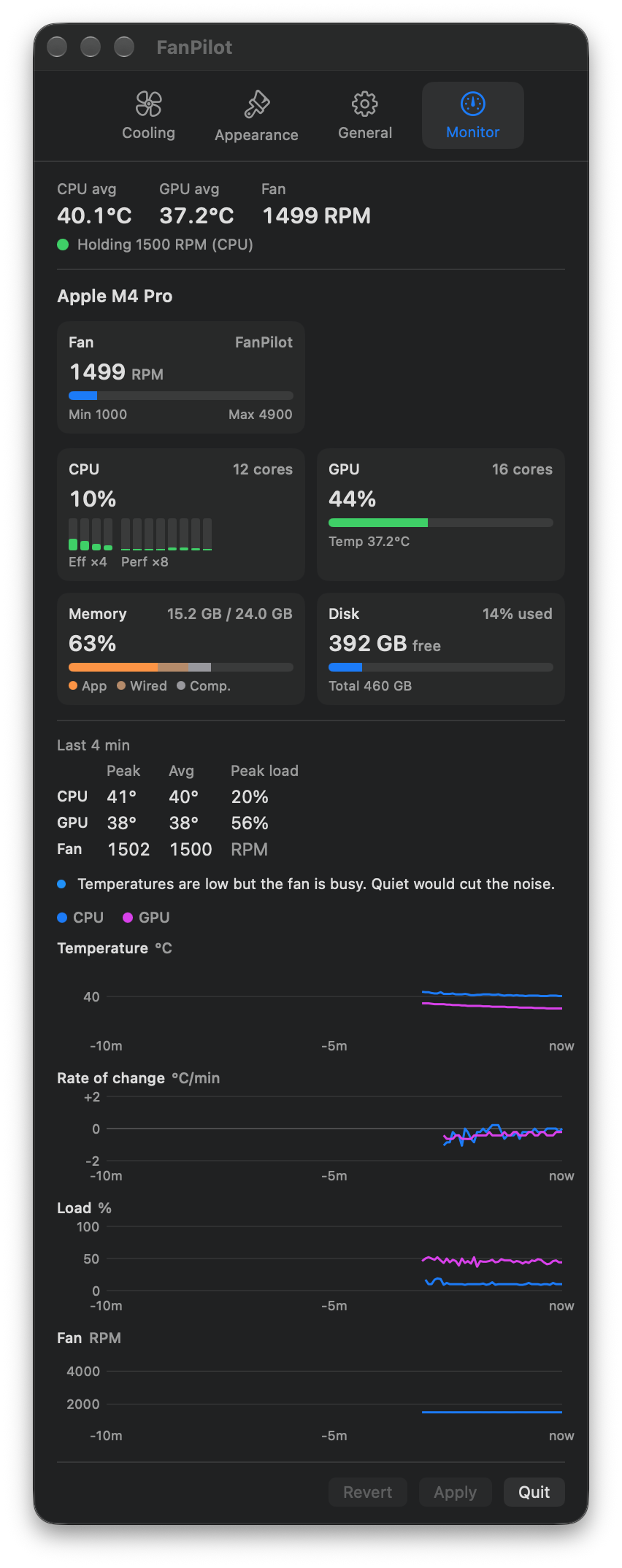
- Monitor: chip and core counts, per-core CPU, GPU, memory, disk, and 10-minute charts (temperature, rate of change, load, RPM) with plain-language advice.
- Menu bar: an icon that spins with the real RPM, left-click to switch modes, right-click for settings, per-mode colors and temperature-colored text.
- Fail-safe: the service runs as two processes that watch each other; any exit, even
kill -9or a crash, hands the fans back to macOS within 0.3 s. - Light: about 0.7 % CPU and 25–35 MB with the settings window open.
- 한국어 / English, °C / °F, System / Light / Dark theme.
Install
- Download
FanPilot.dmgbelow and drag FanPilot into Applications. - Open it. The app isn't notarized, so the first time right-click → Open → Open, or click Open Anyway in System Settings → Privacy & Security.
- Click Install (admin password) to install the fan service.
Requirements: an Apple Silicon Mac with a fan, macOS 14 Sonoma or later.
Tested on: Mac mini (M4 Pro, one fan), macOS 27.2.
Known limitations
- Not notarized (ad-hoc signed).
- Multi-fan control is implemented and its layout was checked with simulated fans, but it hasn't been verified on a real two-fan Mac yet. Reports are welcome.
- Apple Silicon only. Sensor groups (
Tp*/Te*CPU,Tg*GPU) were verified on M4 Pro; other chips may differ.
Verify the download
SHA-256 2de336721bbd82f5aed2fc6ebf7a79799c5562a212082954095f1174be282de5 FanPilot.dmg
shasum -a 256 ~/Downloads/FanPilot.dmg한국어
메뉴 막대에서 쓰는 가볍고 안전한 Apple Silicon Mac 팬 컨트롤러, FanPilot의 첫 공개 버전입니다.
주요 기능
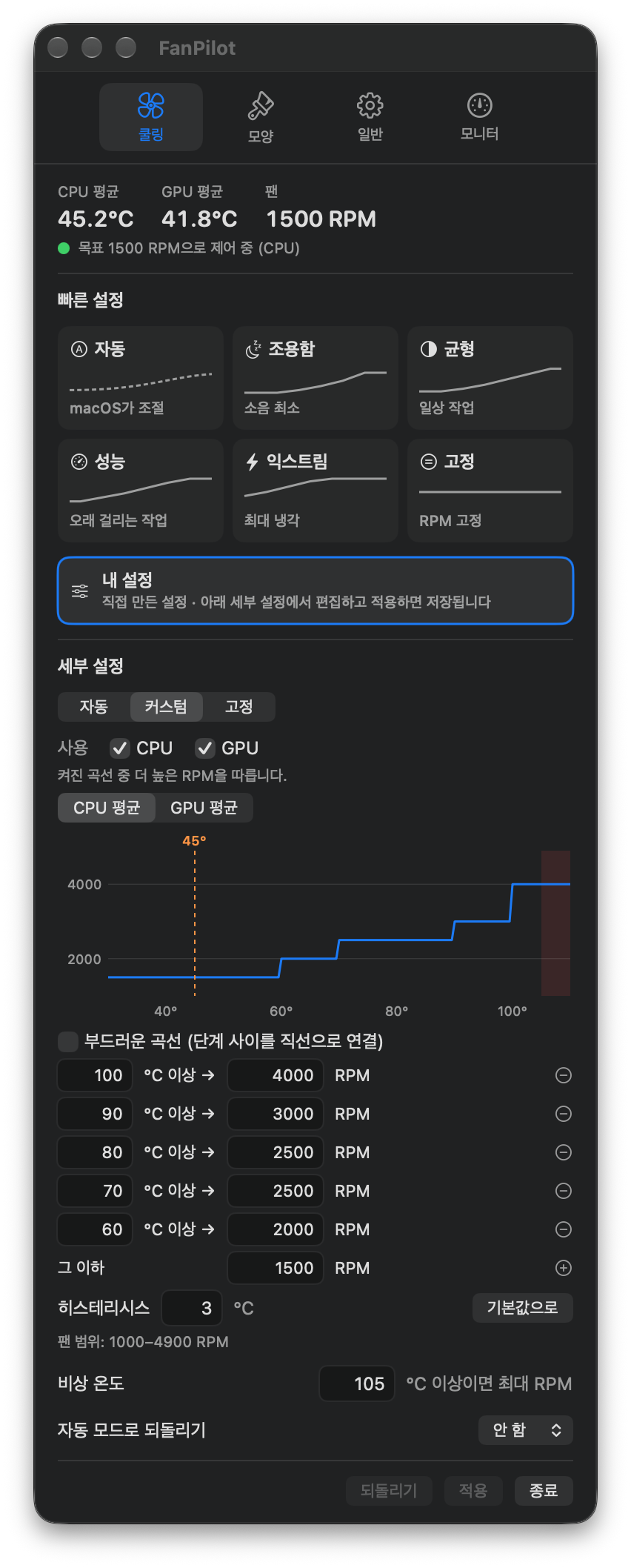
- 클릭 한 번으로 쓰는 빠른 설정: 자동, 조용함, 균형, 성능, 익스트림, 고정. 직접 만든 곡선은 내 설정에 따로 보관되고, 프리셋을 눌러도 지워지지 않습니다.
- CPU와 GPU 곡선을 함께 씁니다. 둘 중 더 높은 RPM을 따라가서 GPU만 뜨거워지는 작업에서도 팬이 제대로 돕니다. 단계형·부드러운 곡선, 히스테리시스, 비상 온도, 시간 지나면 자동 모드로 되돌리기를 지원합니다.
- 팬 여러 개 지원: 팬이 여러 개면 팬마다 카드가 생기고, 모든 팬이 각자의 범위에 맞춰 같은 비율로 돕니다.
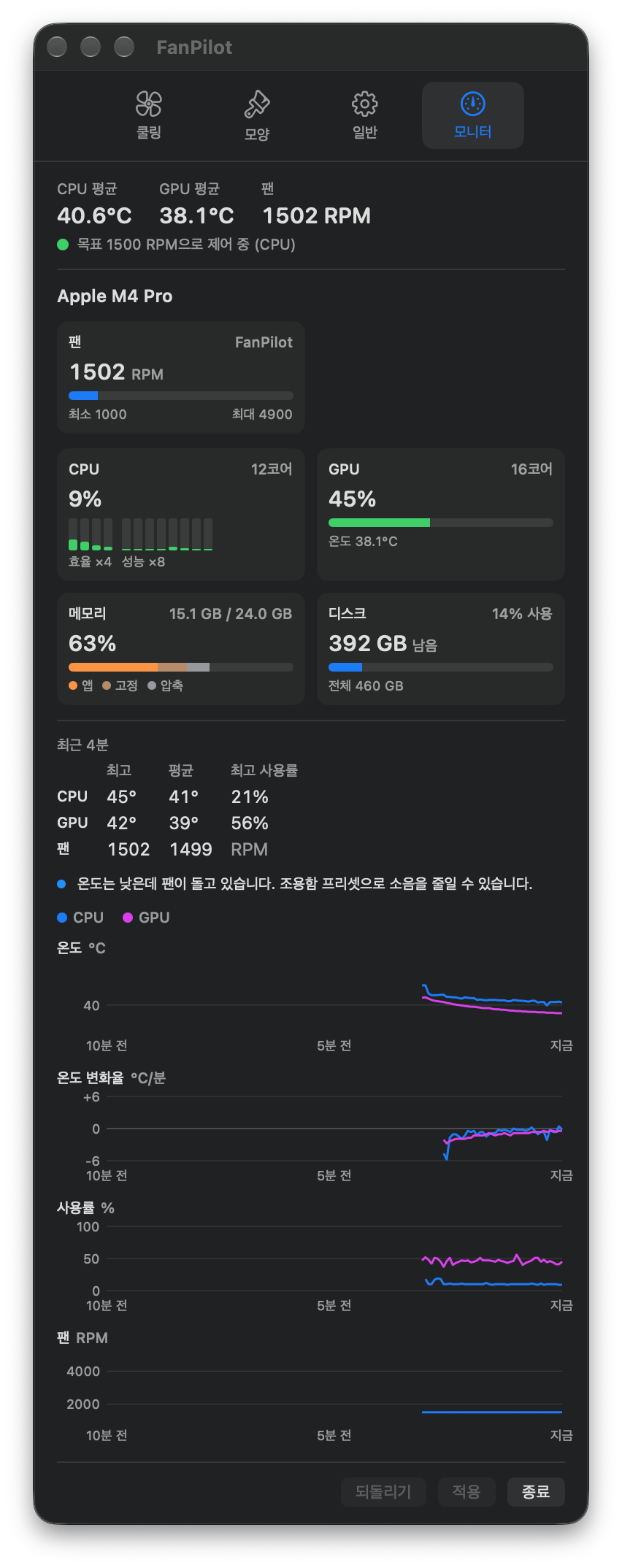
- 모니터: 칩과 코어 구성, 코어별 CPU, GPU, 메모리, 디스크, 최근 10분 그래프(온도, 변화율, 사용률, RPM)와 상황별 안내
- 메뉴 막대: 실제 RPM에 맞춰 돌아가는 아이콘, 왼쪽 클릭으로 모드 전환, 오른쪽 클릭으로 설정, 모드별 아이콘 색과 온도별 글자 색
- 안전함: 서비스가 서로를 지켜보는 두 프로세스로 돌아가서,
kill -9나 크래시를 포함해 어떻게 종료되든 0.3초 안에 팬을 macOS로 돌려놓습니다. - 가벼움: 설정 창을 띄워 놓아도 CPU 0.7 % 안팎, 메모리 25~35 MB 정도입니다.
- 한국어 / English, °C / °F, 시스템 / 라이트 / 다크 테마
설치하기
- 아래에서 **
FanPilot.dmg**를 받아 FanPilot을 응용 프로그램 폴더로 끌어다 놓습니다. - 앱을 엽니다. 공증을 받지 않은 앱이라 처음에는 오른쪽 클릭 → 열기 → 열기를 누르거나, 시스템 설정 → 개인정보 보호 및 보안에서 그래도 열기를 누르세요.
- **설치 (관리자 암호 필요)**를 눌러 팬 제어 서비스를 설치합니다.
필요한 환경: 팬이 달린 Apple Silicon Mac, macOS 14 Sonoma 이상
테스트 환경: Mac mini(M4 Pro, 팬 1개), macOS 27.2
알려진 제한
- 공증을 받지 않았습니다(ad-hoc 서명).
- 팬 여러 개 제어는 구현했고 화면 배치는 가상의 팬으로 확인했지만, 팬이 2개인 실제 Mac에서는 아직 검증하지 못했습니다. 써 보시고 알려 주시면 큰 도움이 됩니다.
- Apple Silicon 전용입니다. 센서 구성(CPU
Tp*/Te*, GPUTg*)은 M4 Pro에서 확인했고, 다른 칩에서는 다를 수 있습니다.
다운로드 파일 확인
SHA-256 2de336721bbd82f5aed2fc6ebf7a79799c5562a212082954095f1174be282de5 FanPilot.dmg
shasum -a 256 ~/Downloads/FanPilot.dmg