http://dl.acm.org/citation.cfm?id=2939514
@inproceedings{trendquery,
  author = {Kamat, Niranjan and Wu, Eugene and Nandi, Arnab},
  title = {TrendQuery: A System for Interactive Exploration of Trends},
  booktitle = {Proceedings of the Workshop on Human-In-the-Loop Data Analytics},
  year = {2016},
  pages = {12:1--12:4},
  doi = {10.1145/2939502.2939514},
  publisher = {ACM},
}
Video: https://www.youtube.com/watch?v=DfBEomuxNtw
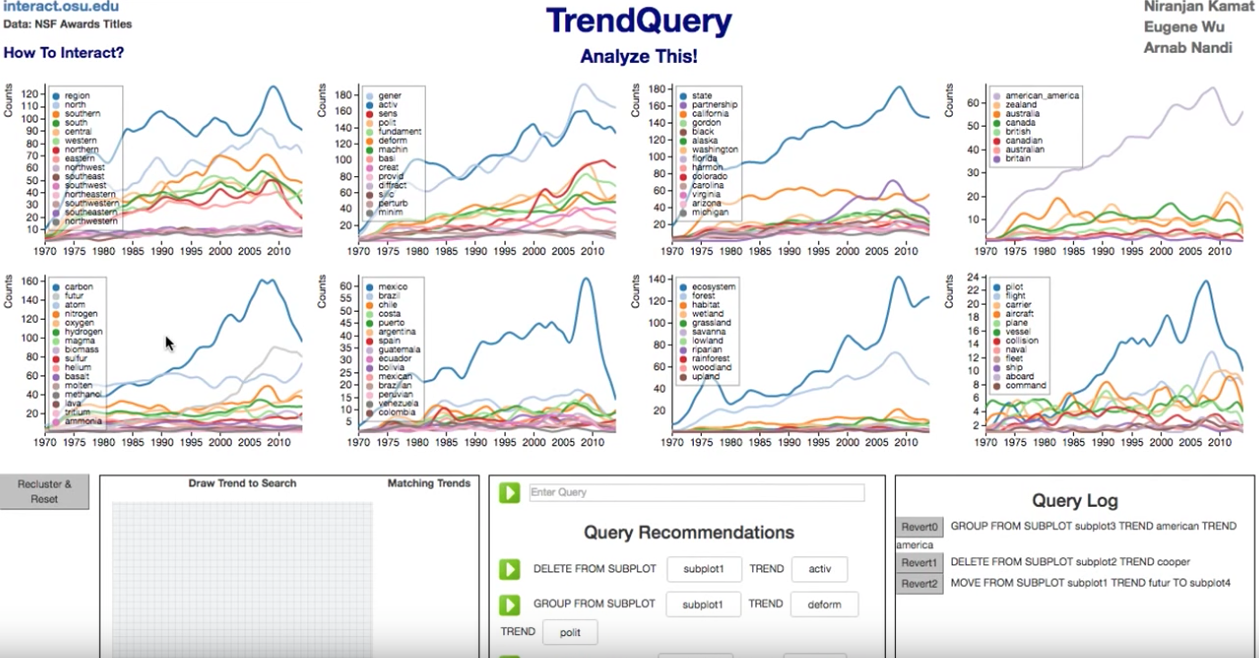
Requirements:
- flask
- textblob
- numpy
- scipy
- pandas
- metric_learn
- fastcluster
- nltk
- Download glove.6B.50d.txt, which is part of the Stanford Glove project, at location offline/src/ .
Run: Install flask. Run python flask_trend.py to run TrendQuery on local server. Point browser at localhost:5000. You can perform all analysis on the nsf dataset that we have used, including metric learning and reclustering.
Actions: From UI:
1. Delete: Right click

2. Group: Click on a trend. Then click on another in the same plot

3. Split: Middle Click on a grouped trend

4. Move: Click on a trend. Then click on another

You can also draw a rectangle over trends to select them and then perform one of the selected actions.

From Textbox:

1.a Delete: DELETE FROM SUBPLOT s0 TREND math

1.b Where: delete from subplot s0 where outlying rank < 3

2.a Group: GROUP FROM SUBPLOT subplot0 TREND math TREND science

2.b Where: Group from subplot s0 where similarity rank < 3

3.a Split: SPLIT FROM SUBPLOT subplot0 TREND math

3.b Where: Split from subplot s0 where dissimilarity rank < 1

4.a Move: MOVE FROM SUBPLOT subplot0 TREND math TO subplot1

4.b Where: Move from s0 to s1 where similarity rank < 3
Work to be done before using your data: You will have to spend some time creating the initial clustering output files as part of the pre-processing step. I am describing what I have done for nsf data. Email me at kamat.14@osu if you need help using the code. The changes should take a couple of days.
- NSF data is supposed to be located at offline/data/nsf_data in zip files. It has not been added to the repo due to its size. Email me if you need it.
- Run offline/src/parse_zip_test.py/test_write_year_title. It creates output/nsf_output/nsf_word_year_count.dict
- Run offline/src/nsf_stats.py/test_create_nsf_db_original. It creates offline/tests/nsf_stats_title_only_greater_than_5.db
- Run offline/src/cluster_link.py. This will create the required data files for viz and iterative data mining.