L10nization is a VS Code extension for Flutter projects that extracts string literals into ARB files and helps organize them with sorting, formatting, and generation support.
- Select a Dart string literal such as "Hello World".
- Use the code action
Extract 'Hello World' to arb files. - Choose or edit the localization key to fit your project.
- Keep ARB files sorted and formatted automatically when saving, or trigger the sort manually.
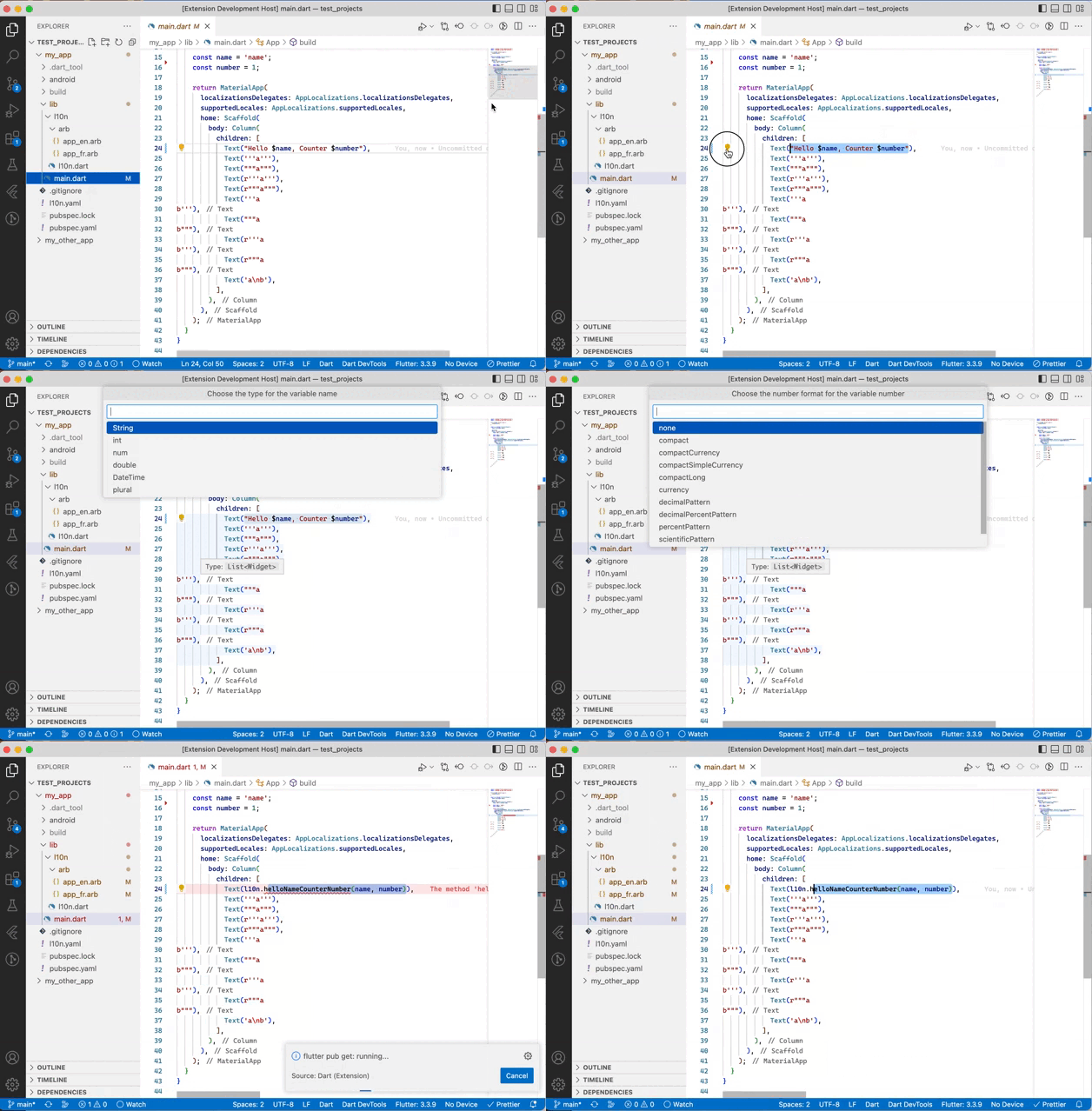
- Extract a string from Dart code into the template ARB file.
- Keep metadata descriptions with
l10nization.haveDescription. - Let the extension run
flutter gen-l10nvia the Dart extension when generation is enabled. - Sort and organize your ARB files with the
L10nization: Sort arb filescommand.
This project follows the spirit of Living Documentation: architecture and decisions are treated as working artifacts, not as a one-time write-up.
The project documents its intent in the following places:
- ARCHITECTURE.md captures the core architectural model.
- src/core/README.md explains the pure business rules.
- src/features/README.md explains the command and editor orchestration layer.
- src/infrastructure/README.md explains shared runtime adapters.
- src/ui/README.md explains the UI boundary.
- Keep the source of truth close to the code that implements it.
- Prefer tests as the proof that a rule still holds.
- Update the documentation when behavior changes, not only when the feature is created.
- Keep architecture decisions explicit, especially when a boundary matters.
- docs/decisions/README.md
- docs/decisions/0001-functional-core-imperative-shell.md
- docs/decisions/0002-core-business-rules-must-be-testable.md
- docs/decisions/0003-commands-are-orchestration-only.md
- docs/CONTRIBUTING.md explains how changes should update the architecture and tests together.
- docs/architecture-map.md gives a navigable map of how the extension is structured and why the boundaries exist.
- docs/reading-guide.md helps readers navigate the project by role and concern.
- The project treats architecture comments, layer docs, and ADRs as part of the implementation, not as an afterthought.
The extension exposes the following settings:
{
  "l10nization.appLocalizationsVariable": "l10n",
  "l10nization.yamlFile": "l10n.yaml",
  "l10nization.haveDescription": false,
  "l10nization.copyMetadataInAllFiles": true,
  "l10nization.generationEnabled": true,
  "l10nization.arbSort": true,
  "l10nization.organizeOnSave": true,
  "l10nization.addNewMessagesIn": "all"
}By default the generated access is l10n. You can change it with:
"l10nization.appLocalizationsVariable": "yourVariable"To use the extension with r13n, adjust the config:
"l10nization.appLocalizationsVariable": "r13n",
"l10nization.yamlFile": "r13n.yaml"You can make the extraction workflow ask for a description by enabling:
"l10nization.haveDescription": truel10nization.haveMetadatas remains available as a deprecated alias for compatibility.
Use l10nization.copyMetadataInAllFiles to decide whether descriptions are copied to every locale file or only to the template ARB file.
The setting l10nization.addNewMessagesIn supports:
all: add new messages to every ARB filetemplate: add new messages only to the template ARB file
You can run the command L10nization: Sort arb files at any time, or enable l10nization.organizeOnSave to sort and format files automatically when they are saved.
| Message format value | Output for numberOfDataPoints(1200000) |
|---|---|
compact |
1.2M |
compactCurrency |
$1.2M |
compactSimpleCurrency |
$1.2M |
compactLong |
1.2 million |
currency |
USD1,200,000.00 |
decimalPattern |
1,200,000 |
decimalPercentPattern |
120,000,000% |
percentPattern |
120,000,000% |
scientificPattern |
1E6 |
simpleCurrency |
$1,200,000.00 |
The extension does not validate the correctness of the custom date format; it lets you choose an existing format or write your own.
See the changelog for the full release history.
This project follows the Functional Core / Imperative Shell pattern.
- Functional Core: pure, deterministic logic that does not depend on VS Code APIs. It lives under
src/coreand contains rules such as ARB selection, configuration parsing, placeholder validation, and function-call generation. - Imperative Shell: VS Code runtime concerns that talk to the workspace, UI, and editor lifecycle. It lives under
src/featuresandsrc/infrastructure/shared.
- Core contract: pure data transformation, no editor I/O, no side effects.
- Shell contract: adapt the core to VS Code, handle workspace and user interaction, and orchestrate execution.
- Infrastructure contract: shared runtime adapters and helpers that support the shell without owning business logic.
- UI contract: present prompts and pickers, but keep logic delegated to the shell or core.
Functional Core:
src/core/arb/selectArbFiles.tssrc/core/arb/parseArbConfig.tssrc/core/arb/buildFunctionCall.tssrc/core/arb/shouldApplyArbFormat.tssrc/core/placeholders/numberFormat.ts
Imperative Shell:
src/features/extension/extension.tssrc/features/extension/getArbFiles.tssrc/features/extension/getChangesForArbFiles.tssrc/features/extension/setEditFilesParameters.tssrc/ui/inputBox/showInputBox.ts
This separation makes the project easier to test, easier to reason about, and safer to evolve because behavior changes in the core can be validated without depending on the editor runtime.
This repository uses the VS Code extension build flow and Vitest for unit tests. The main validation commands are available in package.json and are intended to be run from the project root.