
A self-hosted net worth tracker for European bank accounts, brokerage and crypto. Your data lives in your own Supabase project. No SaaS, no subscription.


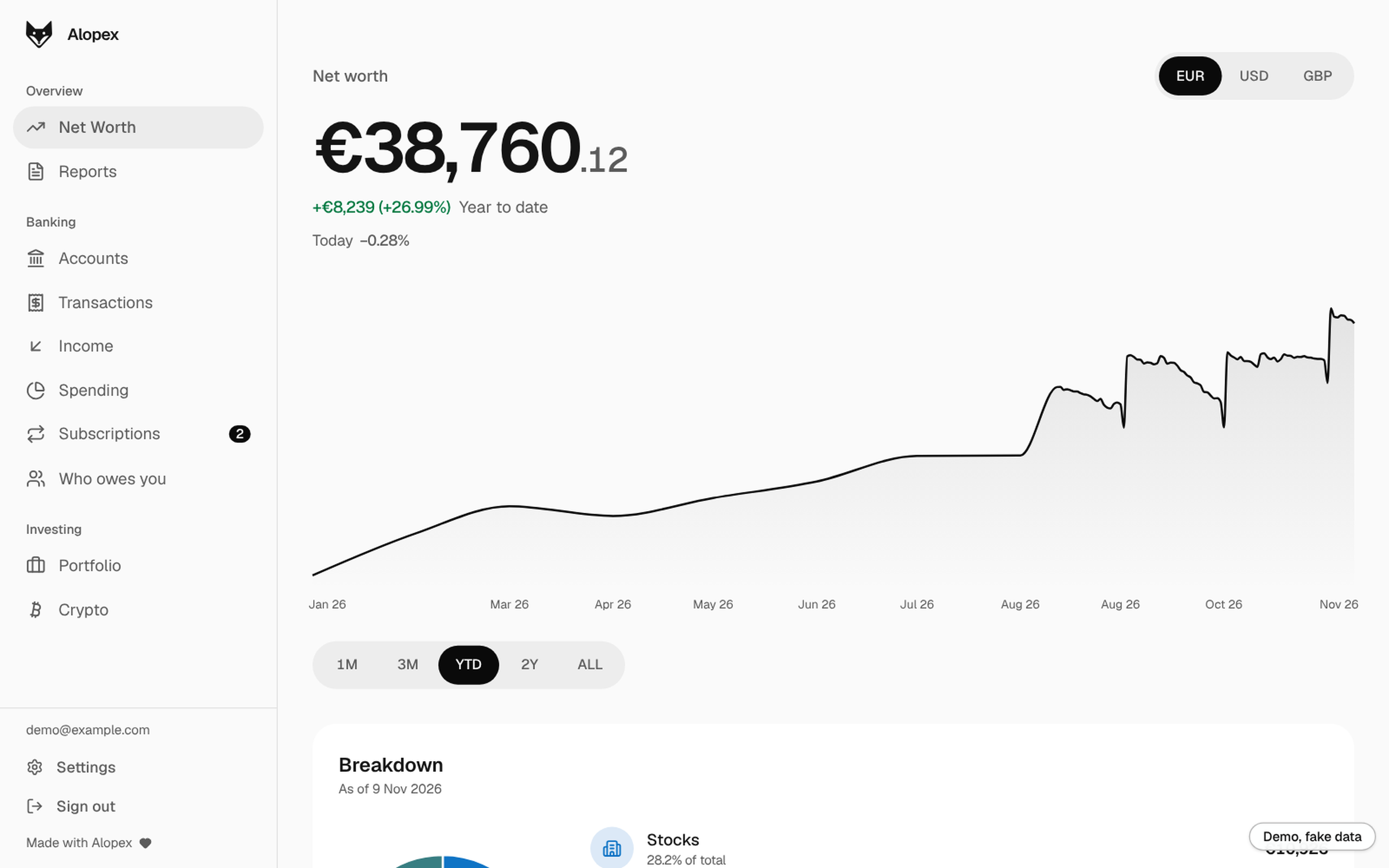
This repo is the backend: sync scripts, Supabase Edge Functions and migrations. The dashboard is alopex-web.
| 🏦 Bank sync | PSD2 open banking via Enable Banking: Revolut, Wise, Fineco and 2000+ other European banks. Multi-user. |
| 🏷️ Categorization | Your own category_rules first, Gemini for the rest. Hand-set categories are never overwritten. The Gemini key is recommended but optional: without it, or when Gemini fails, your rules still run. |
| 🔁 Subscription detection | Every transaction is marked Subscription or One-time. |
| 🔀 Flow detection | spend, income or transfer, so exchanges and top-ups don't count as income. |
| 📈 Portfolio and crypto | Prices from Yahoo Finance, Coinbase (read-only key) and CoinGecko. |
| 💱 FX | Daily EUR rates from Frankfurter/ECB, history backfilled on first run. |
| 🔔 "Worth it?" prompts | Web Push after discretionary purchases. |
Trade-offs: European (PSD2) banks only, and you renew bank access every 180 days. The sync runs inside your own Supabase project (pg_cron + Edge Functions): no computer has to stay on.
flowchart LR
    Bank[(Banks<br/>Enable Banking)] --> SYNC[sync-bank]
    CRON[pg_cron<br/>every 6 hours] --> SYNC
    SYNC --> DB[(Supabase<br/>Postgres + RLS)]
    DB --> POST[post-sync<br/>rules, Gemini, flows, refunds]
    POST --> DB
    PRICES[sync-prices<br/>FX, Yahoo, Coinbase, CoinGecko] --> DB
    DB --> REC[detect-recurring]
    DB --> UI[alopex-web<br/>dashboard]
    DB --> PUSH[notify<br/>Web Push]
npx create-alopex schedules everything with pg_cron inside your Supabase project (20261118000000_schedule_sync.sql). Every 6 hours (banks typically cap unattended access at about 4 calls a day per account), for every linked user:
sync-bankpulls balances and new transactions, with a 7-day overlap because banks post late, and marks payments between your own accounts.post-syncfills merchant keys, applies your rules and past choices, then Gemini, for categories; marksSubscriptionorOne-time; categorizes Splitwise expenses; marksspend,incomeortransfer(your flow rules, your own accounts, the bank's code); suggests transfer pairs; then pairs each card refund with its original charge (same account, merchant, amount and currency, within 90 days) and marks bothrefundedso neither counts. A flow you set by hand, or a transfer from a rule, is never changed. Refund pairing also covers rows a rule marked "not a transfer" and rows synced before flows were tracked (legacy).sync-pricesstores daily EUR rates and prices your stocks, ETFs and crypto.detect-recurringupdates the subscription radar.
A newly linked bank doesn't wait for the next run: its first sync starts right after linking.
notify sends "worth it?" prompts hourly and the bank-access reminder daily. Everything covers every user; only the Coinbase sync is single-user (your own API key).
The Node scripts in this repo (sync-transactions.js, classify-flow.js, ...) are the older Docker, cron or launchd path. They do less than the Edge Functions: no flow rules, own-account or transfer pairing, merchant keys or subscription radar. New installs should use npx create-alopex.
Bank linking and the dashboard's other server-side actions (account deletion, holdings, statements, rules) run as Supabase Edge Functions, see supabase/functions/README.md.
Built to keep running: every outbound call has a 60 s timeout, each scheduled script a 10 minute limit, sync cursors are written atomically (and kept on a volume in Docker), and one user's failing rows can't block anyone else's classification.
Want to look first? Try the live demo: fake data, no sign-up.
Your own copy takes about 30 minutes, all in the browser: no computer has to stay on and nothing to install. Most of the time goes into Enable Banking's signup.
| Account | What it's for | Cost |
|---|---|---|
| GitHub | runs the setup (Codespaces) and the sync (Actions) | free |
| Supabase | your database and login | free tier is enough |
| Enable Banking | the PSD2 connection to your banks | free for your own accounts |
| Vercel (sign in with GitHub) | puts the dashboard online over HTTPS | free Hobby plan |
| Gemini API key | AI categories and subscription detection | free tier; optional, recommended. Each new transaction (name, description, amount), each Splitwise expense description and any statement PDF you import go to Google; on the free tier Google may use them to improve its models, a paid-tier key opts out |
In Enable Banking, sign up only; setup tells you when to create the app and gives the exact redirect URL.
One command (Mac, Linux or Windows, needs Node 20+):
npx create-alopexIt downloads both apps into ./alopex, signs you in to Supabase and Vercel in your browser, creates the project, tables, Edge Functions and your login, turns on the scheduled sync inside Supabase (pg_cron: no computer, fork or GitHub Actions needed), walks you through Enable Banking and puts the dashboard online. Run it again in the same folder to update. See installer/README.md.
Or the guided script in Codespaces:

This opens a terminal in your browser.
Free: 60 hours a month on a personal account, no card needed. First open takes 2-3 minutes. Codespaces has Node 22, the Supabase CLI and gh ready.
Run:
./setup.shChoose 1, GitHub Actions. Setup forks this repo to your account, creates or links your Supabase project, applies the schema, deploys the functions, creates your login (the app has no sign-up screen), switches off public sign-ups, stores your keys as secrets of your fork and turns the sync on. When it asks for the .pem, drag it from your Downloads onto the file list on the left.
At the end it prints three values for the next step (also saved in dashboard-values.txt) and waits for you to open the dashboard and sign in once. Keep the Codespace open.
Click GitHub first, then Install Vercel (All repositories is fine). Paste the three values setup printed and deploy, then open the address under Domains on the project page (not a deployment URL) and sign in. Your dashboard tells your database its own address on that first sign-in, so there is nothing to copy back: setup sees it, prints Done! Open <your address>, sign in as <email> and bank linking sends you back there. Closed the terminal first? Nothing is lost, the sign-in alone finishes it.
Then delete the Codespace, since it holds your keys: github.com/codespaces, the ... menu, Delete. GitHub warns about unsaved changes: that's expected, delete anyway. Everything you set up stays in Supabase, GitHub and Vercel.
Sign in on your dashboard. On Accounts, use Connect a bank: balances show at once, and the first sync of transactions starts right away (a minute or two). On Portfolio, Add an investment finds yours by name, ticker or ISIN; on Crypto, Add a coin. A checklist on the dashboard shows what's left.
Bank access lasts 180 days. Two weeks before it ends the Accounts page shows a Renew access banner, and you get a push notification the day the banner appears, then 7 days, 1 day and on the day it expires.
Run ./setup.sh again any time: it keeps what's in .env, asks only for what's missing, and applies new migrations and functions. Forgot your password? ./setup.sh --reset-password.
On your own computer or server instead (Docker)
Needs Docker, the Supabase CLI and Node 22. The sync runs only while that machine is on.
git clone https://github.com/marcodonghiaa/alopex.git
git clone https://github.com/marcodonghiaa/alopex-web.git
cd alopex
./setup.sh          # choose 2, Docker
docker compose up -d --build
Open http://localhost:3000 (only this computer; set WEB_BIND=0.0.0.0 in .env to reach it from your phone on the same network). With Docker, a newly linked bank's last 90 days of transactions arrive within about 5 minutes. Check your configuration any time with node env-check.js.
Manual setup
- Create a Supabase project, then
supabase link --project-ref <ref>andsupabase db push --linked. - In Enable Banking, create a Production application with redirect URL
https://<ref>.supabase.co/functions/v1/bank-consent-callback(must match exactly). Activate it by linking one of your own accounts in their panel. - Deploy the functions and set
ENABLE_BANKING_APP_IDandENABLE_BANKING_PRIVATE_KEYas Edge Function secrets. (FRONTEND_URLis optional: the dashboard registers its own address when you sign in.) - In the dashboard, Authentication -> Users -> Add user (tick auto-confirm) to create your login, and put its id in
.envasUSER_ID. - Authentication -> Sign In / Providers -> User Signups: turn off Allow new users to sign up. Supabase leaves it on, which lets anyone who finds your project URL create an account.
npm install, thencp .env.example .envand fill it in.
| Task | Command |
|---|---|
| Run a full sync by hand | bash run-daily-sync.sh |
| Send "worth it?" prompts now | bash run-notify.sh |
| Re-apply changed category rules | node categorize.js --reapply-rules |
Check your .env |
node env-check.js |
| Run the tests | npm test |
--reapply-rules recategorizes rows the AI or an earlier rule set. Categories you set by hand are never touched (tracked in transactions.category_source; categories that predate the column count as hand-set).
With npx create-alopex there is nothing to schedule: pg_cron in your Supabase project runs the sync. The options below are for the older setups.
On GitHub, no computer needed: in your fork, add the secrets APP_ID, PRIVATE_KEY (the whole .pem), SUPABASE_URL, SUPABASE_SECRET_KEY, USER_ID and, if you use them, GEMINI_API_KEY, VAPID_PUBLIC_KEY, VAPID_PRIVATE_KEY, VAPID_SUBJECT, COINBASE_API_KEY_NAME, COINBASE_API_PRIVATE_KEY (Settings -> Secrets and variables -> Actions). Then add the variable SYNC_ON_GITHUB = true and enable Actions on the fork. .github/workflows/sync.yml then syncs every 6 hours, sends "worth it?" prompts hourly and the bank-access reminder daily; run any of them by hand from the Actions tab. Your fork is public, so its list of runs is public too: the sync logs only counts, never names or amounts, and setup keeps logs for 1 day. GitHub can start scheduled runs 10-30 minutes late.
Docker runs everything on its own schedule (scheduler.js). Without Docker, use cron or launchd:
0 */6 * * *    cd /path/to/alopex && bash run-daily-sync.sh
*/30 * * * *   cd /path/to/alopex && bash run-notify.sh
0 9 * * * cd /path/to/alopex && node consent-notice.jsEvery table is Row Level Security scoped to auth.uid() = user_id.
| Area | Tables |
|---|---|
| Banking | accounts, transactions (primary key (account_uid, entry_reference)), net_worth_snapshots, fx_rates |
| Rules | category_rules, subscription_billing_overrides |
| Investments | portfolio_holdings / portfolio_snapshots, crypto_holdings / crypto_snapshots |
The dashboard reads security_invoker views such as v_net_worth_daily, v_transactions_eur and v_subscriptions. Schema changes live in supabase/migrations.
.env,*.pemandlast-sync.json*are gitignored. The Enable Banking key authenticates your app, so treat it like a password.- The dashboard only uses the publishable key. The service-role key stays in the sync scripts and Edge Functions.
- A Postgres trigger blocks users from editing bank-sourced columns on
transactions. Only category, type, flow, split and worth-it fields are writable. - Two-step sign-in (authenticator app, set up in Settings) is enforced by the database: once a user has an authenticator, a session without the code gets nothing from the API. See UPGRADING.md for recovery.
- The bank-linking
stateis a single-use token, not a user id, and error text is never reflected into the redirect. - Bank text is sent to the LLM as untrusted data, in per-user batches.
- The Coinbase integration uses a read-only key.
Tests run on every push and pull request. See CONTRIBUTING.md.