
A wallpaper-driven theme switcher for the niri Wayland compositor.
Press Mod+Shift+T, pick a wallpaper card, and the whole desktop recolors behind a circular reveal that grows out of the card you clicked. The accent color comes from the wallpaper automatically. The same opacity applies to every window. Terminals, editors, GTK and KDE apps, Discord, Firefox/Zen, Spotify, btop and your shell prompt all follow the new theme, most of them live, without restarting.
A small dashboard creates, edits and deletes themes.
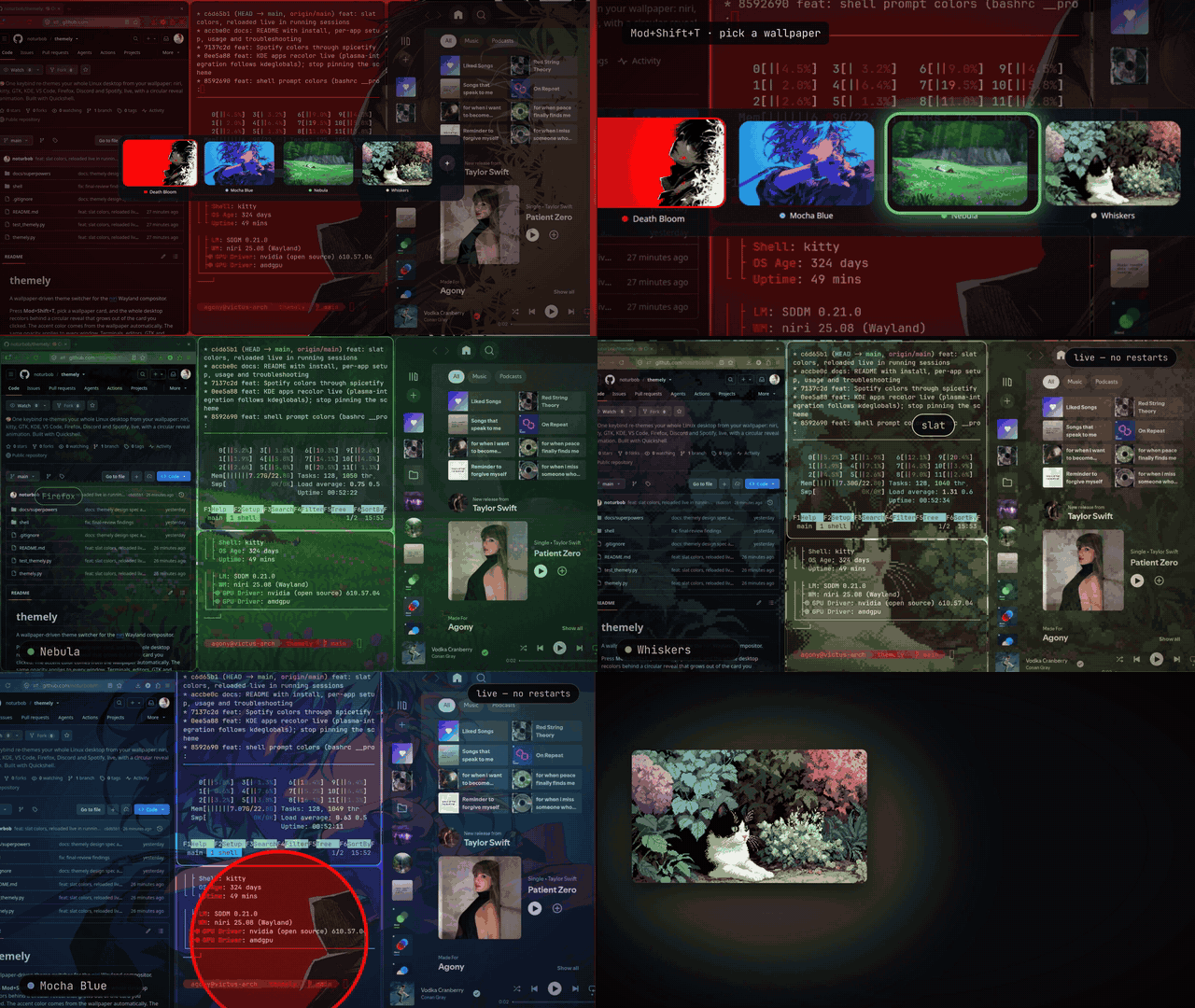
▶ Watch the full 31-second film (1080p, 60fps)
Website · Install · Usage · Troubleshooting
- How it works
- What gets themed
- Requirements
- Install
- One-time app setup
- Usage
- Troubleshooting
- Uninstall and backups
- Development
Mod+Shift+T ─► Quickshell switcher ─► pick a card
                                         │
             freeze the screen (screencopy) on every output
                                         │
             themely apply <theme>  ──►  rewrite each app's colors + reload it
                                         │
             grow a circular hole from the card: the new desktop shows through
There are two parts:
| Part | What it does |
|---|---|
themely.py |
The engine and CLI (Python stdlib + ImageMagick). It owns all theme data and every config write. |
shell/ |
A Quickshell config: the switcher overlay, the reveal animation and the dashboard. It calls themely for everything. |
A theme is a folder ~/.config/themely/themes/<id>/ with a wallpaper image and a theme.json:
{ "name": "Nebula", "accent": "#50c87c", "opacity": 0.85 }~/.config/themely/current is a symlink to the active theme. It is also what swaybg shows at login.
Colors. When you add a theme, the engine picks the accent from the wallpaper. It shrinks the image to 8 colors with ImageMagick and chooses the most vivid one that isn't tiny, grey, black or white. Every other color is derived from that one accent: background, surfaces, text, a second accent, and the 16 terminal colors. Red, green and yellow keep their usual meaning. You can override the accent in the dashboard.
Safe edits. In hand-written configs, themely only rewrites the lines between two marker comments:
# >>> themely colors
...generated, replaced on every switch...
# <<< themely
Everything outside the markers is yours. Every write:
- is skipped when nothing changed;
- is atomic, and follows symlinks, so a dotfiles repo stays intact;
- keeps a one-time
<file>.themely-bakof the file as it was before themely first changed it.
| App | How | When |
|---|---|---|
| Wallpaper | swaybg restarted under the reveal overlay | live |
| Window opacity + blur | one niri rule for every window (kitty uses its own background opacity so text stays crisp); every window (and fuzzel, mako) blurs what's behind it, like kitty's background_blur |
live |
| niri borders + overview | layout { border } colors; the overview (Mod+Tab) sits on a blurred, half-dimmed copy of the wallpaper drawn by the shell |
live |
| kitty | colors + background_opacity, reloaded with SIGUSR1 |
live |
| Shell prompt (bash powerline) | ~/.cache/themely/prompt.sh, sourced before each prompt; in kitty, palette slots 16–21 |
live in kitty (also inside slat), else next prompt |
| flowbar | [theme] accent/background/opacity (flowbar watches its config) |
live |
| mako | notification colors + makoctl reload |
live |
| fuzzel | [colors] |
next launch |
| hyprlock | $bg, $fg, $accent … variables the lock screen layout uses |
next lock |
| VS Code, Antigravity, VSCodium, Cursor | workbench.colorCustomizations in settings.json, covering the gutter, minimap, menus and widgets too, so no blue from the base theme shows through |
live |
| Vesktop | ~/.config/vesktop/themes/themely.css (Vencord hot-reloads it) |
live |
| GTK 3 / GTK 4 | recolored copy of GTK's own theme, switched through gsettings |
live |
| Brave / Chromium | follows the GTK theme (Settings → Appearance → Theme → GTK) | live |
| KDE / Qt 6 (Dolphin, Okular, Gwenview, Ark …) | kdeglobals color groups via plasma-integration |
live |
| Qt 5 (VLC) | qt5ct color scheme | next launch |
| Firefox / Zen | Pywalfox (~/.cache/wal/colors.json + pywalfox update) |
live |
| btop | themes/themely.theme, reloaded with SIGUSR2 |
live |
| slat | [theme] colors in config.toml, daemon reloaded with SIGUSR1 |
live |
| Spotify | spicetify color scheme, reloaded by a small themely extension | live (restarts once, when the extension is first added) |
| System dark mode | gsettings color-scheme prefer-dark |
live |
Can't be themed:
- the official Discord client (use Vesktop);
- apps with only built-in themes (e.g. Bruno);
- the colors of web pages themselves.
A target whose app isn't installed is skipped. A target that fails, for example because its markers
were deleted, doesn't stop the others. themely apply names it and exits non-zero, and the switcher
shows a notification.
Required
- niri
- Quickshell ≥ 0.3
- Python ≥ 3.10 with PyGObject (
python-gobject). PyGObject is used to read GTK's built-in theme. - ImageMagick 7 (
magick) - swaybg
Optional, each one only needed for its app:
plasma-integration: live recoloring of KDE/Qt 6 appspywalfox+ the Pywalfox browser add-on: Firefox/Zenspicetify-cli: Spotify- btop, kitty, mako, fuzzel, flowbar, Vesktop, VS Code …
On Arch:
sudo pacman -S quickshell python-gobject imagemagick swaybg
sudo pacman -S plasma-integration            # optional: live KDE/Qt apps
uv tool install pywalfox                     # optional: Firefox/Zen
yay -S spicetify-cli # optional: Spotifygit clone https://github.com/noturbob/themely ~/projects/themely
cd ~/projects/themely
# the CLI
chmod +x themely.py
ln -s "$PWD/themely.py" ~/.local/bin/themely
# the Quickshell UI
mkdir -p ~/.config/quickshell
ln -s "$PWD/shell" ~/.config/quickshell/themely
# theme storage (optionally inside your dotfiles, e.g. ln -s ~/dotfiles/themely ~/.config/themely)
mkdir -p ~/.config/themely/themesAdd these to ~/.config/niri/config.kdl. Replace /home/you with your home directory; niri doesn't
expand ~.
environment {
    QT_QPA_PLATFORMTHEME "kde"   // live KDE/Qt colors (needs plasma-integration)
}

spawn-at-startup "swaybg" "-i" "/home/you/.config/themely/current/wallpaper" "-m" "fill"
spawn-at-startup "qs" "-c" "themely"

// the dashboard floats
window-rule {
    match title="^themely$"
    open-floating true
}

binds {
    Mod+Shift+T hotkey-overlay-title="Switch theme" { spawn "qs" "-c" "themely" "ipc" "call" "switcher" "toggle"; }
}
Then add the two marker blocks themely fills in.
The border block goes inside layout { }. Remove your own border { } block:
layout {
    // >>> themely border
    // <<< themely
}
The opacity block goes at the top level. Remove your own per-app opacity window rules:
// >>> themely opacity
// <<< themelyPut the markers where the generated lines should go, and delete your own copies of those lines:
| File | Marker lines | Replaces these lines of yours |
|---|---|---|
~/.config/kitty/kitty.conf |
# >>> themely colors / # <<< themely |
background, foreground, selection_*, cursor*, color0–color15, background_opacity, dynamic_background_opacity |
~/.config/flowbar/config.ini (in [theme]) |
# >>> themely colors / # <<< themely |
accent, accent-2, background, foreground, opacity |
~/.config/mako/config |
# >>> themely colors / # <<< themely |
background-color, text-color, border-color |
~/.config/fuzzel/fuzzel.ini (under [colors]) |
# >>> themely colors / # <<< themely |
the whole [colors] body |
~/.config/hypr/hyprlock.conf (at the top) |
# >>> themely colors / # <<< themely |
your $bg, $surface, $fg, $muted, $accent, $accent2, $red, $yellow variables |
VS Code and its forks need nothing: themely adds its markers to settings.json on the first run.
themely save --name "My Theme" --wallpaper ~/Pictures/wall.jpg   # accent picked automatically
themely apply my-theme
Log out and back in once, so apps start with the new QT_QPA_PLATFORMTHEME and swaybg reads the
current wallpaper.
These steps are one click or one command each. Skip the ones for apps you don't use.
Shell prompt (bash). Inside your prompt function, after your default colors, source the generated
file. It defines lav lav_bg blue blue_bg sap sap_bg as the color part of an SGR code, used as
\e[38;${blue}m (text) or \e[48;${blue_bg}m (background). In kitty they are palette slots 16–21
(5;16…), so prompts already on screen recolor live, also inside a multiplexer like slat; elsewhere
they are 24-bit 2;R;G;B:
__prompt() {
  local lav='2;180;190;254' lav_bg='2;90;94;129' blue='2;137;180;250' blue_bg='2;64;78;111' sap='2;116;199;236' sap_bg='2;52;74;95'
  [ -r ~/.cache/themely/prompt.sh ] && . ~/.cache/themely/prompt.sh   # themely colors
  ...
}
Vesktop. Open Settings (gear, bottom left) → Vencord → Themes → Local Themes, and turn
on themely. Alternatively, quit Vesktop, add "themely.css" to enabledThemes in
~/.config/vesktop/settings/settings.json, and start it again.
Firefox / Zen (Pywalfox).
pywalfox install                                                      # Firefox
pywalfox install --manifest-path ~/.config/zen/native-messaging-hosts \
                 --profile-path ~/.config/zen                         # Zen
Then install the Pywalfox add-on in each browser and click Fetch Pywal colors once. Any other browser theme (e.g. Catppuccin) is replaced.
Spotify (spicetify). Spotify must be writable, and needs one backup:
sudo chmod -R a+wr /opt/spotify
spicetify backup apply
On niri without Xwayland, Spotify also needs Wayland flags, or it exits silently at launch:
printf -- '--enable-features=UseOzonePlatform\n--ozone-platform=wayland\n' > ~/.config/spotify-flags.confQt 5 apps (VLC). plasma-integration is Qt 6 only, so keep qt5ct for VLC with a launcher override:
sed 's/^Exec=/Exec=env QT_QPA_PLATFORMTHEME=qt5ct /' /usr/share/applications/vlc.desktop \
  > ~/.local/share/applications/vlc.desktop
Brave / Chromium. Open Settings → Appearance → Theme and choose GTK.
| Key / action | Does |
|---|---|
| Mod+Shift+T | open or close the switcher on the focused monitor |
| ← / → | move between themes |
| Enter or click | switch, with the reveal animation |
| Esc or click outside | close |
| + card | open the dashboard |
Open it from the + card, or run qs -c themely ipc call dashboard toggle.
Left side: your themes. Click one to edit it, or use + New theme.
Right side:
- Name.
- Wallpaper: click the preview to choose an image.
- Accent:
- picked from the wallpaper when you choose one;
- click another swatch, or type a hex, to override.
- Opacity for every window.
- A live palette preview. The dashboard itself recolors as you edit.
Buttons:
- Save applies right away if you're editing the active theme.
- Delete asks you to confirm. The active theme can't be deleted.
themely list                         # themes as JSON (which one is current)
themely apply <id>                   # switch without the animation
themely save --name N --wallpaper IMG [--accent '#rrggbb'] [--opacity 0.85] [--slug ID]
                                     # create (no --slug) or edit (--slug); no --accent = from the wallpaper
themely delete <id>
themely swatches IMG                 # colors the wallpaper offers, the automatic pick first
themely palette '#rrggbb'            # the full derived palette
For an animated switch from scripts or keybinds:
qs -c themely ipc call theme apply <id>| Symptom | Fix |
|---|---|
| Notification "Some apps didn't switch" | It names each failing target. Usually its markers were edited away: put them back. |
| Switcher doesn't open | Is Quickshell running? pgrep -a qs, or start it with qs -c themely. Check themely is on $PATH for niri. |
| KDE apps don't change live | plasma-integration must be installed and QT_QPA_PLATFORMTHEME=kde set (log out and in). Apps started from an old terminal keep the old variable. |
| KDE folder icons keep the old color | Icons are cached; they update when redrawn or on the app's next start. |
| Firefox/Zen keep the old colors | Pywalfox add-on installed in that browser, and Fetch Pywal colors clicked once? |
| Spotify won't start | Missing ~/.config/spotify-flags.conf Wayland flags (see above). |
| "Some apps didn't switch: spotify" | Spotify updated, so spicetify's backup is stale: spicetify backup apply (after sudo chmod -R a+wr /opt/spotify if it can't write). |
| Prompt didn't change in an open terminal | source ~/.bashrc once (needed after updating themely's prompt setup); new terminals are fine. |
| niri shows a config error after a switch | Your niri is too old for the background-effect { blur true; } rule in the opacity block. Update niri. |
| A theme is missing from the list | Its theme.json is invalid; themely list prints why on stderr. |
Before its first change to a file, themely saves <file>.themely-bak next to it. To undo themely:
- Restore each
*.themely-bak(or remove the marker blocks) and delete the niri lines above. rm ~/.local/bin/themely ~/.config/quickshell/themely- Theme data lives in
~/.config/themely. Keep it or delete it. - Generated files you can delete:
~/.local/share/themes/Themely-*~/.local/share/color-schemes/Themely.colors~/.config/vesktop/themes/themely.css~/.config/btop/themes/themely.theme~/.config/spicetify/Themes/themely~/.cache/themely
- Set GTK back:
gsettings set org.gnome.desktop.interface gtk-theme Adwaita.
python3 test_themely.pyThe tests are plain asserts. They run against a temporary $HOME (via THEMELY_HOME) and never
touch the real desktop.
- Adding an app: write a
fn(palette, opacity)inthemely.py, add it toTARGETS, and add a test. - Palette keys:
accent accent2 bg surface0 surface1 overlay fg fg_muted color0…color15.
The website and design notes live on the
website branch, and the demo media in the
media release, so a clone of main holds
only the app.