This repo is a structured Machine Learning pipeline combining self-supervised representations, intermediate linguistic structure, and alignment for real-world applications. It implements the following papers:
-
Text-Independent Phone-to-Audio Alignment Leveraging SSL (TIPAA-SSL) Pre-Trained Model Latent Representation and Knowledge Transfer
-
MUST&P-SRL: Multi-lingual and Unified Syllabification in Text and Phonetic Domains for Speech Representation Learning
- Published at EMNLP 2023: https://aclanthology.org/2023.emnlp-industry.8/
- Algorithm: function "prefill_for_sentence" in flowspeech/text_processing.py
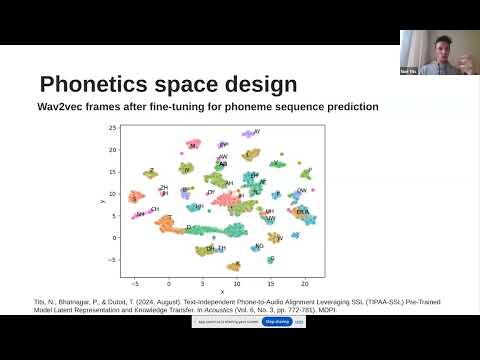
A talk about this work at ISCA SIG-SLATE webinars covering the 2 papers:
- The
flowspeechpackage contains the actual implementation of the tech:DL_speech_techcontains the pronunciation aspect function with intermediary steps that are common between different pronunciation aspects- text and phonetics processing, pronunciation dictionaries, audio processing, ...
wav2vec2_frame_predictionthat contains a class that wraps the model pipeline of wav2vec2 finetuned model, dimension reduction, frame classification, and dtw forced alignment (itself defined in another class)- some data processing and loading functions and other utilities
appcontains the definition of the API endpoints that call theDL_speech_techfunctionsnginxcontains the configuration and Docker files for the deployment serverdatacontains different datasets: syllables, phonetics, and some audio filesmodelscontains trained model checkpoints for the part of the processing pipeline which we train ourselves (dimensionality reduction + frame classifier)syllabipycontains a tweaked version of the syllabipy package, used to syllabify sentencesscriptsfolder contains scripts that are used "offline", i.e. not used behind the API endpoints. E.g. script for- download pretrained models
- extract forced alignments, i.e. time-aligned phonetic transcriptions, thanks to "Montreal Forced Aligner" (MFA)
- experiment different frame reduction and frame classifiers (where a frame is an output vector of the wav2vec2 model)
- ...
content_toolscontains a simple streamlit-based web interface related to exploring phonetic dictionaries, using linguistic data extraction (phonetization + syllabification in text and phonetics) and other related content processing tools
A Flask API is provided to access the speech analysis features by pronunciation aspect. To learn more about making requests to the Speech Processing API, please see this documentation file.
Please see this documentation file.
git clone https://github.com/numediart/TIPAA-SSL
A script is available to build the last_hidden_state.quant.onnx in scripts/onnx_utils.py.
This makes a compressed version of a pretrained wav2vec2 model from hugginface.
Create a folder hf_models and put that file into it.
Note: the dimensionality reduction and frame classifiers that run on top of the base wav2vec2 model are stored in this repository in models.
First install all necessary packages listed in ./Dockerfile:
sudo apt-get install git-lfs espeak-ng festival
git lfs install
To setup the micromamba environment, you first have to install micromamba: https://mamba.readthedocs.io/en/latest/installation/micromamba-installation.html
"${SHELL}" <(curl -L micro.mamba.pm/install.sh)
Then, create the environment (this will install all dependencies), activate it, and finally install the project.
micromamba create -n flowspeech_mm -f env.yml
micromamba activate flowspeech_mm
pip install -e .
A few adjustments are needed to be able to run on Apple Silicon, as some of the dependencies on conda are not available for ARM architectures.
Install basic dependencies:
brew install git-lfs micromambaInstall homebrew for x86 and install dependencies:
arch -x86_64 zsh
/bin/bash -c "$(curl -fsSL https://raw.githubusercontent.com/Homebrew/install/HEAD/install.sh)"
brew install espeak
exit
Setup the conda environment for x86:
CONDA_SUBDIR=osx-64 micromamba create -n flowspeech_mm -f env.yml
micromamba activate flowspeech_mm
conda env config vars set PHONEMIZER_ESPEAK_PATH=/usr/local/bin/espeak
conda env config vars set PHONEMIZER_ESPEAK_LIBRARY=/usr/local/lib/libespeak.dylibThe unit tests should work after these step: just run pytest
To test the tech's performance, develop new features, ..., you will need speech datasets. Example: M-AILABS
We should strive to follow these guidelines:
- Clear organization of modules, with separation of concerns
- Use python type hints as much as possible, see here and here
- Write docstrings, if possible following the numpy format standard
- Use a linter and formatter with the Ruff and Black Formatter (plugins for VSCode). Make sure you configure VSCode to use Black as the active formatter.
- The environment for running the app in production should be reproducible. For us this means using a lock file generated by conda-lock, see e.g. here and here.
If you like experimenting with notebooks, start a jupyter server in the conda environment:
$ jupyter lab
Have a look at the helpers in here for recording and playing audio in notebooks.
The following have not yet been implemented but should be:
- Manage production and developments environments separately. The production one could be much leaner. E.g. use conda-lock categories and Docker multi-stage builds.
- Specify the major/minor versions of all dependencies in the [env.yml] environment file. This would make it easier to regenerate a lock file whenever we want to update a dependency.
- Use pre-commit to automatically run the linter and formatter whenever a commit is done (to avoid relying on the VSCode extensions).
The difficulty is that
pre-commitneeds to be installed, andgit commitalways be ran wherepre-commitis installed. - Perhaps using a tool such as poetry for dependency management, but this doesn't play super nice with conda.
- The code often assumes that modules are imported or scripts are from the project's root folder. If not, files under
data/ormodels/will not be found. It should be easy to make it independent of the location by finding the root folder of the installedflowspeechpackage.