
For shipped changes, see the changelog. Test, CI and build history is recorded separately in development and validation history.
.NET client libraries for Apple TV remote-control protocols: Companion Link (HID input, media
transport, volume, power state - used by tvOS remotes and the Apple TV Remote app) and MRP
(Media Remote Protocol, tunneled over AirPlay 2 - now-playing metadata, playback control, and
player/queue state). Both target net472 and net10.0 from a single, non-conditional codebase.
This repository does not implement RAOP or DMAP/DACP, and does not implement AirPlay 2 media streaming itself - only the MRP control channel tunneled over an AirPlay 2 connection.
Trademark notice and disclaimer: Apple, Apple TV, tvOS, AirPlay, and Siri are trademarks of Apple Inc., registered in the U.S. and other countries. This project is an independent, unofficial implementation of a reverse-engineered protocol and is not affiliated with, endorsed by, sponsored by, or approved by Apple Inc. in any way. "Apple TV" and other Apple product names are used solely to describe compatibility and interoperability. No Apple software, assets, or confidential documentation are included in or derived for this repository.
API documentation is published at oznetmaster.github.io/AppleTVControlLibrary, covering the Companion Link, MRP, and Discovery libraries.
| Package | Contents |
|---|---|
AppleTvControlLibrary |
Companion Link protocol, framing, crypto, pairing/verification, OPACK/TLV8 codecs, and the high-level CompanionApi. |
AppleTvControlLibrary.Discovery |
mDNS/DNS-SD discovery for both protocols: Companion Link (ICompanionDiscovery), AirPlay (IAirPlayDiscovery), and MRP (IMrpDiscovery), each isolated behind its own interface so it can be swapped per host. |
AppleTvControlLibrary.Mrp |
MRP client library: pairing/verification (via the shared AppleTv.Hap crypto library), AirPlay 2-tunneled framing, player/queue state tracking, and the high-level MrpRemoteControl. |
AppleTvControlLibrary.All |
Convenience meta-package that installs all three independent libraries (AppleTvControlLibrary, AppleTvControlLibrary.Mrp, and AppleTvControlLibrary.Discovery); it contains no DLL of its own. |
AppleTvControlLibrary, AppleTvControlLibrary.Mrp, and AppleTvControlLibrary.Discovery are
intentionally independent, independently versioned packages: a host with a known Apple TV address
can use either protocol library without multicast discovery, and a host can use the discovery
library (which covers Companion Link, AirPlay, and MRP discovery behind their own interfaces - see
MRP Discovery) independently of either protocol. Install AppleTvControlLibrary.All
when all three are wanted; it restores all three library packages automatically.
| Path | Contents |
|---|---|
src/AppleTV.Companion |
Core Companion Link library and the DocFX documentation source. |
src/AppleTV.Companion.Discovery |
Independently usable mDNS/DNS-SD discovery library. |
src/AppleTV.Companion.All |
Meta-package project that restores all three library packages (Companion Link, MRP, and Discovery). |
src/AppleTv.Remote.Wpf |
WPF reference host for Companion Link: scanning, pairing, connecting, and remote control. |
src/AppleTv.Hap |
Shared HAP (HomeKit Accessory Protocol) pairing/verification and crypto library, used by both Companion Link and MRP. |
src/AppleTv.Mrp |
MRP client library, tunneled over AirPlay 2. |
src/AppleTv.Remote.Mrp.Wpf |
WPF reference host for MRP: pairing, connecting, and now-playing/remote control. |
tests/AppleTV.Companion.Tests |
Companion Link unit and protocol test suite. |
tests/AppleTV.Companion.FakeDevice |
Fake Apple TV used by Companion Link protocol and session integration tests. |
tests/AppleTV.Companion.LiveTests |
Opt-in socket discovery tests using a simulated mDNS responder. |
tests/AppleTv.Hap.Tests |
Unit tests for the shared HAP pairing/crypto library. |
tests/AppleTv.Mrp.Tests |
MRP unit, protocol, and pairing integration test suite. |
tests/AppleTv.Mrp.FakeDevice |
Fake Apple TV used by MRP pairing and protocol integration tests. |
tools/AppleTV.Companion.RemoteTool |
Command-line Companion Link remote-control utility. |
tools/AppleTV.Companion.ScanTool |
Command-line Companion Link discovery utility. |
tools/AppleTV.AirPlay.RemoteTool |
Command-line AirPlay/MRP remote-control utility. |
tools/AppleTV.AirPlay.ScanTool |
Command-line AirPlay discovery utility. |
tools/AppleTV.Mrp.ScanTool |
Command-line MRP-over-AirPlay discovery utility. |
archive/mrp-tcp-transport |
Retired raw-TCP MRP transport, kept for reference only (see its own README); superseded by the AirPlay 2-tunneled transport. |
.github |
Continuous integration, publishing, and GitHub Pages workflows. |
The Companion Link protocol is the channel tvOS remotes and the Apple TV Remote app use for HID
input (remote buttons, touch), media transport control, volume, and power state. The
AppleTvControlLibrary package is a from-scratch, byte-exact C# port of pyatv's Companion Link
implementation; see Companion Link protocol reference and correctness
below.
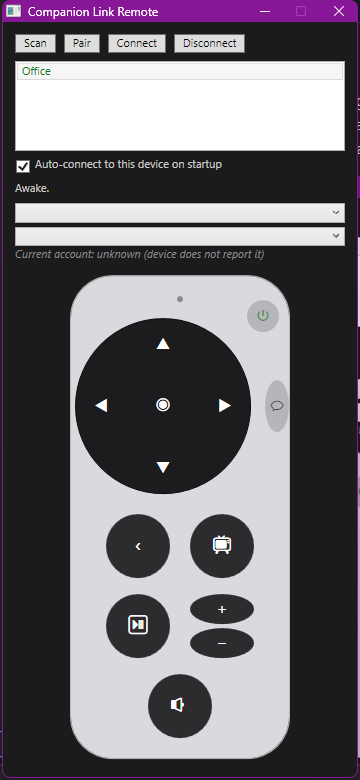
src/AppleTv.Remote.Wpf is a working desktop reference host rather than a reusable UI component.
It demonstrates the full application workflow: scan for devices, pair once, persist credentials,
reconnect, and control a selected Apple TV. Its UI includes directional and media controls,
capability-aware volume and mute controls, power-state updates, app launching, switchable-account
selection, and reactive text entry when the Apple TV keyboard gains focus. It also demonstrates
handling CompanionApi.ConnectionClosed: on an unexpected fault (not a user-initiated disconnect)
it retries the connection with a bounded, increasing backoff, giving up after a few attempts if
the device stays unreachable.
Use it as an integration example for credential storage, connection lifecycle handling, and the
high-level CompanionApi; hosts are expected to provide their own UI and secure credential-store
implementation.
- Discover Apple TVs advertising Companion Link over mDNS (
_companion-link._tcp), query a known device address directly, or stop a multicast lookup once an exact service name resolves. - Pair with a device (HAP pair-setup over SRP) and persist the resulting credentials.
- Establish an encrypted session (HAP pair-verify, ChaCha20-Poly1305) and bring up a Companion
Link session (
_systemInfo,_touchStart,_sessionStart,TVRCSessionStart,_tiStart). - Notify callers when the connection is closed or lost (
CompanionApi.ConnectionClosed), whether cleanly or due to an unexpected fault, viaConnectionClosedEventArgs.Exception. The library itself does not reconnect automatically; consumers wanting to reconnect (as the WPF reference host does) must do so themselves in response to this event. - Send HID commands (directional pad, menu/home, volume, play/pause, Siri, etc.) and touch/swipe events.
- Send media-control commands (play/pause/skip, absolute volume) gated by the device's advertised capabilities.
- Track power state (asleep/awake/screensaver/idle) via pushed
SystemStatus/TVSystemStatusevents, and toggle power via sleep/wake HID commands. - List launchable apps (
AppList()) and launch an app by bundle identifier or deep-link URL (LaunchApp(...)). Treat an empty or missing app list as a normal outcome, not an error - some tvOS builds do not populate it, and callers should not hard-depend on the list being non-empty. - List switchable user accounts (
AccountList()) and switch the active account (SwitchAccount(...)). Same graceful-degradation rule as app listing: an empty or missing account list is a normal outcome, not an error. There is no way to query which account is currently active -FetchUserAccountsEventreturns only the switchable list, and nothing in_systemInfoor the_iMCevent fills the gap. Callers can only know the current account after they themselves issue a successfulSwitchAccount(...); a switch made on the device itself (Control Center, the user icon, another client) is invisible to this library, with no event pushed for it.
- No now-playing metadata (title, artist, artwork, position) - that is MRP territory; see the MRP section below.
- No absolute channel selection (only channel increment/decrement).
- No mute command exists on the wire; callers build it from
SetVolume(0.0)plus a stashed previous level, gated on the device advertising volume control at all.
using AppleTvControlLibrary.Discovery.Companion;
using AppleTvControlLibrary.Protocol;

// 1. Discover devices.
var discovery = new MulticastCompanionDiscovery ();
var results = await discovery.ScanAsync (TimeSpan.FromSeconds (5));

// If an Apple TV IPv4 address is already known, resolve its advertised Companion TCP endpoint.
var directDiscovery = new UnicastCompanionDiscovery (IPAddress.Parse ("192.0.2.10"));
var directResult = await directDiscovery.ScanAsync (TimeSpan.FromSeconds (5));

// Or stop the multicast lookup when this exact mDNS service instance name resolves.
var namedResult = await MulticastCompanionDiscovery.DiscoveryAsync (
	 "Living Room", TimeSpan.FromSeconds (5));

// 2. Pair (once per device) using AppleTvDeviceManager-style orchestration in your host app,
//    or drive SrpAuthHandler / CompanionProtocol directly for full control.

// 3. After pairing, connect and issue commands via CompanionApi.
await api.ConnectAsync ();
await api.SendHidCommandAsync (down: true, command: HidCommand.Select);
await api.SendHidCommandAsync (down: false, command: HidCommand.Select);Version 1.1.0 is async-first.
connection, commands, event subscriptions, and discovery. The original synchronous APIs remain
available for source compatibility but are obsolete; migrate to their Async equivalents to avoid
blocking application threads.
The WPF reference host also recovers one stale auto-connect endpoint at startup: it discovers the
stored device name, requires its rpmrtid identifier to match the paired device, updates the saved
address and port, and retries once. It never accepts a same-named device with a different identifier.
See src/AppleTv.Remote.Wpf in the source repository for a complete reference host application
(scan, pair, connect, and drive a remote-control UI).
This library has been tested against Apple TV 4K models only. Older, pre-4K devices (e.g. Apple TV HD / A1625, and earlier generations) are not part of the test matrix and have not been validated against real hardware. Companion Link should work the same way on those devices, and nothing in the protocol implementation deliberately excludes them, but "should work" is not a guarantee - treat pre-4K support as unverified until confirmed against real hardware, and please report any issues you hit on that hardware.
This library is a from-scratch, byte-exact C# port of the Companion Link protocol as implemented by pyatv 0.18.0. Every protocol constant in the source carries a comment citing the pyatv symbol it was ported from (see ATTRIBUTIONS.md), so that a future re-vendor of pyatv can be reconciled with a diff rather than a re-derivation of the whole protocol. See THIRD-PARTY-NOTICES.txt for full license text of the projects consulted during the port.
MRP (Media Remote Protocol) is the protocol tvOS uses for now-playing metadata and playback
control. Apple TV no longer exposes MRP directly over a raw TCP socket; the AppleTvControlLibrary.Mrp
package speaks MRP tunneled over an AirPlay 2 connection (AirPlayMrpConnection / Ap2Session),
matching pyatv's current transport. Pairing and channel encryption reuse the same HAP (HomeKit
Accessory Protocol) pair-setup/pair-verify and ChaCha20-Poly1305 primitives as Companion Link, via
the shared AppleTv.Hap library - src/AppleTv.Mrp depends on it directly rather than
re-implementing crypto.
- Pair with a device over AirPlay 2 (HAP pair-setup over SRP) and establish an encrypted MRP session (HAP pair-verify, ChaCha20-Poly1305).
- Track now-playing state: active player/client, title, artist, album, duration, elapsed time,
playback rate, shuffle/repeat state, and supported commands, all pushed by the device and
exposed through
MrpPlayerStateManager. - Fetch artwork for the current now-playing item, preferring the device's own remote-artwork URL
(HTTP fetch with an in-memory cache) and falling back to an in-band
PLAYBACK_QUEUE_REQUEST_MESSAGEfetch when no remote URL is available, mirroring pyatv's_fetch_remote_artwork/_fetch_local_artworkbehavior. - Send playback commands (play, pause, next/previous track, skip, seek) and volume commands
through
MrpRemoteControl, gated by the currently active player's supported-command set. - Track device power state (
MrpPowerState: Unknown/Off/On) derived from device-info messages, raisingPowerStateChangedonly when the state actually changes. - Subscribe to push updates through
MrpPushUpdater, which forwards player-state changes to a registeredIMrpPushUpdaterListenerand routes listener exceptions to the listener's error callback instead of letting them escape as unhandled exceptions - starting a push updater without a listener registered throwsMrpNoAsyncListenerExceptionrather than failing silently.
- No HID button/touch input, discovery-mode switching, or account switching - that is Companion Link territory; see Companion Link above.
- No AirPlay 2 media/audio/video streaming - only the MRP control channel tunneled over the AirPlay 2 connection is implemented.
- No raw-TCP MRP transport. An earlier direct-TCP
MrpConnection/TcpMrpTransportimplementation has been retired in favor of the AirPlay 2-tunneled transport and is kept only for reference underarchive/mrp-tcp-transport.
src/AppleTv.Remote.Mrp.Wpf is a working desktop reference host for MRP, structured the same way
as the Companion Link WPF host: pair once, persist credentials, connect, and drive a now-playing
UI. Its MainViewModel renders title/artist/album, artwork (with app-icon fallback when no
artwork is available), and transport controls that enable/disable based on the currently
advertised supported-command set. MrpDeviceManager wires MrpProtocol, MrpPlayerStateManager,
and MrpRemoteControl together for the view model to consume.
Use it as an integration example for MRP pairing, credential storage, and now-playing UI binding; hosts are expected to provide their own UI and secure credential-store implementation.
MRP-over-AirPlay devices advertise the _mediaremotetv._tcp mDNS service type. Discovery lives in
the shared AppleTvControlLibrary.Discovery package alongside the Companion Link and AirPlay
discovery implementations, isolated behind IMrpDiscovery (MulticastMrpDiscovery) so it can be
swapped per host, the same as ICompanionDiscovery and IAirPlayDiscovery. There is no separate
AppleTvControlLibrary.Mrp.Discovery package - hosts that need MRP discovery should reference
AppleTvControlLibrary.Discovery directly. tools/AppleTV.Mrp.ScanTool demonstrates it end to end.
Like the Companion Link library, AppleTvControlLibrary.Mrp is a from-scratch C# port of pyatv's
MRP implementation (pyatv/protocols/mrp), including its protobuf message definitions (vendored
under src/AppleTv.Mrp/Protobuf/pyatv/protocols/mrp/protobuf) and constants such as RepeatState,
ShuffleState, and InputAction, each carrying a citation comment to the pyatv source file and
line it was ported from. See ATTRIBUTIONS.md and
THIRD-PARTY-NOTICES.txt for licensing details.
Each protocol has a matching set of command-line tools and test projects:
| Protocol | Scan tool | Remote tool | Test project | Fake device |
|---|---|---|---|---|
| Companion Link | tools/AppleTV.Companion.ScanTool |
tools/AppleTV.Companion.RemoteTool |
tests/AppleTV.Companion.Tests |
tests/AppleTV.Companion.FakeDevice |
| MRP (over AirPlay) | tools/AppleTV.AirPlay.ScanTool, tools/AppleTV.Mrp.ScanTool |
tools/AppleTV.AirPlay.RemoteTool |
tests/AppleTv.Mrp.Tests |
tests/AppleTv.Mrp.FakeDevice |
The scan tools discover devices over mDNS and print their advertised service metadata; the remote tools pair with a device once (persisting credentials locally) and then send interactive commands from the console, serving as minimal, UI-free integration examples for each library.
Both protocol test suites are NUnit-based, multi-targeted (net472 and net10.0), and run
primarily against an in-process fake Apple TV rather than real hardware, so the suites are
deterministic and safe to run in CI. tests/AppleTV.Companion.LiveTests is the only opt-in
exception: it exercises multicast/unicast sockets with a simulated responder and is excluded from the standard CI run. It does not pair with or control a real Apple TV. tests/AppleTv.Hap.Tests
covers the pairing/crypto library shared by both protocols independently of either transport.
- .NET Framework 4.7.2 (desktop, including Mono hosts - validate independently; see notes below)
- .NET 10
net472 support relies on Span<T>/Memory<T> polyfills and compiler-attribute shims so the
same C# 13 codebase compiles on both targets with no #if branching in the protocol layer. If a
net472 build is destined for a Mono runtime rather than desktop .NET Framework, validate
Span<T>/ValueTask behavior and socket options on that runtime specifically - a green build on
Windows net472 does not guarantee equivalent behavior on Mono.
MIT - see LICENSE. Third-party attributions are listed in ATTRIBUTIONS.md and THIRD-PARTY-NOTICES.txt.
Apple, Apple TV, tvOS, AirPlay, and Siri are trademarks of Apple Inc. This project is not affiliated with, endorsed by, or sponsored by Apple Inc. All product names, logos, and brands referenced are property of their respective owners and are used here for identification purposes only.
See CHANGELOG.md.
See test instructions and dependency versions. The four test projects use official NUnit 5.0.0 and NUnit3TestAdapter 6.3.0 with net472 and net10.0 targets. Visual Studio Test Explorer and dotnet test run the same fixtures. Each fixture has a fresh instance per test case. The ordinary Companion, HAP and MRP suites use simulated devices and require no saved credentials.
dotnet test tests/AppleTV.Companion.Tests/AppleTV.Companion.Tests.csproj -c Release
dotnet test tests/AppleTv.Hap.Tests/AppleTv.Hap.Tests.csproj -c Release
dotnet test tests/AppleTv.Mrp.Tests/AppleTv.Mrp.Tests.csproj -c Release
The repository .runsettings excludes the Live category by default. To explicitly run socket discovery tests with their fake responder, use:
dotnet test tests/AppleTV.Companion.LiveTests/AppleTV.Companion.LiveTests.csproj -c Release -f net472 --settings .runsettings.network
dotnet test tests/AppleTV.Companion.LiveTests/AppleTV.Companion.LiveTests.csproj -c Release -f net10.0 --settings .runsettings.network
These tests depend on the host's multicast support and socket permissions. Test discovery itself does not start the responder or open network connections. Keep any real credentials and device settings outside tracked files.
The Unit tests workflow runs on pull requests and pushes to the main development branch. Separate Windows jobs test net472 and .NET 10, retaining a result file for each suite/runtime. Live tests are excluded; no account credentials or physical devices are needed. These checks do not publish packages or releases. XML documentation is generated in each target framework's output directory. Parallel net472 and .NET 10 builds therefore do not overwrite the same XML file in the source tree.
The publish/release workflows support an explicit manual override when the processor or local self-hosted GitHub Actions runner is unavailable. Select skip_hardware_checks and provide a single-line hardware_skip_reason. Use the workflow's normal source and version controls. The override applies only to that invocation and is recorded with the exact source revision in its warning and job summary; it does not create a passing hardware-test result.
GitHub-hosted validation remains mandatory for the checked-out source, and the normal build, tests and packaging steps still run. Wait for the configured hosted workflows to pass, or run them on the same source revision first. None of these hosted checks needs the local runner or processor. Automatic tag/release-triggered runs retain the normal hardware checks; use a manual invocation of the updated release workflow when an offline override is needed.
All maintained NUnit suites use the official NUnit 5.0.0 framework. Async exception assertions are awaited, and discarded-task warnings fail test builds. Processor test packages use CrestronHomeNUnit SDK 2.2.0; workflow and Android suites, where provided, use the released 2.2.0 adapter. Tests remain available in Visual Studio, VS Code and the command line. Live and manual tests still require their documented devices and permissions. This is a test-tooling update; the published product version and runtime behavior are unchanged.
Test package 1.1.0 uses NUnit 5.0.0. It is independent of the product version. Download package, documentation, validation, exact source revisions, and SHA-256 checksums are attached to the existing product release. No product binary or NuGet version changed for this test update.
Validated on 1 October 2026: 237 offline cases passed in each of two runs from the packaged assembly on Windows. All suite identities were checked against source discovery. Live/manual tests and execution on the processor were not repeated during this migration; earlier hardware results do not certify this new package.