
- Config values marked with [Synced with Server] are synchronized from the server by default. Most of them control whether an entire feature or section is enabled, while its visual presentation and formatting remain configurable by each client
- Server administrators can change the synchronization policy for policy-controlled settings in BepInEx/config/shudnal.ConditionalConfigSync/ConditionalConfigSync.SyncPolicy.cfg
- Prefix an exact setting or whole-section identifier with + to force server control or - to make it client-controlled. Exact-setting rules take precedence over whole-section rules
- Use shared modpack configs or distribute your config manually if you also want client-controlled appearance and formatting settings to be identical for all players initially
- If you install this mod manually do not forget to install ConditionalConfigSync
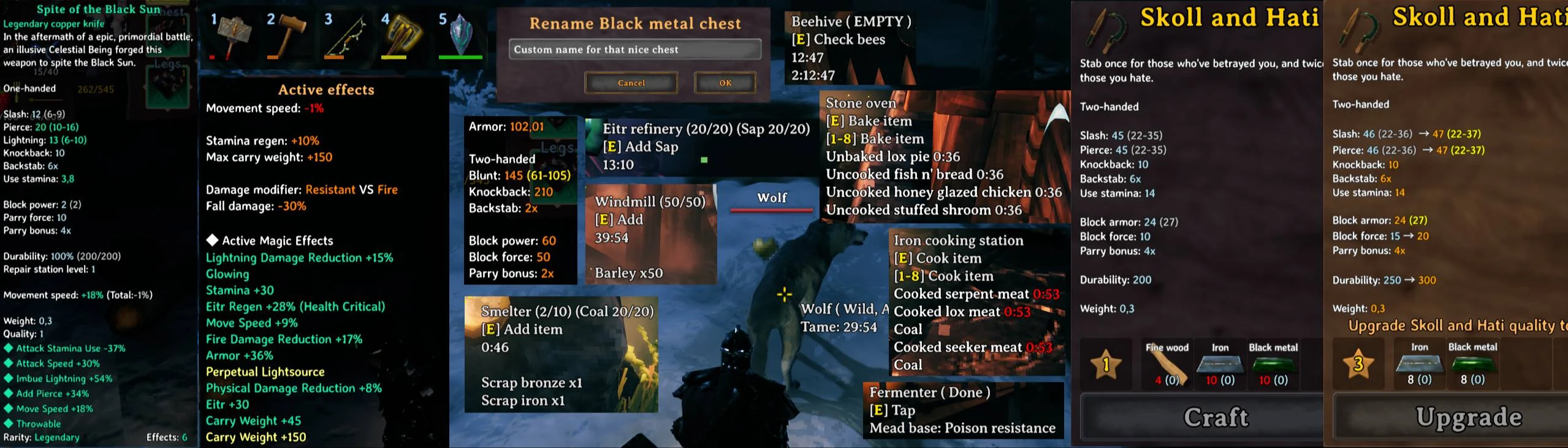
- Amount of required resources from your inventory when crafting
- Multicraft (gamepad and mouse scroll supported)
- Colored durability bars on items
- Configurable icon scale
- Reordered item tooltips (EpicLoot supported)
- Highlight stats to be upgraded in crafting description
- Hold Alt to disable item tooltip altering
- Present quality level as configurable symbols (star by default)
- Configurable ammo and bait icons and amount for weapons using ammo
- Craft list filter
- Hold the keyboard or controller interaction button at a crafting station to repair all eligible items and close the station. Requires both
Inventory / Enable repair on holdandHover - Stations / Hold to mass repair; releasing the button cancels the operation. - Panels for fast filtering and sorting in Crafting window
- Default position is above the minimap (you can move it to any position in the screen)
- Show/hide current day or current time or both
- Time could be set in a configurable fuzzy way
- Default position is below the minimap (moveable)
- Tracked weathers (Clear, Rain, Snow storm, Thunderstorm, Mist, Cinder Raid)
- Icon and timer will show the moment of the next change of the weather state (like Clear -> Rain, or Thunderstorm -> Mist)
- If you have custom environment with ambient or particle systems with custom names it can be configured to be tracked in current tracked weather list
- Default position is below the minimap (moveable)
- You will see the direction of next several winds (5 by default)
- Amount of forecasted winds and bar filling direction are configurable (so as other parameters)
- Winds change every 2 min
- Default position is above the food slots
- Show/hide/move current weight or empty slots or both
- Bar colors, font color and background color could be changed
- Equipment slots from EaQS, AzuEPI and ExtraSlots doesn't count as empty slots, only quick slots count as empty that can handle any item you grab
- Advanced character stats in character selection screen
- Combined characater stats in Armor hover tooltip (Top Right section in inventory window)
- Combined active status effects in Weight hover tooltip (Bottom Right section in inventory window, EpicLoot magic effects supported)
- Fermenter (time to end, percent, current mead)
- Plants (time to full grow)
- Contextual radial menu hint for stations that can currently accept an item
- Cooking stations (time to cook/coal for each cooking item)
- Oven (time to bake/coal for each baking item)
- Windmill (time to produce everything, depends on current wind force)
- Spinning wheel (time to end)
- Smelters (show ore and fuel on both sides, time to end, queued items in order, hold E to add ore/fuel faster)
- Kiln (time to end and queued wood, hold E to add wood faster)
- Tameable (time to stay fed for tamed, time to tame for untamed)
- Tamed (time to grow up)
- Eggs (time to hatch)
- Rename chests
- Configure what to show on chest hover
- Free slots or current/max item count
- Show chest content
- Move status effects anchor
- Set direction of status effect list fill
- More compact look for status effect
- Move ship control interface
- Distinct settings for nomap mode and regular mode
extract MyLittleUI.dll folder to your BepInEx\Plugins\ folder.
The best way to handle configs is Configuration Manager.