




This is a stateful serial port Model Context Protocol (MCP) server for developer tools and AI agents. It works with Claude Code, VS Code with Copilot, and any MCP-compatible runtime. It communicates over stdio. It uses pyserial for serial access on macOS, Windows, and Linux.
Example: Ask Claude Code to list the serial ports, connect to your microcontroller, reset it with DTR, and read the boot banner from the device.
This project is a fork of es617/serial-mcp-server. It adds features for driving vintage and other real hardware over a live serial link:
- A cross-platform TCP mirror transport. The original mirror works only over PTY, on macOS and Linux.
- Exclusive-forwarding pause and resume. This lets an agent and a human share an
rw-mode mirror safely. - Built-in paced writes with gap calibration. This helps UARTs that drop characters at full speed.
See CHANGELOG.md for the full list. Everything from the original still works. This fork only adds features; it does not rewrite them.
Have you ever copied and pasted commands into screen or minicom? Have you guessed baud rates, toggled DTR to start a bootloader, or run the same test sequence 20 times by hand? This server is for you.
You have a serial device. You want an AI agent to talk to it: to open a port, send commands, read responses, and debug protocols. This server makes that possible.
It gives any MCP-compatible agent a full set of serial tools. These include listing ports, opening connections, reading, writing, line-oriented I/O, and control line commands. It also adds protocol specs and device plugins. These let the agent reason about device behavior, not just raw bytes.
The agent calls these tools and gets structured JSON back. It reasons about what to do next. You do not need to type commands into a terminal at every step.
What agents can do with it:
- Develop and debug. You connect to your device, send commands, read responses, and diagnose issues in conversation. Examples: boot banners, prompts, error codes.
- Iterate on new firmware. You attach a protocol spec. The agent then understands your command set, boot modes, and output format as they change.
- Automate test flows. The agent resets the device with DTR, waits for the prompt, runs a command sequence, and checks the output.
- Explore unknown devices. The agent probes command sets, finds prompts, and infers message formats.
- Build serial automation. Examples: long-running test rigs, manufacturing bring-up, and CI hardware smoke tests.
- Embedded engineers. Iterate faster on serial protocols. Debug in conversation. Automate test sequences.
- Hobbyists and makers. Work with serial devices without writing boilerplate code. Let the agent help you reverse-engineer simple protocols.
- QA and test engineers. Build repeatable serial test suites with plugin tools.
- Support and field engineers. Diagnose serial device issues in conversation, without special tools.
- Researchers. Automate data collection from serial devices. Explore device capabilities systematically.
The server needs Python 3.11 or newer. The Python that comes with macOS is 3.9, which is too old. uv gets a suitable Python for you, so install uv first:
brew install uvWithout Homebrew, or on Windows or Linux, use the uv installer: https://docs.astral.sh/uv/getting-started/installation/
Install the server from the newest release. uv tool install gives it its own Python and installs two commands: serial_mcp (the server, which Claude Code starts) and serial-watch (a window to watch the device's console, see Watching with serial-watch):
uv tool install "serial-mcp-server @ https://github.com/trgeuy/serial-mcp-server/releases/latest/download/serial-mcp-server.tar.gz"The link always points to the newest release, so this command never goes out of date. uv builds the package from that release's source the first time, which takes a few seconds.
uv puts the commands in its tools folder (~/.local/bin on macOS and Linux) and tells you if that folder is not on your PATH (uv tool update-shell adds it).
Register the MCP server with Claude Code. --scope user makes it available in every project on this computer. The two settings turn on the read-only console mirror over TCP. The pacing tools (paced.*) are on by default:
claude mcp add --scope user serial \
  -e SERIAL_MCP_MIRROR=ro \
  -e SERIAL_MCP_MIRROR_TRANSPORT=tcp \
  -- serial_mcp
On Windows, in PowerShell, type the command on one line. The \ line breaks above work only in macOS and Linux shells:
claude mcp add --scope user serial -e SERIAL_MCP_MIRROR=ro -e SERIAL_MCP_MIRROR_TRANSPORT=tcp -- serial_mcpIf you already have Python 3.11 or newer, you can use pip in place of uv tool install:
pip install "serial-mcp-server @ https://github.com/trgeuy/serial-mcp-server/releases/latest/download/serial-mcp-server.tar.gz"Do not install serial-mcp-server from PyPI. That name is the upstream package, without the changes in this fork.
Install the serial-mcp skill. It tells the agent how to drive old hardware: control bytes, pacing, and when a console is ready. The skill is not in the wheel. Each release has it as serial-mcp-skill.zip. These commands install it for all your projects:
curl -LO https://github.com/trgeuy/serial-mcp-server/releases/latest/download/serial-mcp-skill.zip
unzip -o serial-mcp-skill.zip -d ~/.claude/skills
On Windows, download serial-mcp-skill.zip from the release page. Then, in PowerShell: Expand-Archive serial-mcp-skill.zip -DestinationPath $HOME\.claude\skills -Force. To update the skill later, do the same with the zip from the new release. Start a new Claude Code session to load it.
Then in Claude Code, try:
"List available serial ports and connect to the one on /dev/ttyUSB0 at 115200 baud."
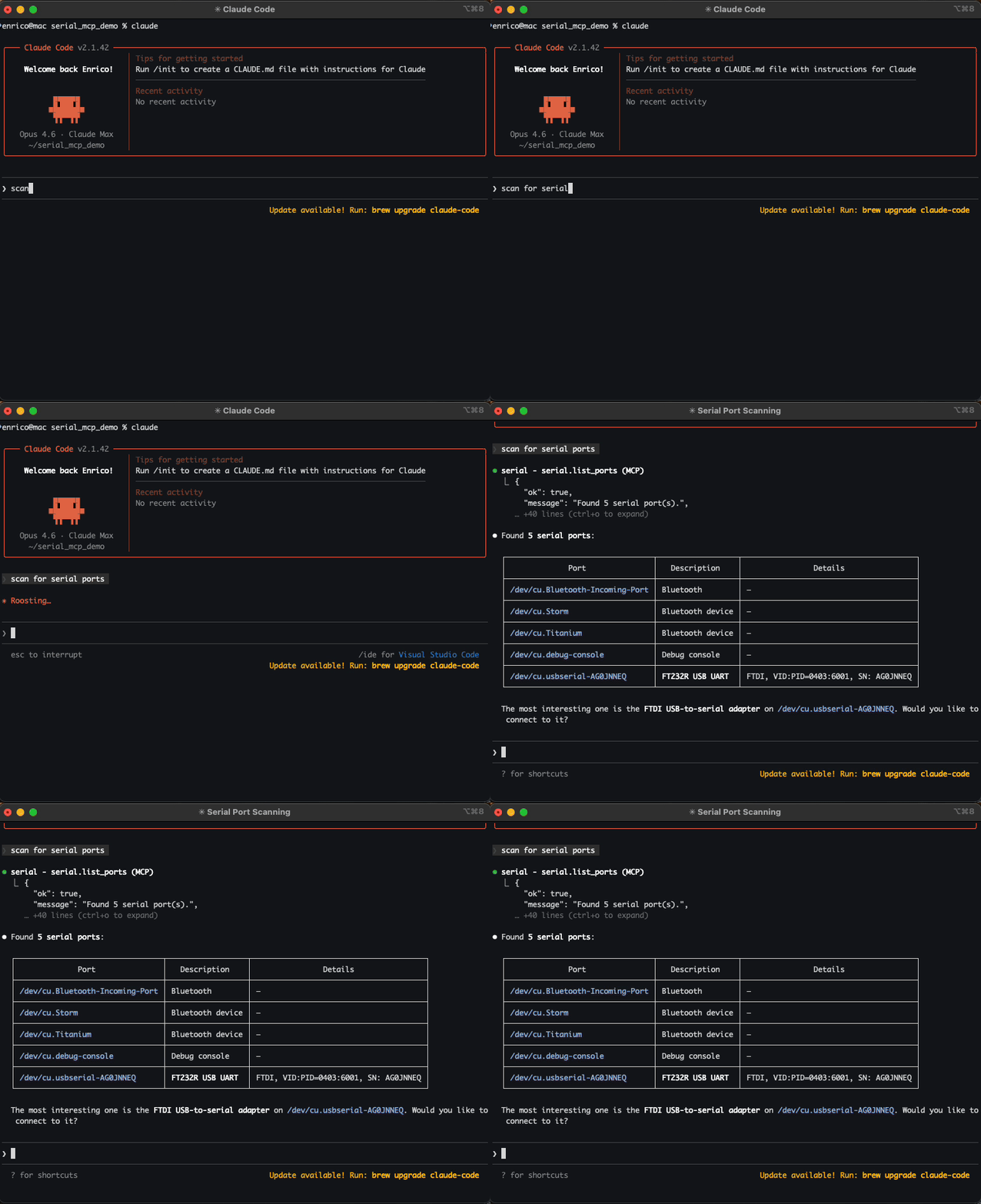
Once connected, the agent has full serial capabilities:
- List ports to find the available serial devices.
- Open and close connections. Set the baud rate, parity, stop bits, and encoding.
- Read and write data in text, hex, or base64 format.
- Line-oriented I/O. Use
readlineandread_untilfor text-based protocols. - Control lines. Set or pulse DTR and RTS. Use this for a hardware reset or to enter boot mode.
- Flush the input and output buffers.
- Attach protocol specs so the agent understands device-specific commands and data formats.
- Use plugins for high-level device actions instead of raw reads and writes.
- Create specs and plugins for new devices, so future sessions already know your protocol.
- Mirroring. Attach
screen,minicom,telnet, or a custom script to the same serial session the agent uses. This works over a virtual device file (PTY, macOS and Linux only) or a plain TCP socket (works on Windows too).
The agent can run multi-step flows on its own. For example, it can toggle reset, wait for the prompt, send an init sequence, and stream the output.
At a high level:
Raw Serial → Protocol Spec → Plugin
Start with raw serial tools. Move up the stack as you understand your device protocol and it becomes repeatable.
Editable install from repo root:
pip install -e .Or with uv:
uv pip install -e .MCP is a protocol. This server works with any MCP-compatible client. Below are setup instructions for the most common clients.
# Standard setup
claude mcp add serial -- serial_mcp

# Or run as a module
claude mcp add serial -- python -m serial_mcp_server

# Enable all plugins
claude mcp add serial -e SERIAL_MCP_PLUGINS=all -- serial_mcp

# Enable specific plugins only
claude mcp add serial -e SERIAL_MCP_PLUGINS=mydevice,ota -- serial_mcp

# Debug logging
claude mcp add serial -e SERIAL_MCP_LOG_LEVEL=DEBUG -- serial_mcpThis repo includes a Claude Code skill, .claude/skills/serial-mcp/. It tells the agent how
to drive real hardware with these tools: how to send control bytes, how to pace a UART with
no flow control, and when an old console is ready for the next command. It works for any
vintage machine with a serial console: it has a bring-up procedure for a machine or program
nobody has measured yet, and a table that maps each kind of lost data to its cause.
Measured gaps go in one pacing profile file for all your projects
(~/.config/serial-mcp/pacing-profiles.md, or %APPDATA%\serial-mcp\pacing-profiles.md on
Windows). The agent reads it before it types into a program and adds a row when it
measures a new one. The skill defines the format. references/pacing-examples.md holds
tested values for an Altair 8800c and a UCSD Pascal III system, as examples.
The skill loads automatically when you run Claude Code in this repo. To use it in every
project, install serial-mcp-skill.zip from the release (see the Quickstart).
Add to your project's .vscode/mcp.json (or create it):
{
  "servers": {
    "serial": {
      "type": "stdio",
      "command": "serial_mcp",
      "args": [],
      "env": {
        "SERIAL_MCP_PLUGINS": "all"
      }
    }
  }
}
Adjust env to match your needs:
- Set
SERIAL_MCP_PLUGINSto specific plugin names. - Add
SERIAL_MCP_MIRRORfor mirroring. On Windows, also addSERIAL_MCP_MIRROR_TRANSPORT=tcp. - The pacing tools are on by default. Add
SERIAL_MCP_PACED=0to turn them off.
Add to your project's .cursor/mcp.json (or create it). Cursor does not support dots in tool names. Set SERIAL_MCP_TOOL_SEPARATOR to _:
{
  "mcpServers": {
    "serial": {
      "command": "serial_mcp",
      "args": [],
      "env": {
        "SERIAL_MCP_PLUGINS": "all",
        "SERIAL_MCP_TOOL_SEPARATOR": "_"
      }
    }
  }
}| Variable | Default | Description |
|---|---|---|
SERIAL_MCP_MAX_CONNECTIONS |
10 |
The maximum number of serial connections open at once. |
SERIAL_MCP_PLUGINS |
disabled | The plugin policy. Set to all to allow every plugin, or to a list like name1,name2 to allow only those plugins. Leave unset to disable plugins. |
SERIAL_MCP_MIRROR |
off |
The mirror mode. Use off, ro (read-only), or rw (read-write). |
SERIAL_MCP_MIRROR_TRANSPORT |
pty |
The mirror transport. Use pty for a virtual device file (macOS and Linux only), or tcp for a plain socket (works on Windows too). Windows has no PTY equivalent. |
SERIAL_MCP_MIRROR_LINK |
/tmp/serial-mcp |
PTY transport only. This is the base path for the symlinks. Connections get a number, for example /tmp/serial-mcp0, /tmp/serial-mcp1. |
SERIAL_MCP_MIRROR_TCP_HOST |
127.0.0.1 |
TCP transport only. This is the bind address for the mirror socket. |
SERIAL_MCP_MIRROR_TCP_PORT |
2424 |
TCP transport only. This is the bind port. Set it to 0 to let the OS pick a free port instead. serial.open's response reports the actual port either way. Use 0 if you mirror more than one connection at once: a fixed port can bind to only one connection's mirror at a time. |
SERIAL_MCP_MIRROR_TCP_TELNET |
0 |
TCP transport only. Set to 1 to negotiate telnet echo handling and fix double-echo in a real telnet client. Leave off for plain socket clients (nc, test scripts). |
SERIAL_MCP_PACED |
1 (on) |
Turns on the paced-write, gap-calibration, and exclusive-forwarding tools (paced.*). Set to 0 to turn them off. |
SERIAL_MCP_LOG_LEVEL |
WARNING |
The Python log level (DEBUG, INFO, WARNING, or ERROR). Logs go to stderr. |
SERIAL_MCP_TRACE |
enabled | JSONL tracing of every tool call. Set to 0, false, or no to disable. |
SERIAL_MCP_TRACE_PAYLOADS |
disabled | Adds write data to the traced arguments. By default, this data is removed. |
SERIAL_MCP_TRACE_MAX_BYTES |
16384 |
The most payload characters allowed before truncation. This only applies when TRACE_PAYLOADS is on. |
SERIAL_MCP_TOOL_SEPARATOR |
. |
The character used to separate parts of a tool name. Set to _ for MCP clients that reject dots in tool names, for example Cursor. |
| Category | Tools |
|---|---|
| Serial Core | serial.list_ports, serial.open, serial.close, serial.connection_status, serial.read, serial.write, serial.readline, serial.read_until, serial.flush, serial.set_dtr, serial.set_rts, serial.pulse_dtr, serial.pulse_rts |
| Introspection | serial.connections.list |
| Protocol Specs | serial.spec.template, serial.spec.register, serial.spec.list, serial.spec.attach, serial.spec.get, serial.spec.read, serial.spec.search |
| Tracing | serial.trace.status, serial.trace.tail |
| Plugins | serial.plugin.template, serial.plugin.list, serial.plugin.reload, serial.plugin.load |
Paced Writes (on by default; SERIAL_MCP_PACED=0 turns them off) |
paced.configure, paced.write, paced.calibrate, paced.sweep, paced.exclusive_begin, paced.exclusive_end |
Specs are markdown files. They describe a serial device's protocol: connection settings, message format, commands, and multi-step flows. They live in .serial_mcp/specs/ and teach the agent what the byte stream means.
Without a spec, the agent can still open a port and exchange data. With a spec, it knows what commands to send, what responses to expect, and what the data means.
You can create specs by telling the agent about your device. Paste a datasheet, describe the protocol, or let the agent explore the device and document what it finds. The agent then generates the spec file, registers it, and uses it in future sessions. You can also write specs by hand.
Plugins add device-specific shortcut tools to the server. Instead of the agent building raw read and write sequences, a plugin gives it a high-level action, for example mydevice.read_temp or ota.upload_firmware.
The agent can also generate Python plugins, with your approval. It explores a device and writes a plugin based on what it learns. Future sessions then get shortcut tools, with no manual coding needed.
To enable plugins:
# Enable all plugins
claude mcp add serial -e SERIAL_MCP_PLUGINS=all -- serial_mcp

# Enable specific plugins only
claude mcp add serial -e SERIAL_MCP_PLUGINS=mydevice,ota -- serial_mcp
To edit an already-loaded plugin, use serial.plugin.reload. No restart is needed.
Every tool call is traced to .serial_mcp/traces/trace.jsonl and to an in-memory ring buffer of the last 2000 events. Tracing is on by default. Set SERIAL_MCP_TRACE=0 to turn it off.
Two events per tool call:
{"ts":"2025-01-01T00:00:00.000Z","event":"tool_call_start","tool":"serial.read","args":{"connection_id":"s1"},"connection_id":"s1"}
{"ts":"2025-01-01T00:00:00.050Z","event":"tool_call_end","tool":"serial.read","ok":true,"error_code":null,"duration_ms":50,"connection_id":"s1"}connection_idcomes from the arguments, when present.- Write
datais removed from traced arguments by default. SetSERIAL_MCP_TRACE_PAYLOADS=1to keep it.
Use serial.trace.status to check the configuration and event count. Use serial.trace.tail to get recent events. You do not need to read the file directly.
When the MCP server owns a serial port, most OSes prevent any other process from opening it. Mirroring creates a second, external-facing copy of the same byte stream. Other tools, such as screen, minicom, logic analyzers, telnet, and custom scripts, can connect to this copy at the same time.
There are two transports. Pick one with SERIAL_MCP_MIRROR_TRANSPORT. See docs/concepts.md for the full architecture and a transport comparison table.
A virtual device file. Any tool that expects a real serial device, such as screen or minicom, can open it directly.
claude mcp add serial \
  -e SERIAL_MCP_MIRROR=ro \
  -- serial_mcp
After opening a connection, the response includes the mirror path:
{ "mirror": { "transport": "pty", "pty_path": "/dev/ttys004", "link": "/tmp/serial-mcp0", "mode": "ro" } }In another terminal, connect with the symlink path:
screen /tmp/serial-mcp0 115200A plain network socket instead of a device file. Use this on Windows, since Windows has no PTY equivalent.
claude mcp add serial \
  -e SERIAL_MCP_MIRROR=ro \
  -e SERIAL_MCP_MIRROR_TRANSPORT=tcp \
  -- serial_mcp
The response reports the actual bound host and port:
{ "mirror": { "transport": "tcp", "tcp_host": "127.0.0.1", "tcp_port": 2424, "mode": "ro" } }It defaults to a fixed port, 2424, so client scripts can hardcode it. If you mirror more than one connection at once, a fixed port will not work — only one connection can bind it at a time. Set SERIAL_MCP_MIRROR_TCP_PORT=0 instead, so the OS picks a free port per connection, and read the actual port back from each connection's response.
In another terminal, watch it with serial-watch (next section), or with any raw TCP client.
serial-watch comes with the package (see the Quickstart). It watches the TCP mirror in a terminal window while the agent drives the device, on macOS, Linux and Windows. It needs no telnet or nc. It waits for the mirror, shows its output, and connects again on its own when the mirror drops (the agent closed the port, the server restarted, or a new client took its place). So you can leave a window watching for a full working session.
serial-watch                 # localhost:2424, this server's default
serial-watch 54321           # another port on localhost
serial-watch 10.0.0.2 2424   # a mirror on another computer
Press Ctrl-C to stop watching. It only watches: it does not send what you type. To type into the device through an rw mirror, use a full terminal emulator, or telnet with the setting in the next section. Leave that setting off when you use serial-watch, because it shows the negotiation bytes as junk.
The server's TCP mirror accepts one watcher at a time. A second watcher gets the line "another client is already connected", and its connection ends; serial-watch then tries again every second. If you see that line repeat, close the other watcher. If you mirror more than one connection at once (SERIAL_MCP_MIRROR_TCP_PORT=0), give each serial-watch the port from that connection's serial.open response.
Tested on macOS and Windows 11 (ARM64). Linux is not tested yet: please open an issue if it does not work there.
serial-watch replaces the examples/mirror-watch/ scripts of earlier releases of this fork. altairsim ships its own tools/mirror-watch.sh for its machine mirror (port 2323); that script is separate and unchanged.
A real telnet client echoes what you type in its own window. The device on the other end often echoes the same keystrokes back too. Without any negotiation, you see each character twice.
Set SERIAL_MCP_MIRROR_TCP_TELNET=1 to fix this: the server tells the client it will handle echoing, so the client's local echo turns off. This also strips telnet's own protocol bytes out of the mirrored stream so they never reach the serial device. It also changes the Enter key: a telnet client sends Enter as CR LF or as CR NUL, and the server sends only the CR to the device, as a serial terminal does. Without this, a Unix console runs an empty command for the LF (two prompts for each Enter) or shows the NUL as ^@. Turn it on only for real telnet clients — a plain socket tool like nc does not expect these bytes and does not need it.
claude mcp add serial \
  -e SERIAL_MCP_MIRROR=rw \
  -e SERIAL_MCP_MIRROR_TRANSPORT=tcp \
  -e SERIAL_MCP_MIRROR_TCP_TELNET=1 \
-- serial_mcpWindows has no PTY, so the read-write mirror uses the TCP transport, and you type through a telnet client. Tested with PuTTY on Windows 11 (ARM64), with a PDP-11 (2.11 BSD) console on a COM port.
-
Register a second server for the times when you and the agent both type. Your
serialserver then stays read-only. In PowerShell, on one line:claude mcp add --scope user serial-shared -e SERIAL_MCP_MIRROR=rw -e SERIAL_MCP_MIRROR_TRANSPORT=tcp -e SERIAL_MCP_MIRROR_TCP_TELNET=1 -e SERIAL_MCP_MIRROR_TCP_PORT=2425 -- serial_mcp
Port 2425 keeps its mirror apart from the
serialserver's mirror on 2424. -
Tell the agent to use
serial-sharedand open the port. The mirror starts only when the port is open. -
In PuTTY, set Connection type to Telnet, Host Name to
127.0.0.1, and Port to2425. Keep all other settings at their defaults. Click Open, then press Enter to get a new prompt.
When the agent closes the port, the mirror closes too, and PuTTY closes its window. Open the PuTTY session again after the agent opens the port again.
The agent does not see your keystrokes. It sees what the device echoes back, as on a real terminal line. Do not open the COM port in PuTTY itself while the agent has it open: Windows lets only one program use a COM port.
| Mode | Behavior |
|---|---|
off |
No mirror (default). Only the MCP server can access the port. |
ro |
External tools see all serial data but cannot write to the device. |
rw |
External tools can both see data and write to the device. |
The PTY transport needs os.openpty(). macOS and Linux have this function; Windows does not, and has no way to create a virtual COM port on its own. If you set SERIAL_MCP_MIRROR_TRANSPORT=pty on Windows anyway, the server logs a warning and turns off the mirror.
The TCP transport works everywhere, Windows included. Use it if you need mirroring on Windows. It also handles a dropped and reconnected client better than PTY: when the client disconnects, the mirror frees its place at once, so a plain poll-and-reconnect script gets a clean mirror every time. The TCP mirror accepts one client at a time. A second client gets a one-line notice ("another client is already connected") and is closed. The first client keeps the mirror.
You can test the server interactively with the MCP Inspector. You do not need Claude or another agent:
npx @modelcontextprotocol/inspector python -m serial_mcp_serverOpen the URL with the auth token shown in the terminal output. The Inspector gives you a web UI to call any tool and see the responses in real time.
- Single-client only. The server handles one MCP session at a time (stdio transport). Multi-client transports (HTTP/SSE) may be added later.
- Exclusive access. Without mirroring enabled, the MCP server must own the serial port exclusively.
This server connects an AI agent to real hardware. That is the point. It also means the risk is higher than with pure-software tools.
Plugins run arbitrary code. When plugins are on, the agent can create and run Python code on your machine with full server privileges. Review agent-generated plugins before you load them. Use SERIAL_MCP_PLUGINS=name1,name2 to allow only specific plugins, instead of all.
Writes affect real devices. A bad command sent to a serial device can cause unexpected behavior, disrupt other connected systems, or damage hardware. For example, it could wipe flash, start bootloader mode, or trigger actuators. Think about what the agent can reach.
Use tool approval with care. When your MCP client asks you to approve a tool call, decide whether to allow it once or every time. "Always allow" is convenient, but it lets the agent repeat that action without asking again.
This software is provided as-is under the MIT License. You are responsible for what the agent does with your hardware.
This project is licensed under the MIT License. See LICENSE for details.
This project is built on the pyserial library. pyserial handles serial communication in Python on macOS, Windows, and Linux.