

A secure and customizable Chrome extension that helps you create strong, random passwords and generate various network identifiers with multiple options.
- Generate random passwords with customizable length (1-100 characters)
- Multiple character set options:
- All characters (maximum security)
- Easy to say (avoids numbers and special characters)
- Easy to read (avoids ambiguous characters like l, 1, I, O, 0)
- UUID generation
- Character type toggles:
- Uppercase letters
- Lowercase letters
- Numbers
- Symbols
- Copy password to clipboard with one click
- Random Port Generator:
- Generate random TCP/UDP ports
- Configurable range from 1 to 65,535
- Local IPv4 Generator:
- Options for Class A (10.0.0.0/8), B (172.16.0.0/12), and C (192.168.0.0/16) private IP ranges
- Single-click generation and copying
- Local IPv6 Generator:
- Simple mode with prefix options
- Unique Local Address mode (RFC 4193)
- Manual mode for custom Global ID and Subnet ID
- Optimized display format
- MAC Address Generator (collapsible section):
- Multiple format options (colon, dash, dot)
- Vendor-specific prefix support for common hardware vendors
- Includes Apple, Cisco, Dell, Intel, Microsoft, Samsung, Sony, Netgear, TP-Link, and Huawei
- Tabbed interface for easy navigation between tools
- Helpful tooltips for all specialized options
- Simple and intuitive design
- Automatic result updates when options change
- One-click copy to clipboard for all generated values
- Visit the Chrome Web Store (coming soon)
- Search for "NetPass Toolkit"
- Click "Add to Chrome"
- Download or clone this repository
- Open Chrome and go to
chrome://extensions/ - Enable "Developer mode" (toggle in the top-right corner)
- Click "Load unpacked" and select the extension directory
- The extension should now appear in your toolbar
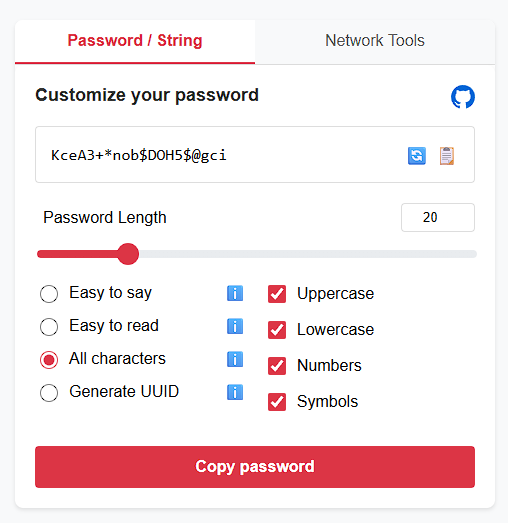
- Click the extension icon in your Chrome toolbar
- The extension popup will open with the "String / Password" tab active
- Customize your password using the available options:
- Adjust the password length using the slider or input field
- Select a character set option (All characters, Easy to say, Easy to read, UUID)
- Toggle specific character types (Uppercase, Lowercase, Numbers, Symbols)
- Click the refresh button (🔄) to generate a new password with current settings
- Click "Copy password" to copy the password to your clipboard
-
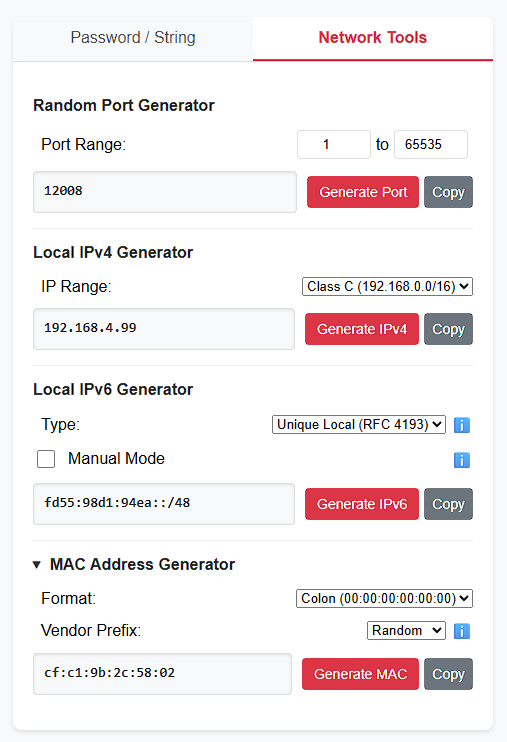
Click the "Network Tools" tab at the top of the extension popup
-
Choose the tool you want to use:
- Set the minimum and maximum port range (defaults: 1-65535)
- Click "Generate Port" to create a random port number
- Click "Copy" to copy the result to your clipboard
- Select the IP class from the dropdown (A, B, or C)
- Click "Generate IPv4" to create a random local IP address
- Click "Copy" to copy the result to your clipboard
- Select the type (Simple or Unique Local)
- For Simple type, select a prefix (fd00::/8 or fe80::/10)
- For Unique Local, you can enable Manual Mode to customize the Global ID and Subnet ID
- Click "Generate IPv6" to create a random IPv6 address
- Click "Copy" to copy the result to your clipboard
- Click the "MAC Address Generator" header to expand this section
- Select a format (Colon, Dash, or Dot)
- Choose a vendor prefix or use Random
- Click "Generate MAC" to create a random MAC address
- Click "Copy" to copy the result to your clipboard
- All Characters: Uses all character types for maximum security
- Easy to Say: Avoids numbers and special characters for easier verbal communication
- Easy to Read: Avoids ambiguous characters like l, 1, I, O, 0 that can be confused with each other
- Generate UUID: Creates a standard UUID (Universally Unique Identifier) in format: xxxxxxxx-xxxx-xxxx-xxxx-xxxxxxxxxxxx
- Uppercase: Include uppercase letters (A-Z)
- Lowercase: Include lowercase letters (a-z)
- Numbers: Include numbers (0-9)
- Symbols: Include special characters (!@#$%^&*()-_=+[]{}|;:,.<>?/~)
- Port Range: Customize the minimum and maximum values for port generation (1-65535)
- IP Range:
- Class A: 10.0.0.0/8 (10.0.0.0 - 10.255.255.255)
- Class B: 172.16.0.0/12 (172.16.0.0 - 172.31.255.255)
- Class C: 192.168.0.0/16 (192.168.0.0 - 192.168.255.255)
- Type:
- Simple: Basic IPv6 address with selected prefix
- Unique Local: Follows RFC 4193 standard
- Prefix (Simple mode):
- fd00::/8 (Unique Local)
- fe80::/10 (Link Local)
- Manual Mode (Unique Local):
- Global ID: 40-bit globally unique identifier
- Subnet ID: 16-bit subnet identifier
- Format:
- Colon: 00:00:00:00:00:00
- Dash: 00-00-00-00-00-00
- Dot: 0000.0000.0000
- Vendor Prefix: Choose from common hardware vendors or random
This extension:
- Does not collect or transmit your passwords
- Operates entirely locally in your browser
- Does not require an internet connection
- Generates passwords using secure random methods
Contributions are welcome! Please feel free to submit a Pull Request.
Developed by vUnkname
This project is licensed under the MIT License - see the LICENSE file for details.
- Added a new Network Tools tab with multiple generators
- Random Port Generator
- Local IPv4 Generator
- Local IPv6 Generator
- MAC Address Generator
- Implemented tabbed interface for better organization
- Added vendor-specific MAC address generation
- Added support for Unique Local IPv6 addresses (RFC 4193)
- Enhanced tooltip functionality with better positioning and readability
- Made MAC Address Generator section collapsible
- Added automatic result updates when inputs change
- Improved styling and visual consistency across all sections
- Optimized IPv6 display format (no trailing zeros)
- Added manual mode option for IPv6 generation
- Improved code organization and modularity
- Basic password generation functionality
- Multiple character set options
- Character type toggles
- Copy to clipboard functionality