
EMI / JEI / REI plugins that show what loot tables, villager trades and world generation actually contain — in the recipe viewer you already use, with no commands and no wiki digging.


 |
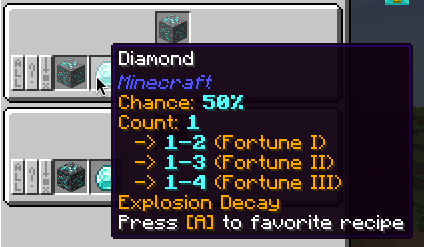 |
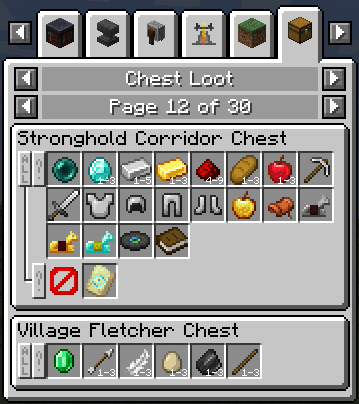
| Chest loot, pool by pool | Drop chances, per item |
 |
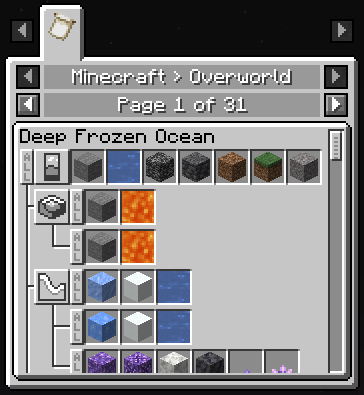 |
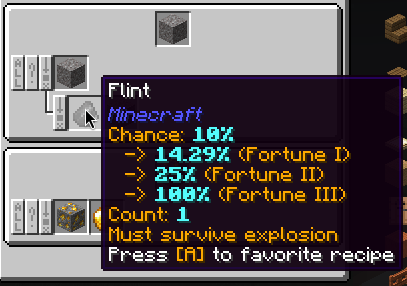
| Conditions and functions in the tooltip | Worldgen, one category per dimension |
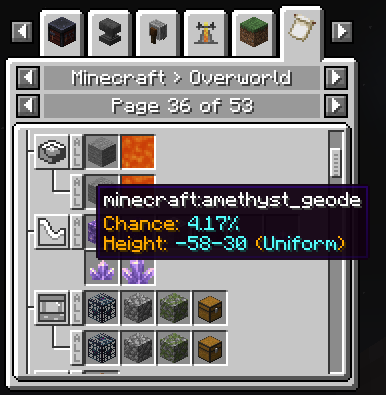 |
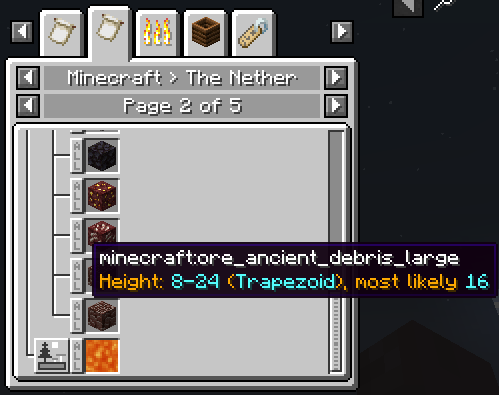 |
| Where a feature can generate | ...and how often, and how deep |
Four separately versioned mods:
| Mod | Required? | What it does | Download |
|---|---|---|---|
| ACI — Advanced Core Info | required by ALI and AWI | Shared library: plugin discovery, tooltip trees, server → client data transfer. Does nothing on its own. | CurseForge · Modrinth |
| ALI — Advanced Loot Info | — | Loot tables and villager trades in EMI/JEI/REI, with the conditions, functions and chances behind every drop. | CurseForge · Modrinth |
| AWI — Advanced Worldgen Info | — | World generation: which features and blocks a biome places, where, how often and at which height. | CurseForge · Modrinth |
| ALICompat | optional | ALI support for third-party mods that ship no ALI plugin of their own — see the supported mods. | CurseForge · Modrinth |
ALI and AWI are independent of each other — install either one, or both.
- Install a recipe viewer: EMI, JEI or REI.
- Install ACI — both mods need it, and the loader refuses a mismatched pair rather than failing later.
- Install ALI, AWI, or both.
- Optionally add ALICompat if your pack contains mods it covers.
On a dedicated server the mods belong on both sides: the data is collected on the server and sent to each client.
LootJS is supported out of the box; see the LootJS wiki page.
Fabric, Forge and NeoForge, across a range of Minecraft versions — which loaders exist for which Minecraft version differs, so check the file list on CurseForge or Modrinth for the combination you need.
Development happens one git branch per Minecraft version (1.20.1, 1.21.1, …), with master tracking the newest one and archive/<version> branches kept for versions no longer updated. Changes travel upwards one branch at a time, so a fix usually lands on several of them. See the branch list.
Pick the branch for the Minecraft version you want to build, then:
./gradlew build
Jars land in <mod>/<loader>/build/libs/, e.g. ali/fabric/build/libs/AdvancedLootInfo-fabric-<mc>-<version>.jar. Ignore the -dev-shadow and -sources ones.
The required JDK is in java_version in gradle.properties; which loaders and viewers are built is controlled by the *_enabled flags in the same file.
Single module:
./gradlew :aci:common:build
./gradlew :ali:fabric:build
Run the game from the dev environment — one task per mod / loader / viewer combination:
./gradlew runAliFabricEmiClient
./gradlew runAliForgeJeiClient
./gradlew runAwiFabricReiClient
Tests live in the common modules:
./gradlew :aci:common:test
./gradlew :ali:common:test
./gradlew :awi:common:test
The wiki covers every supported Minecraft version in one place:
- Users — the interface, configuration, loot categories, fake loot, global loot modifiers, troubleshooting.
- Developers — the plugin API, for adding loot or worldgen support from your own mod without touching a recipe viewer.
Configuration files are described by ali_config.schema.json and awi_config.schema.json. Each mod keeps its own changelog: ACI, ALI, AWI, ALICompat.
Bug reports and feature requests: issues. When reporting, say which Minecraft version, loader and recipe viewer you use, and attach the log.
Pull requests should target the branch of the Minecraft version they were written against — porting to the other branches is done afterwards, upwards, one branch at a time.