Repository navigation
Filtering with SignalP
- generate input file for online tool using "generate_SignalP_input_files" in the korbinian module: this will generate a file in FASTA format holding the accession numbers of the proteins and their full sequences (saved in "summaries/XX/ListXX_predictions/SignalP/ListXX_fasta_for_SignalP.txt", where XX is the list number (e.g. 02))
- (see notes below if you have more than 2000 proteins in your dataset)
- navigate to http://www.cbs.dtu.dk/services/SignalP/ to access the online tool for SignalP
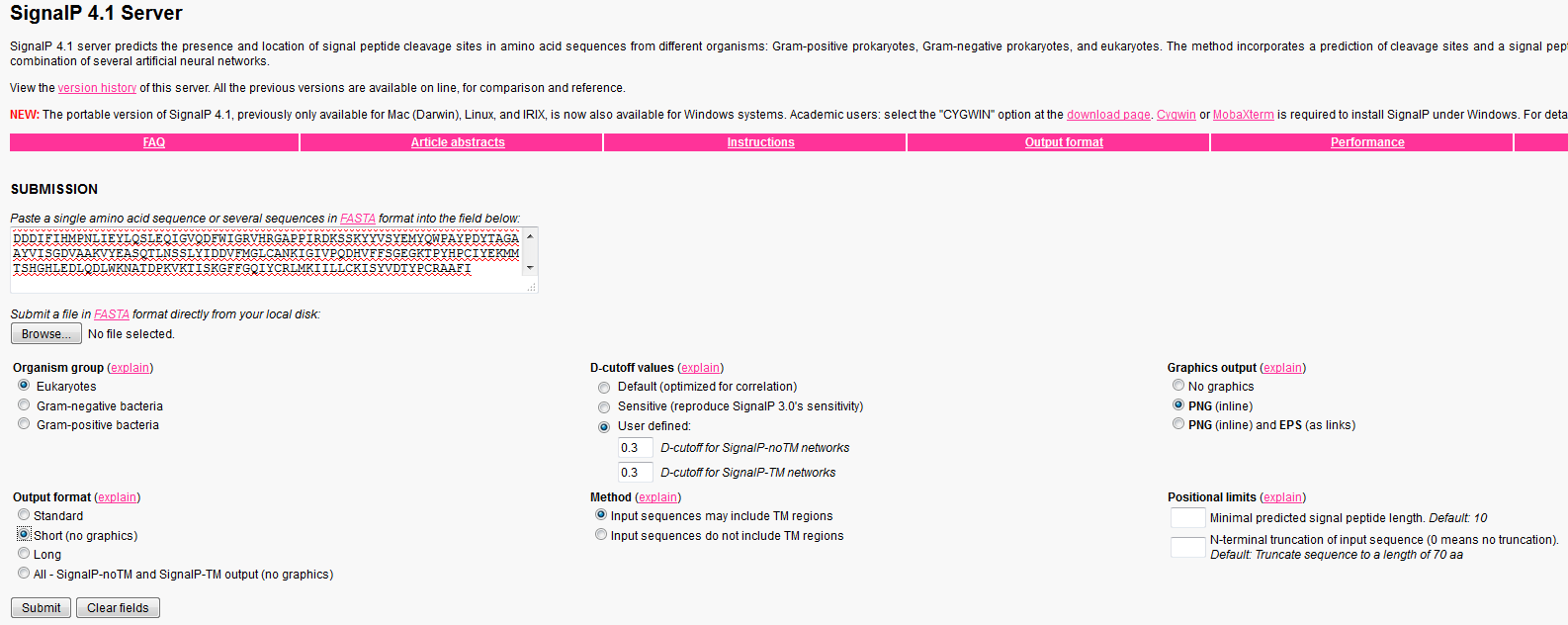
-
Choose file : choose "D:\databases\summaries\XX\ListXX_predictions\SignalP\ListXX_fasta_for_SignalP.txt"
-
change organism to match your input sequences
-
change output format to (no_graphics) (short_no_graphics??)
-
change cut-off values to User-Defined
- 0.3 D-cutoff for SignalP-noTM networks
- D-cutoff for SignalP-TM networks
-
download the "gff.txt" output file
- scroll down to the bottom of the SignalP output page
- download "gff file of processed entries"
- save in the summaries folder as "gff.txt", e.g. "D:\databases\summaries\XX\ListXX_predictions\SignalP\gff.txt"
- korbinian will conduct signalp filtering if gff.txt file exists
-
IF YOU HAVE MORE THAN 2000 PROTEINS IN YOUR LIST
- Follow the instructions for Standalone SignalP setup
- SignalP accepts a max of 2000 proteins in the web server
- split your fasta file up into 2000-protein "chunks"
- run signalP separately for each fasta file
- join the output gff files into one big gff file (delete 3 header lines and paste each gff output underneath)
_
korbinian installation
Getting started
Using korbinian
Protein lists
- UniProt download
- Create protein list from UniProt
- Filtering with SCAMPI
- Getting TMD regions with TMSEG
- Filtering with SignalP
- Prepare protein list
Troubleshooting